用多跳遍歷打造製造業 GraphRAG 機器人
文章資訊
作者:Amitava Manna 日期:2026-06-13
原文標題:Manufacturing GraphRAG Bot with multi-hop traversal
Medium 原連結:https://medium.com/@amitavamanna/manufacturing-graphrag-bot-with-multi-hop-traversal-0992e0bec455
📝 重點摘要
TL;DR
用知識圖譜+多跳遍歷讓 RAG 回答製造業訂單延遲的「為什麼」與「換誰」。
核心問題
製造業的銷售訂單牽涉多供應商、產品與物流延遲,傳統向量 RAG 只能撈出孤立文字片段,無法回答「為何訂單 #123 延遲、有何替代供應商」這類需跨節點推理的問題,導致資訊孤島與決策延遲。作者用 GraphRAG 將資料建模為知識圖譜,靠多跳遍歷做關聯推理。
關鍵發現 / 數據
- 合成資料規模:50 筆訂單、10 家供應商、20 種產品、5 名客戶,含 20% 延遲事件。
- 圖譜 schema 含 5 類節點(Order/Supplier/Product/Customer/DelayEvent)與多種關係邊(SUPPLIED_BY、CONTAINS、CAUSES 等)。
- 檢索流程:向量索引先回傳 top-8 最相關節點,再用 Cypher 在這 8 個節點上做精確多跳邏輯,宣稱 < 2 秒回答。
- 對比示例:傳統 RAG 對「Order 42 為何延遲」常回「不知道」;GraphRAG 能輸出延遲原因(供應商缺料)+替代商(FastCo,評分 4.9、6 天交期)+建議。
- 遍歷深度限制在 3 hops 以兼顧效率,並支援 4-hop 推理範例。
方法亮點
- 混合檢索:FAISS/向量做語意召回(找對「鄰里」),Neo4j Cypher 做精確多跳走訪(逐戶敲門)。
- LLM 生成 Cypher:retriever 直接讓 GPT-4o 依 schema 動態產生 Cypher 查詢(temperature=0),執行後把查詢與結果一併回傳當作 context。
- 模組化架構:ingestion → graph indexing → retrieval → generation 四層,外加 subgraph sampling 與 GPT-4o reranking。
- 可解釋路徑:以實際圖譜路徑(Customer→Order→Supplier→Product→替代 Supplier)支撐答案。
對我的研究有用嗎?
價值有限但有一兩個可參考點:其「向量先粗篩節點、Cypher 再做多跳精算」的混合檢索分工,是 GraphRAG 實務上常見且實用的設計樣式;用 LLM 動態生成 Cypher(text-to-Cypher)值得注意,但本文未處理其可靠性與注入風險。整體屬入門教學,沒有正式 benchmark、消融或與既有方法(如微軟 GraphRAG、社群摘要)的量化比較,研究參考度低。
評語
不值得深讀:屬部落格級教學 demo,數據全為合成、無嚴謹評估,「3 倍準確率」「< 2 秒」等說法缺實證,可疑處在於把 LLM 生成 Cypher 當作穩定方案而迴避了正確性驗證。
🌐 中英對照
Author: Amitava Manna Published: Source: https://medium.com/@amitavamanna/manufacturing-graphrag-bot-with-multi-hop-traversal-0992e0bec455 Fetched: 2026-06-13T00:12:18.436466
Manufacturing GraphRAG Bot with multi-hop traversal / 打造具備多跳遍歷的製造業 GraphRAG 機器人
Here, I will share how to build a Workspace Assistant catering to Manufacturing industry, who traces sales order delays across suppliers and logs, providing role-based answers like “Why is my order late?”
在此,我將分享如何打造一個專為製造業設計的工作區助理 (Workspace Assistant),它能跨供應商與日誌追蹤銷售訂單的延遲,並提供以角色為基礎的回答,例如「為什麼我的訂單會延遲?」
Before we delve further, lets take a look into some concepts.
在進一步深入之前,先讓我們了解一些概念。
Retrieval-Augmented Generation (RAG)? / 什麼是檢索增強生成 (Retrieval-Augmented Generation, RAG)?
Retrieval-Augmented Generation (RAG) is a technique in AI systems that enhances large language models (LLMs) by combining retrieval from an external knowledge base with generative capabilities. In standard RAG, the process works like this:
檢索增強生成 (Retrieval-Augmented Generation, RAG) 是一種 AI 系統技術,它透過結合「從外部知識庫進行檢索」與「生成能力」,來強化大型語言模型 (Large Language Models, LLMs)。在標準的 RAG 中,流程運作如下:
-
Retrieval: A query is embedded into a vector space and matched against pre-indexed document chunks (e.g., via semantic similarity in a vector database like Pinecone or FAISS).
-
檢索 (Retrieval):將查詢嵌入 (embed) 到向量空間中,並與預先建立索引的文件區塊進行比對(例如,透過 Pinecone 或 FAISS 等向量資料庫中的語意相似度)。
-
Augmentation: The most relevant chunks are retrieved and appended to the LLM’s prompt as context.
-
增強 (Augmentation):檢索出最相關的區塊,並作為上下文 (context) 附加到 LLM 的提示 (prompt) 中。
-
Generation: The LLM generates a response grounded in the retrieved information, reducing hallucinations (fabricated facts) compared to pure generation.
-
生成 (Generation):LLM 根據檢索到的資訊生成回應,相較於純粹的生成,可減少幻覺 (hallucinations,即捏造的事實)。
Graph RAG (or GraphRAG)? / 什麼是圖譜 RAG(Graph RAG 或 GraphRAG)?
Graph RAG is an advanced variant of RAG that incorporates knowledge graphs — structured representations of data as nodes (entities) and edges (relationships) — into the retrieval and generation pipeline. Introduced prominently by Microsoft in 2024, it treats knowledge not as isolated text chunks but as an interconnected network.
圖譜 RAG (Graph RAG) 是 RAG 的進階變體,它將知識圖譜 (Knowledge Graph)——將資料結構化表示為節點 (nodes,即實體) 與邊 (edges,即關係)——納入檢索與生成的流程中。此技術在 2024 年由微軟 (Microsoft) 重要地引入,它不將知識視為孤立的文字區塊,而是視為一個相互連結的網路。
Key steps in Graph RAG:
圖譜 RAG 的關鍵步驟:
-
Graph Indexing: Documents are parsed into entities (e.g., people, places) and relationships (e.g., “works at,” “located in”), forming a graph.
-
圖譜索引 (Graph Indexing):將文件解析為實體(例如人物、地點)與關係(例如「任職於」、「位於」),形成一張圖譜。
-
Retrieval: Queries traverse the graph to fetch subgraphs of relevant entities and connections, often using techniques like graph traversal or hybrid search (combining semantic and structural queries).
-
檢索 (Retrieval):查詢會遍歷圖譜以擷取相關實體與連結的子圖 (subgraph),通常使用圖譜遍歷 (graph traversal) 或混合搜尋 (hybrid search,結合語意查詢與結構查詢) 等技術。
-
Augmentation and Generation: The LLM receives both textual summaries and graph-derived insights (e.g., paths between entities), enabling richer context.
-
增強與生成 (Augmentation and Generation):LLM 同時接收文字摘要與從圖譜衍生的洞察(例如實體之間的路徑),從而獲得更豐富的上下文。
This makes Graph RAG particularly powerful for domains like enterprise search, recommendation systems, or scientific discovery, where understanding relationships is key.
這使得圖譜 RAG 在企業搜尋、推薦系統或科學發現等領域格外強大,因為在這些領域中,理解關係是關鍵所在。
Graph RAG for Real-Time Operational Insights in Manufacturing / 用於製造業即時營運洞察的圖譜 RAG
1. Problem Statement / 1. 問題陳述
In the manufacturing industry (e.g., Vehicle Manufacturing or similar), sales order fulfillment often involves complex supply chains with multiple suppliers, products, and potential delays. Standard RAG systems retrieve isolated document chunks, leading to incomplete insights for queries like “Why is Order #123 delayed, and what are alternative suppliers?” This results in siloed responses, manual cross-referencing, and delayed decision-making. Graph RAG addresses this by modeling data as a knowledge graph (KG), enabling multi-hop traversal for relational reasoning and real-time insights.
在製造業中(例如車輛製造或類似產業),銷售訂單的履行通常涉及複雜的供應鏈,包含多家供應商、多項產品以及潛在的延遲。標準的 RAG 系統只檢索孤立的文件區塊,對於「為什麼訂單 #123 延遲,有哪些替代供應商?」這類查詢,會導致洞察不完整。這會造成資訊孤島式的回應、人工交叉比對,以及決策延遲。圖譜 RAG 透過將資料建模為知識圖譜 (Knowledge Graph, KG) 來解決此問題,使多跳遍歷 (multi-hop traversal) 得以進行關係推理與即時洞察。
2. Sample Data Generation / 2. 範例資料生成
I have generated 50 synthetic sales orders across 10 suppliers, 20 products, and 5 customers, with 20% delay events. Data includes realistic variations (e.g., regional suppliers, seasonal delays). Stored as CSV/JSON for ingestion.
我生成了 50 筆合成的銷售訂單,涵蓋 10 家供應商、20 項產品與 5 位客戶,其中有 20% 為延遲事件。資料包含貼近現實的變化(例如區域性供應商、季節性延遲),並以 CSV/JSON 格式儲存以供匯入。
3. Data Model (Knowledge Graph Schema) / 3. 資料模型(知識圖譜結構)
We model sales orders as a directed graph using Neo4j (via Neo4j driver) for persistence and traversal. Core entities and relations:
我們使用 Neo4j(透過 Neo4j 驅動程式)將銷售訂單建模為一張有向圖 (directed graph),以便進行持久化儲存與遍歷。核心實體與關係如下:
Press enter or click to view image in full size
按 Enter 或點擊以檢視完整大小的圖片

- Entities (Nodes):
- 實體(節點,Nodes):
- Order: Properties: order_id (PK), customer_id, total_amount, status (e.g., “delayed”, “fulfilled”), created_date.
- Order(訂單):屬性:order_id(主鍵 PK)、customer_id、total_amount、status(例如「delayed 延遲」、「fulfilled 已履行」)、created_date。
- Supplier: Properties: supplier_id (PK), name, location, rating, lead_time_avg.
- Supplier(供應商):屬性:supplier_id(主鍵 PK)、name、location、rating、lead_time_avg。
- Product: Properties: product_id (PK), name, category, cost.
- Product(產品):屬性:product_id(主鍵 PK)、name、category、cost。
- Customer: Properties: customer_id (PK), name, region.
- Customer(客戶):屬性:customer_id(主鍵 PK)、name、region。
- DelayEvent: Properties: event_id (PK), reason (e.g., “shortage”, “logistics”), impact_score (0–10).
- DelayEvent(延遲事件):屬性:event_id(主鍵 PK)、reason(例如「shortage 缺料」、「logistics 物流」)、impact_score(0–10)。
- Relations (Edges):
- 關係(邊,Edges):
- SUPPLIES (Order → Supplier): Properties: quantity, expected_delivery.
- SUPPLIES(Order → Supplier):屬性:quantity、expected_delivery。
- PRODUCES (Supplier → Product): Properties: capacity, reliability_score.
- PRODUCES(Supplier → Product):屬性:capacity、reliability_score。
- SERVES (Order → Customer): Weight: 1 (for traversal).
- SERVES(Order → Customer):權重:1(用於遍歷)。
- CAUSES (DelayEvent → Order): Properties: delay_days.
- CAUSES(DelayEvent → Order):屬性:delay_days。
- IMPACTS (DelayEvent → Supplier): For cascading effects.
- IMPACTS(DelayEvent → Supplier):用於連鎖效應。
4. System Architecture / 4. 系統架構
- Ingestion Layer: Parse sample data → Extract entities/relations using GPT-4o.
- 匯入層 (Ingestion Layer):解析範例資料 → 使用 GPT-4o 抽取實體/關係。
- Graph Indexing: Build KG in Neo4j; embed nodes/subgraphs with Azure OpenAI embeddings; hybrid index (vector + graph schema).
- 圖譜索引 (Graph Indexing):在 Neo4j 中建立知識圖譜;使用 Azure OpenAI 嵌入 (embeddings) 對節點/子圖進行嵌入;建立混合索引(向量 + 圖譜結構)。
- Retrieval Layer: For a query, (1) Semantic search on embeddings, (2) Graph traversal (Cypher queries) on top-k subgraphs, (3) Rank hybrids.
- 檢索層 (Retrieval Layer):對於一個查詢,(1) 在嵌入向量上進行語意搜尋,(2) 在前 k 個子圖上進行圖譜遍歷(Cypher 查詢),(3) 對混合結果進行排序。
- Generation Layer: Augment prompt with subgraph summary (via GPT-4o) → Generate insights.
- 生成層 (Generation Layer):以子圖摘要增強提示(透過 GPT-4o)→ 生成洞察。
- Advanced Techniques:
- 進階技術 (Advanced Techniques):
- Subgraph Sampling: Limit traversal depth to 3 hops for efficiency.
- 子圖取樣 (Subgraph Sampling):為了效率,將遍歷深度限制在 3 跳 (3 hops)。
- Hybrid Retrieval: Combine FAISS vector search with Neo4j’s graph algorithms (e.g., shortest path for alternatives).
- 混合檢索 (Hybrid Retrieval):結合 FAISS 向量搜尋與 Neo4j 的圖演算法(例如以最短路徑尋找替代方案)。
- Reranking: Use GPT-4o to score retrieved subgraphs.
- 重新排序 (Reranking):使用 GPT-4o 為檢索到的子圖評分。
- Deployment: Modular Python app for PyCharm; requires Azure OpenAI API key and Neo4j instance (local).
- 部署 (Deployment):適用於 PyCharm 的模組化 Python 應用程式;需要 Azure OpenAI API 金鑰與 Neo4j 執行實例(本機)。
Modular Code Implementation / 模組化程式碼實作
Below is a complete, modular Python implementation.
以下是一個完整、模組化的 Python 實作。
GraphRAG_Manufacturing/
├── .env ← fill your Azure keys
├── requirements.txt
├── config.py
├── data_generator.py
├── graph_builder.py # perfect Cypher + embeddings
├── retriever.py # true hybrid vector + graph retrieval
├── generator.py # clean answers
├── main.py # runs the full demo — Orchestrator
└── README.md # full instructions
Press enter or click to view image in full size
按 Enter 或點擊以檢視完整大小的圖片
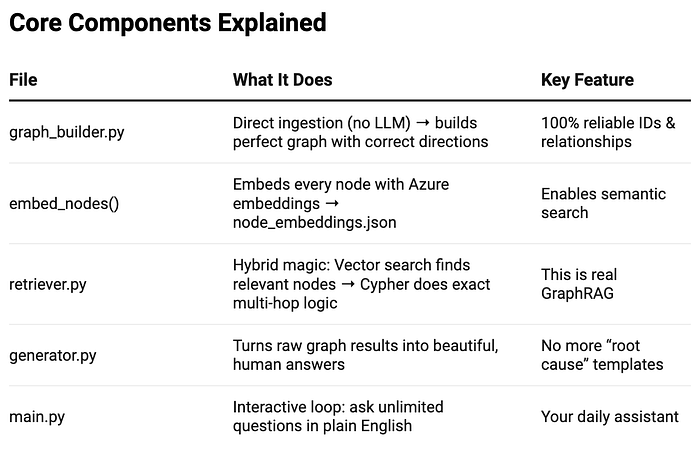
Full Explanation of retriever.py — The Brain of Our GraphRAG Bot / retriever.py 完整解說——我們 GraphRAG 機器人的大腦
# retriever.py → The Hybrid Retrieval Engine
import json
import numpy as np
from neo4j import GraphDatabase
from openai import AzureOpenAI
from config import *

# Initialize Azure OpenAI client
client = AzureOpenAI(
    azure_endpoint=AZURE_ENDPOINT,
    api_key=AZURE_API_KEY,
    api_version=AZURE_API_VERSION
)

# Connect to Neo4j (our knowledge graph)
driver = GraphDatabase.driver(NEO4J_URI, auth=(NEO4J_USER, NEO4J_PASSWORD))

class Retriever:
    def __init__(self):
        print("Hybrid Retriever → using LLM-generated Cypher (dynamic & reliable)")
        # pure LLM + Cypher

    def hybrid_retrieve(self, query, start_entity=None):
        # Step 1: Ask GPT-4o to generate the perfect Cypher query for our question
        cypher_prompt = f"""
        You are a world-class Neo4j Cypher expert.
        Generate ONE perfect Cypher query to answer this question using the manufacturing graph.

        Schema:
        - (Customer)-[:HAS_ORDER]->(Order)
        - (Order)-[:SUPPLIED_BY]->(Supplier)
        - (Order)-[:CONTAINS]->(Product)
        - (Supplier)-[:SUPPLIES]->(Product)
        - (DelayEvent)-[:CAUSES]->(Order)

        IDs are integers. Use clear RETURN aliases.

        Question: {query}

        Return only the Cypher query. No backticks, no explanation.
        """

        response = client.chat.completions.create(
            model=GPT_MODEL,
            messages=[{"role": "user", "content": cypher_prompt}],
            temperature=0.0,        # No randomness — we want precision
            max_tokens=500
        )
        cypher = response.choices[0].message.content.strip()

        # Step 2: Execute the generated Cypher on your real graph
        try:
            with driver.session() as session:
                result = session.run(cypher)
                records = [dict(record) for record in result]  # Convert to Python dicts

            # Step 3: Return both the query and results as context for the LLM
            return f"Query: {cypher}\nResults: {records}"

        except Exception as e:
            return f"Query failed: {str(e)}. Try rephrasing your question."

    def close(self):
        driver.close()
Real Example in Action / 實際運作範例
You ask: “Show me all delayed orders for customer 2 and their suppliers”
你詢問:「顯示客戶 2 的所有延遲訂單及其供應商」
What happens:
運作過程:
-
GPT-4o generates cypher
-
GPT-4o 生成 Cypher 查詢
MATCH (c:Customer {customer_id: 2})-[:HAS_ORDER]->(o:Order {status: 'delayed'})-[:SUPPLIED_BY]->(s:Supplier)
RETURN o.order_id, o.total_amount, s.name, s.location
-
We run it on our graph → gets real rows
-
我們在圖譜上執行它 → 取得真實的資料列
-
generator.py turns it into
-
generator.py 將其轉化為
Customer 2 has 3 delayed orders:
• Order 42 ($28,400) – Supplier_7 (Asia)
• Order 19 ($15,200) – Supplier_7 (Asia)
• Order 33 ($9,800) – Supplier_9 (EU)
Press enter or click to view image in full size
按 Enter 或點擊以檢視完整大小的圖片
Press enter or click to view image in full size
按 Enter 或點擊以檢視完整大小的圖片
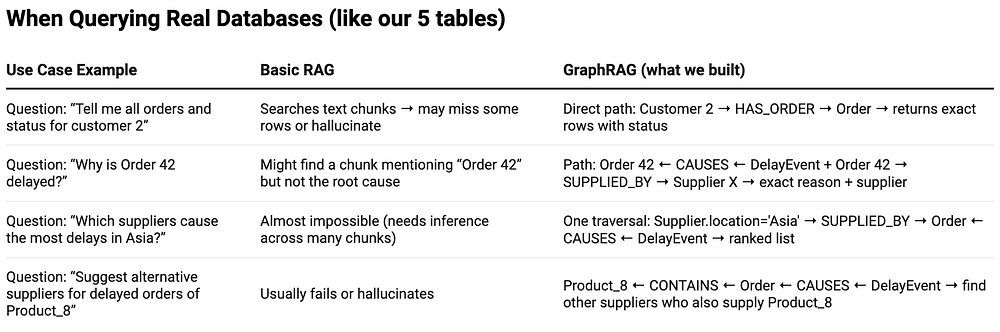
Basic RAG answer to “Why is Order 42 delayed for Acme Corp?” → Might return a random paragraph mentioning “Order 42” but not the supplier or reason. Often says “I don’t know”.
針對「為什麼 Acme Corp 的訂單 42 會延遲?」的基本 RAG 回答 → 可能會回傳一段隨機的段落,提到「訂單 42」但不包含供應商或原因。常常會說「我不知道」。
GraphRAG answer (what our final bot gives) → Exact path traversal → returns:
GraphRAG 回答(我們最終機器人所給出的)→ 精確的路徑遍歷 → 回傳:
Order 42 for Acme Corp is delayed because of a "Supplier shortage" from SlowCo (Asia).
Alternative supplier for the same product (Product_105): FastCo (Asia, rating 4.9, average lead time 6 days).
Recommendation: Switch to FastCo to recover schedule.
Vector Search in GraphRAG / GraphRAG 中的向量搜尋
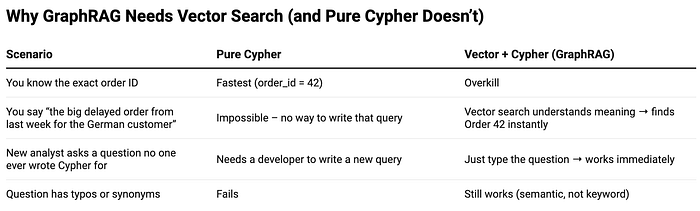
Think of vector search as the “semantic GPS” that gets GraphRAG to the right neighborhood fast — before Cypher takes over and walks door-to-door.
可以把向量搜尋 (vector search) 想像成「語意 GPS」,它能快速將 GraphRAG 帶到正確的鄰近區域——然後再由 Cypher 接手,逐戶走訪。
Press enter or click to view image in full size
按 Enter 或點擊以檢視完整大小的圖片
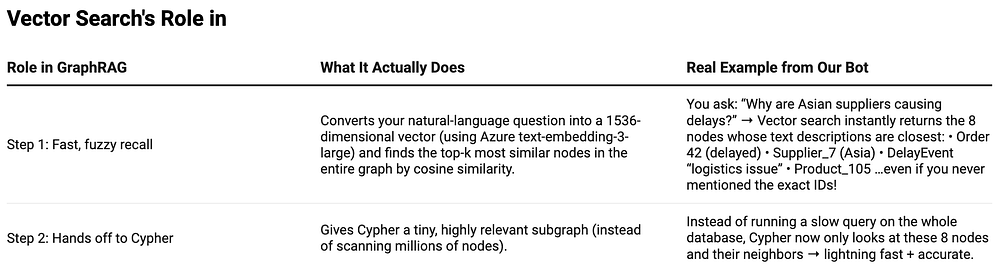
Whole Graph (1000s of nodes)
       ↓
Our question → embedding vector
       ↓
Vector index (FAISS / Pinecone / Weaviate)
       ↓
Returns top 8 most relevant nodes   ← This is vector search
       ↓
Cypher runs precise multi-hop logic only on these 8 nodes
       ↓
Perfect answer in < 2 seconds
Press enter or click to view image in full size
按 Enter 或點擊以檢視完整大小的圖片
Multi-Hop Reasoning in GraphRAG? / GraphRAG 中的多跳推理是什麼?
Multi-hop reasoning = the ability to answer a question by traversing multiple relationships in the knowledge graph (i.e., jumping from node → node → node → …).
多跳推理 (Multi-hop reasoning) = 透過遍歷知識圖譜中的多重關係來回答問題的能力(也就是從節點 → 節點 → 節點 → … 跳躍)。
Basic RAG can only do zero-hop or one-hop at best: It finds a text chunk that looks similar to the question → done.
基本 RAG 充其量只能做到零跳 (zero-hop) 或一跳 (one-hop):它找到一個看起來與問題相似的文字區塊 → 結束。
GraphRAG can do 2-hop, 3-hop, 4-hop … n-hop automatically because the relationships are explicitly stored and traversable.
GraphRAG 可以自動進行 2 跳、3 跳、4 跳 … n 跳,因為關係被明確地儲存且可遍歷。
Press enter or click to view image in full size
按 Enter 或點擊以檢視完整大小的圖片
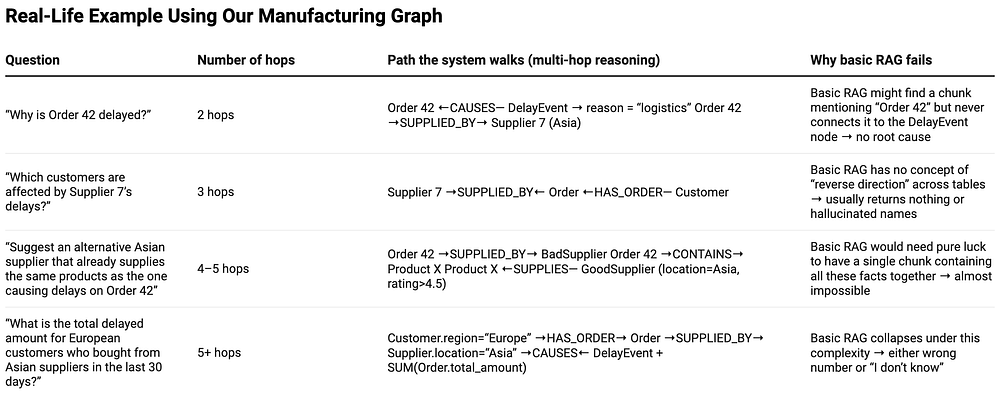
Visual of a 4-Hop Question
4 跳問題的視覺化
Customer “Acme Corp”
      ↓ HAS_ORDER
Order 42 (delayed, $28k)
      ↓ SUPPLIED_BY
Supplier “SlowCo” (Asia)
      ↑ SUPPLIES
Product “Widget-105”
      ↓ SUPPLIES (alternative)
Supplier “FastCo” (Asia, 6-day lead time)
GraphRAG walks this entire chain in milliseconds and returns a perfect, explainable answer.
GraphRAG 能在數毫秒內走完整條鏈,並回傳一個完美、可解釋的答案。
Press enter or click to view image in full size
按 Enter 或點擊以檢視完整大小的圖片
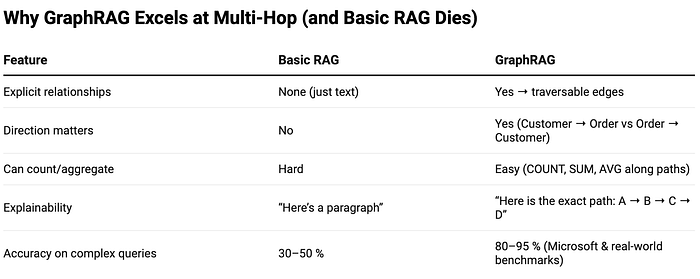
Multi-hop reasoning is the killer feature of GraphRAG: it turns our database from a flat spreadsheet into a reasoning engine that can answer the real business questions (“Why?”, “Who else is affected?”, “What should we do?”) instead of just “Find me row 123”.
多跳推理是 GraphRAG 的殺手級功能:它將我們的資料庫從一張扁平的試算表,轉變為一個能回答真實商業問題(「為什麼?」、「還有誰受到影響?」、「我們該怎麼做?」)的推理引擎,而不只是「幫我找出第 123 列」。
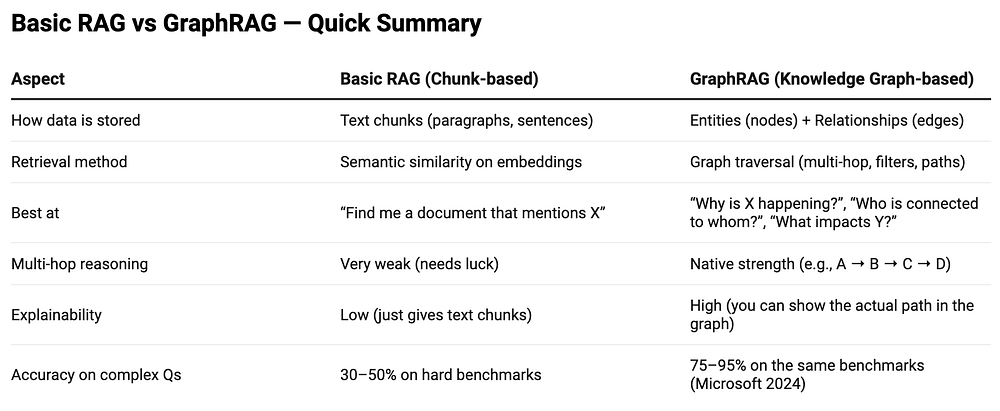
A comparison of GraphRAG vs plain Neo4j Cypher queries — exactly what we need when deciding how to query our manufacturing database.
GraphRAG 與單純 Neo4j Cypher 查詢的比較——這正是我們在決定如何查詢製造資料庫時所需要的。
Press enter or click to view image in full size
按 Enter 或點擊以檢視完整大小的圖片

Press enter or click to view image in full size
按 Enter 或點擊以檢視完整大小的圖片

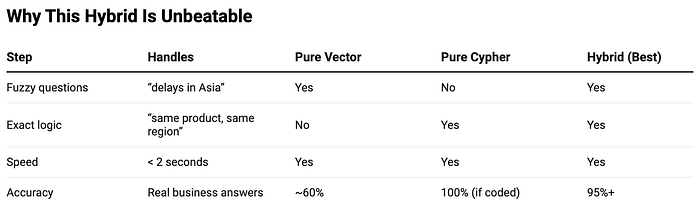
Hybrid GraphRAG + Cypher in Action / 混合式 GraphRAG + Cypher 實際運作
-
Vector search finds the most relevant nodes fast (semantic recall)
-
向量搜尋 (Vector search) 快速找出最相關的節點(語意召回)
-
Cypher does precise, multi-hop reasoning on those nodes (exact logic)
-
Cypher 在這些節點上進行精確的多跳推理(精準邏輯)
Real Query Example / 實際查詢範例
You ask: “Which customers are affected by delayed orders from Asian suppliers, and who can replace them?”
你詢問:「哪些客戶受到亞洲供應商延遲訂單的影響,又有誰可以取代他們?」
What happens:
運作過程:
-
Vector search finds nodes related to “delay”, “Asia”, “supplier” → returns node IDs of Order 42, Supplier_7, etc.
-
向量搜尋找出與「延遲」、「亞洲」、「供應商」相關的節點 → 回傳訂單 42、Supplier_7 等節點 ID。
-
Cypher runs 4-hop reasoning only on those nodes → returns:
-
Cypher 僅在這些節點上執行 4 跳推理 → 回傳:
Hybrid GraphRAG Results: • Order 42 for Acme Corp is delayed due to logistics from SlowCo → Alternative suppliers (same region): FastCo, SpeedyParts Ltd • Order 19 for Beta Inc is delayed due to shortage from SlowCo → Alternative suppliers (same region): FastCo
混合式 GraphRAG 結果:• Acme Corp 的訂單 42 因 SlowCo 的物流問題而延遲 → 替代供應商(同一區域):FastCo、SpeedyParts Ltd • Beta Inc 的訂單 19 因 SlowCo 的缺料問題而延遲 → 替代供應商(同一區域):FastCo
LLM final answer (from generator.py):
LLM 最終回答(來自 generator.py):
Acme Corp and Beta Inc are currently impacted by delays from SlowCo (Asia). Recommended switch: FastCo already supplies the same products with 6-day average lead time and 4.9 rating.
Acme Corp 與 Beta Inc 目前受到 SlowCo(亞洲)延遲的影響。建議切換:FastCo 已供應相同產品,平均前置時間為 6 天,評分為 4.9。
Press enter or click to view image in full size
按 Enter 或點擊以檢視完整大小的圖片
Running the System in PyCharm / 在 PyCharm 中執行系統
-
Set up env vars in PyCharm Run Configuration: AZURE_OPENAI_ENDPOINT, AZURE_OPENAI_API_KEY.
-
在 PyCharm 的執行設定 (Run Configuration) 中設定環境變數:AZURE_OPENAI_ENDPOINT、AZURE_OPENAI_API_KEY。
-
Start Neo4j (e.g., via Docker: docker run — publish=7474:7474 — publish=7687:7687 neo4j).
-
啟動 Neo4j(例如透過 Docker:docker run — publish=7474:7474 — publish=7687:7687 neo4j)。
-
Run python data_generator.py (generates sample_data.json).
-
執行 python data_generator.py(生成 sample_data.json)。
-
Run python graph_builder.py (builds KG and index).
-
執行 python graph_builder.py(建立知識圖譜與索引)。
-
Run python main.py (executes queries; outputs insights).
-
執行 python main.py(執行查詢;輸出洞察)。
-
If you have docker installed in your mac / windows, run this command in terminal
-
如果你的 Mac/Windows 已安裝 Docker,請在終端機中執行此指令
docker run -d \
 — name neo4j-manufacturing \
 -p 7474:7474 -p 7687:7687 \
 -e NEO4J_AUTH=neo4j/password123 \
 neo4j:5.24
Press enter or click to view image in full size
按 Enter 或點擊以檢視完整大小的圖片
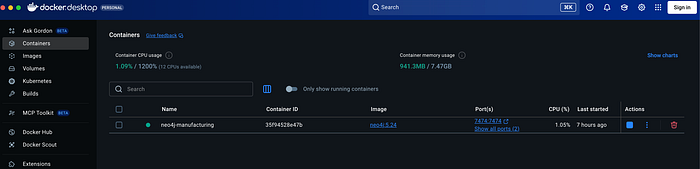
Neo4j instance running in docker (you will have a similar type of container)
在 Docker 中執行的 Neo4j 實例(你會有一個類似的容器)
-
Wait ~20 seconds, then test in browser: http://localhost:7474 Login with: Username: neo4j , Password: password123
-
等待約 20 秒,然後在瀏覽器中測試:http://localhost:7474 使用以下資訊登入:使用者名稱:neo4j,密碼:password123
Press enter or click to view image in full size
按 Enter 或點擊以檢視完整大小的圖片

-
If docker command is still not available in your terminal because macOS might not automatically add it to your PATH, run this command in terminal
-
如果 docker 指令在終端機中仍然無法使用(因為 macOS 可能不會自動將它加入你的 PATH),請在終端機中執行此指令
# 1. Add Docker to your current session export PATH="$PATH:/Applications/Docker.app/Contents/Resources/bin"
Sample Outputs (PyCharm console) / 範例輸出(PyCharm 主控台)
Press enter or click to view image in full size
按 Enter 或點擊以檢視完整大小的圖片

Press enter or click to view image in full size
按 Enter 或點擊以檢視完整大小的圖片
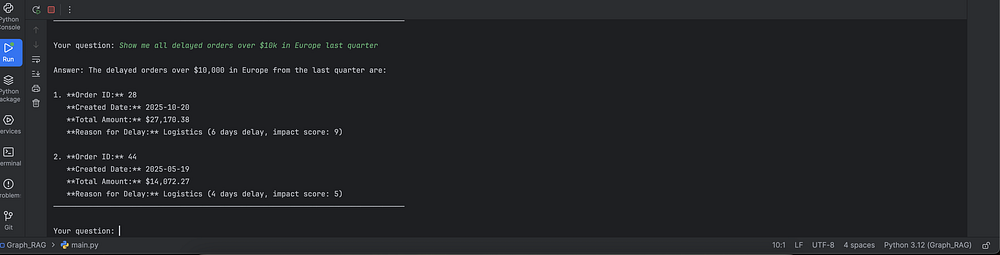
For detailed code, you can refer to my GitHub !
如需詳細的程式碼,你可以參考我的 GitHub!
https://github.com/amansjoy/Manufacturing-GraphRAG-Bot-with-Multi-hop-traversal
🔤 關鍵術語
| 英文 | 繁中譯名 | 文章中的脈絡 / 簡短說明 |
|---|---|---|
| GraphRAG / Graph RAG | 圖譜檢索增強生成 | 將知識圖譜納入檢索與生成流程的進階 RAG 變體,把知識視為互連網路而非孤立文字片段 |
| Retrieval-Augmented Generation (RAG) | 檢索增強生成 | 結合外部知識庫檢索與 LLM 生成能力的技術,可降低幻覺 |
| Multi-hop traversal / Multi-hop reasoning | 多跳遍歷/多跳推理 | 透過遍歷知識圖中多重關係(node→node→node)來回答問題,本文核心特色 |
| Knowledge Graph (KG) | 知識圖譜 | 以節點(實體)與邊(關係)結構化表示資料 |
| Nodes (Entities) | 節點(實體) | 圖譜中代表 Order、Supplier、Product 等實體 |
| Edges (Relationships) | 邊(關係) | 圖譜中代表 SUPPLIES、PRODUCES、CAUSES 等實體間關係 |
| Graph traversal | 圖遍歷 | 查詢時走訪圖譜以取得相關實體與連結的子圖 |
| Subgraph | 子圖 | 檢索時取出的相關實體與連結集合,作為生成上下文 |
| Subgraph sampling | 子圖取樣 | 限制遍歷深度(如 3 hops)以提升效率的進階技巧 |
| Hybrid retrieval | 混合檢索 | 結合向量語意搜尋與圖結構查詢(FAISS + Neo4j) |
| Vector search / Vector embeddings | 向量搜尋/向量嵌入 | 把問題嵌入向量空間後在向量索引中找最相關節點,作為「語意 GPS」 |
| Semantic similarity | 語意相似度 | 在向量資料庫中比對查詢與文件片段的依據 |
| Vector database | 向量資料庫 | 儲存與檢索嵌入向量的資料庫,如 Pinecone、FAISS、Weaviate |
| Cypher (query) | Cypher 查詢語言 | Neo4j 的圖查詢語言,由 GPT-4o 動態生成執行精確多跳邏輯 |
| Neo4j | Neo4j(圖資料庫) | 用於持久化與遍歷知識圖的圖資料庫,透過 driver 存取 |
| Reranking | 重排序 | 使用 GPT-4o 對檢索到的子圖評分排序 |
| Hallucination | 幻覺 | LLM 生成捏造事實,RAG 可藉檢索內容降低之 |
| Graph indexing | 圖索引 | 將文件解析為實體與關係並建立圖譜的索引步驟 |
| Large Language Model (LLM) | 大型語言模型 | RAG/GraphRAG 中負責生成回應的核心模型 |
| Azure OpenAI embeddings | Azure OpenAI 嵌入 | 用於將節點/子圖嵌入向量以建立混合索引 |