使用 LangExtract、Neo4j、Qdrant 與 Ollama 的實用 GraphRAG 架構
文章資訊
作者:M K Pavan Kumar 日期:2026-06-29
原文標題:A Practical GraphRAG Architecture Using LangExtract, Neo4j, Qdrant, and Ollama
📝 重點摘要
TL;DR
用全本地端工具把文字抽成知識圖譜,以向量檢索+圖遍歷取代傳統文本切塊檢索。
核心問題
傳統 RAG 只檢索文件切塊(chunks),會丟失實體間的關聯脈絡。本文示範如何把非結構化文字轉成知識圖譜,讓檢索同時具備語意相似度與結構化關係,使 LLM 能基於明確的事實連結進行推理,特別適合醫療、金融、法律等重關聯的領域。
關鍵發現 / 數據
- 以醫療用藥情境驗證:62 歲多重慢性病患的處方文字,被抽成約 21 個節點與多種關係邊(dosage/frequency/condition/route)。
- 查詢「心血管相關藥物及劑量」可正確回出 Aspirin 81mg、Atorvastatin 40mg、Lisinopril 10mg。
- 查詢分辨服藥頻率:正確區分每日(Aspirin/Sertraline/Levothyroxine)與每日兩次(Metformin 500mg)。
- 全套件本地化:擷取與回答用
gemma3,嵌入用embeddinggemma(768 維),Qdrant 採 COSINE 相似度。 - 本文無任何 benchmark、無與基線 RAG 的量化比較——屬工程教學而非實證研究。
方法亮點
- LangExtract few-shot 抽取:以
medication_group屬性把同一藥物的劑量、頻率、條件群組起來,再轉成 anchor 節點+語意邊。 - 雙庫分工:Neo4j 存結構(關係型別作為實際 edge label,並對 LLM 產出的關係名做 sanitize 防 Cypher injection);Qdrant 存實體名嵌入,payload 帶 Neo4j node id 做橋接。
- 實體層嵌入:只嵌入實體名稱而非整段文字,檢索回傳節點 id 作為圖的進入點。
- 圖擴展:以多跳 Cypher(一跳+兩跳 UNION)取回子圖,再格式化成 triples 餵給 LLM。
對我的研究有用嗎?
向量檢索(語意進入點)+圖遍歷(結構擴展)的混合檢索範式值得參考,尤其「嵌入實體而非 chunk」與「id mapping 雙庫橋接」是乾淨的工程設計。但對 GraphRAG 研究者而言,本文缺乏圖建構品質、多跳推理、與 baseline 的評估,無法佐證效果優劣,只能當作 pipeline 雛形參考。
評語
工程教學紮實、可複現,但本質是 demo 而非研究——無評測、無消融、實體粒度過細(如「on an empty stomach...」整句成節點)易致圖噪音,不值得深讀,淺看架構即可。
🌐 中英對照
Author: M K Pavan Kumar
Published:
Source: https://blog.stackademic.com/a-practical-graphrag-architecture-using-langextract-neo4j-qdrant-and-ollama-0e4c86908c41
Fetched: 2026-06-29T22:10:00.264292
A Practical GraphRAG Architecture Using LangExtract, Neo4j, Qdrant, and Ollama / 使用 LangExtract、Neo4j、Qdrant 與 Ollama 的實用 GraphRAG 架構
Today, we are going to build a complete GraphRAG system using 100% local LLMs powered by Ollama, Neo4j, Qdrant, and LangExtract. Unlike traditional RAG systems that retrieve document chunks, this architecture transforms raw text into a knowledge graph and retrieves semantically relevant entities connected through relationships. The real highlight of this solution is LangExtract, which automatically extracts entities and relationships from unstructured text and converts them into graph-ready knowledge. By combining vector retrieval from Qdrant with graph traversal in Neo4j, we create a retrieval pipeline that understands both meaning and context. Let’s dive into the architecture and see how each component works together to deliver graph-grounded answers.
今天,我們將使用由 Ollama、Neo4j、Qdrant 與 LangExtract 驅動的 100% 本機大型語言模型 (Large Language Model, LLM),建立一套完整的 GraphRAG 系統。與傳統那種檢索文件片段 (chunk) 的 RAG 系統不同,這套架構會將原始文字轉換為知識圖譜 (Knowledge Graph),並檢索透過關係彼此連接、且在語意上相關的實體 (entity)。這套解決方案真正的亮點在於 LangExtract,它能自動從非結構化文字中萃取出實體與關係,並將其轉換為可直接用於圖譜的知識。透過結合 Qdrant 的向量檢索 (vector retrieval) 與 Neo4j 的圖譜遍歷 (graph traversal),我們打造出一條同時理解意義與情境的檢索流程。讓我們深入這套架構,看看各個元件如何協同運作,提供以圖譜為依據的答案。
Press enter or click to view image in full size
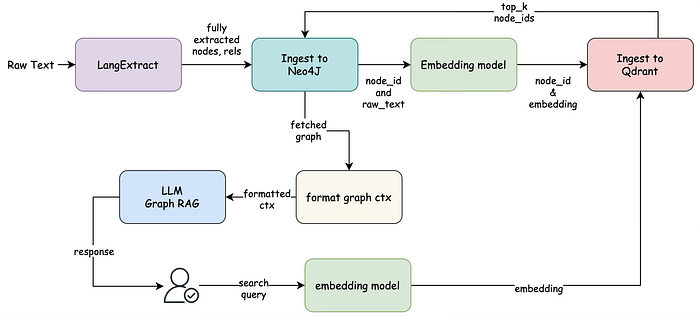
created by author M K Pavan Kumar
由作者 M K Pavan Kumar 製作
Architecture Deep Dive / 架構深入探討
The architecture begins with unstructured raw text entering the LangExtract layer. Unlike conventional RAG pipelines that immediately split documents into chunks and generate embeddings, this system first transforms the text into structured knowledge. LangExtract, powered by an Ollama-hosted language model, identifies entities and their semantic relationships directly from the source text. In the medication example, entities such as medications, dosages, frequencies, and medical conditions are extracted while preserving their relationships through a common grouping mechanism. This stage effectively converts natural language into a structured representation that captures factual connections rather than merely storing text passages.
這套架構始於非結構化的原始文字進入 LangExtract 層。與傳統那種立即將文件切分成片段並產生嵌入向量 (embedding) 的 RAG 流程不同,這套系統會先將文字轉換為結構化知識。LangExtract 由 Ollama 託管的語言模型驅動,直接從來源文字中辨識出實體及其語意關係。在用藥的範例中,藥物、劑量、頻率與醫療狀況等實體會被萃取出來,同時透過一個共同的分組機制保留它們之間的關係。這個階段實際上是把自然語言轉換為一種結構化表示,捕捉的是事實之間的關聯,而非僅僅儲存文字段落。
Once extraction is complete, the generated entities and relationships are transformed into graph components. Every extracted concept becomes a graph node with a unique identifier, while semantic relationships such as dosage, frequency, or condition become explicit edges connecting those nodes. This conversion process creates a formal knowledge representation where information is organized around entities and their relationships instead of document boundaries. The graph structure preserves contextual meaning that would normally be lost in traditional chunk-based retrieval systems.
萃取完成後,產生的實體與關係會被轉換為圖譜元件。每個被萃取出的概念都會成為一個帶有唯一識別碼的圖譜節點 (node),而劑量、頻率或狀況等語意關係則成為連接這些節點的明確邊 (edge)。這個轉換過程建立了一種正式的知識表示,資訊是圍繞著實體及其關係來組織,而非以文件邊界來組織。這種圖譜結構保留了在傳統以片段為基礎的檢索系統中通常會遺失的情境意義。
The extracted graph is then ingested into Neo4j, which serves as the system’s primary knowledge repository. Each entity is stored as a graph node, and each semantic relationship is stored as a native graph edge. Neo4j becomes the authoritative source of structured knowledge and enables efficient traversal across connected concepts. Rather than retrieving isolated text snippets, the system can later explore multi-hop relationships between entities, allowing it to uncover contextual information that extends beyond the original extraction point.
接著,萃取出的圖譜會被匯入 Neo4j,做為系統的主要知識儲存庫。每個實體都以圖譜節點儲存,而每個語意關係都以原生圖譜邊儲存。Neo4j 成為結構化知識的權威來源,並能在彼此連接的概念之間進行高效遍歷。系統之後不再只是檢索孤立的文字片段,而是能探索實體之間的多跳 (multi-hop) 關係,使其能夠揭露超出原始萃取點之外的情境資訊。
After graph construction, the architecture generates embeddings for every graph node. Instead of embedding entire documents or chunks, the embedding model operates directly on entity names and concepts. Each entity receives a vector representation that captures its semantic meaning in embedding space. This design choice creates a semantic index over graph entities rather than textual content, enabling retrieval to focus on concepts rather than passages.
在圖譜建構完成後,這套架構會為每個圖譜節點產生嵌入向量。嵌入模型不是對整份文件或片段做嵌入,而是直接針對實體名稱與概念進行運算。每個實體都會獲得一個向量表示,在嵌入空間 (embedding space) 中捕捉其語意意義。這個設計選擇是在圖譜實體(而非文字內容)之上建立一個語意索引,使得檢索能聚焦於概念而非段落。
These entity embeddings are then stored in Qdrant alongside their corresponding Neo4j node identifiers. Qdrant functions as a high-performance semantic retrieval layer, while Neo4j remains the structured knowledge layer. The payload stored in Qdrant contains the Neo4j node ID, creating a direct mapping between vector search results and graph entities. This separation of responsibilities allows Qdrant to excel at semantic similarity search while Neo4j handles relationship traversal and graph reasoning.
接著,這些實體嵌入向量會連同其對應的 Neo4j 節點識別碼一起儲存在 Qdrant 中。Qdrant 扮演高效能的語意檢索層,而 Neo4j 則維持為結構化知識層。儲存在 Qdrant 中的酬載 (payload) 包含 Neo4j 節點 ID,在向量搜尋結果與圖譜實體之間建立了直接的對應關係。這種職責分離讓 Qdrant 能專精於語意相似度搜尋,而 Neo4j 則負責關係遍歷與圖譜推理。
During query time, a user submits a natural language question. The same embedding model converts the query into a vector representation. This query embedding is then searched against Qdrant to identify the most semantically relevant graph entities. Unlike traditional RAG systems that return document chunks, the retrieval process returns node identifiers corresponding to entities within the knowledge graph. These nodes act as semantic entry points into the graph and represent the concepts most closely related to the user’s intent.
在查詢階段,使用者提交一個自然語言問題。同一個嵌入模型會將查詢轉換為向量表示。接著,這個查詢嵌入向量會在 Qdrant 中進行搜尋,以辨識出語意上最相關的圖譜實體。與傳統那種回傳文件片段的 RAG 系統不同,這個檢索過程回傳的是對應到知識圖譜中各實體的節點識別碼。這些節點扮演進入圖譜的語意入口,並代表與使用者意圖最密切相關的概念。
The retrieved node identifiers are subsequently used to query Neo4j. Rather than stopping at the retrieved entities, the system performs graph expansion by traversing neighboring nodes and relationships. This traversal retrieves a relevant subgraph containing both the matched entities and their connected context. The expansion process allows the architecture to gather supporting information that may not have been directly retrieved through vector similarity alone. As a result, the retrieved context contains both semantic relevance and structural relationships.
隨後,檢索到的節點識別碼會被用來查詢 Neo4j。系統不會止步於檢索到的實體,而是透過遍歷鄰近節點與關係來執行圖譜擴展 (graph expansion)。這個遍歷會檢索出一個相關的子圖譜 (subgraph),其中同時包含匹配到的實體及其相連的情境。這個擴展過程讓架構能蒐集到可能無法僅靠向量相似度直接檢索到的佐證資訊。如此一來,檢索到的情境便同時具備語意相關性與結構關係。
The resulting subgraph is then transformed into a format suitable for language model consumption. Nodes are collected into a structured list, while relationships are converted into readable triples that express explicit connections between entities. For example, relationships such as “Lisinopril dosage 10mg” or “Metformin condition diabetes” become structured contextual statements. This formatting stage bridges the gap between graph databases and language models by converting graph structures into interpretable textual context.
接著,產生的子圖譜會被轉換為適合語言模型使用的格式。節點被蒐集成一份結構化清單,而關係則被轉換為可讀的三元組 (triple),表達實體之間的明確連結。舉例來說,「Lisinopril dosage 10mg」(賴諾普利 劑量 10 毫克)或「Metformin condition diabetes」(二甲雙胍 狀況 糖尿病)這類關係會變成結構化的情境陳述。這個格式化階段透過將圖譜結構轉換為可解讀的文字情境,彌合了圖譜資料庫與語言模型之間的落差。
Finally, the formatted graph context is provided to the LLM. Instead of relying on retrieved document chunks, the model receives a graph-grounded representation consisting of entities and relationships. This enables the LLM to reason over explicit facts and connections rather than inferring relationships from fragmented text passages. Because the context originates from graph traversal, the model gains access to structured knowledge that is inherently more explainable and traceable than standard vector-based retrieval.
最後,格式化後的圖譜情境會提供給 LLM。模型不再仰賴檢索到的文件片段,而是接收一個由實體與關係構成、以圖譜為依據的表示。這使 LLM 能基於明確的事實與連結進行推理,而非從零碎的文字段落中推斷關係。由於情境源自圖譜遍歷,模型得以取得結構化知識,這在本質上比標準的以向量為基礎的檢索更具可解釋性與可追溯性。
The overall architecture can therefore be viewed as a hybrid retrieval system where LangExtract performs knowledge extraction, Neo4j manages structured relationships, Qdrant provides semantic entity retrieval, and the LLM performs graph-grounded reasoning. The combination of vector similarity and graph traversal creates a retrieval mechanism that is both semantically aware and structurally informed, allowing the system to answer questions using connected knowledge rather than isolated text fragments. This approach significantly improves the retrieval of relational information and makes it particularly effective for domains such as healthcare, finance, legal systems, enterprise knowledge management, and scientific research where understanding relationships between entities is often more important than retrieving individual passages of text.
因此,整體架構可被視為一套混合式檢索系統 (hybrid retrieval system):LangExtract 負責知識萃取,Neo4j 管理結構化關係,Qdrant 提供語意實體檢索,而 LLM 則執行以圖譜為依據的推理。向量相似度與圖譜遍歷的結合,創造出一種既具語意感知、又掌握結構資訊的檢索機制,讓系統能運用彼此連接的知識(而非孤立的文字片段)來回答問題。這種方法大幅提升了關係型資訊的檢索效果,使其在醫療、金融、法律系統、企業知識管理與科學研究等領域特別有效——在這些領域中,理解實體之間的關係往往比檢索個別文字段落更為重要。
Implementation Walkthrough / 實作逐步解說
__init__()
The constructor serves as the entry point for the entire GraphRAG system. It loads all required configuration values such as Neo4j credentials, Qdrant connection details, and Ollama settings from environment variables. The method establishes connections to both Neo4j and Qdrant so they can be reused throughout the pipeline. It also initializes the Ollama client that will be used for entity extraction, embedding generation, and answer synthesis. Finally, it stores model names and vector dimensions, allowing the architecture to remain flexible and configurable.
建構子 (constructor) 是整個 GraphRAG 系統的進入點。它會從環境變數載入所有必要的設定值,例如 Neo4j 憑證、Qdrant 連線細節與 Ollama 設定。此方法會建立與 Neo4j 和 Qdrant 的連線,以便在整條流程中重複使用。它也會初始化 Ollama 用戶端,用於實體萃取、嵌入向量產生與答案合成。最後,它會儲存模型名稱與向量維度,讓架構保持彈性且可設定。
def __init__(self,env_path: str = ".env",ollama_model_extract: str = "gemma3:latest",
            ollama_model_answer: str = "gemma3:latest",ollama_embedding_model: str = "embeddinggemma:latest",
            ollama_host: str | None = None,vector_dimension: int = 768,
    ):

        load_dotenv(env_path)

        self.qdrant_key = os.getenv("QDRANT_KEY")
        self.qdrant_url = os.getenv("QDRANT_URL")
        self.neo4j_uri = os.getenv("NEO4J_URI")
        self.neo4j_username = os.getenv("NEO4J_USERNAME")
        self.neo4j_password = os.getenv("NEO4J_PASSWORD")

        self.neo4j_driver = GraphDatabase.driver(
            self.neo4j_uri, auth=(self.neo4j_username, self.neo4j_password)
        )

        self.qdrant_client = QdrantClient(
            url=self.qdrant_url,
            api_key=self.qdrant_key,
        )

        # Ollama client for local embeddings (embeddinggemma:latest)
        self.ollama_client = ollama.Client(host=ollama_host) if ollama_host else ollama.Client()

        # langextract needs a plain URL string, not a client object
        self.ollama_url = ollama_host or os.environ.get("OLLAMA_HOST", "http://localhost:11434")

        # Model / config knobs
        self.ollama_model_extract = ollama_model_extract
        self.ollama_model_answer = ollama_model_answer
        self.ollama_embedding_model = ollama_embedding_model
        self.vector_dimension = vector_dimension
extract_graph_components()
This method is responsible for converting raw unstructured text into structured knowledge. It defines extraction instructions and provides examples that guide LangExtract in identifying entities and their relationships. Using an Ollama-hosted LLM, LangExtract processes the input text and extracts concepts such as medications, dosages, frequencies, and conditions. The output at this stage is still a collection of extracted elements rather than a graph. The method then forwards these extractions for graph construction, creating the foundation for the knowledge graph.
此方法負責將原始的非結構化文字轉換為結構化知識。它定義了萃取指令,並提供範例來引導 LangExtract 辨識實體及其關係。透過 Ollama 託管的 LLM,LangExtract 處理輸入文字並萃取出藥物、劑量、頻率與狀況等概念。在此階段的輸出仍然只是一組被萃取出的元素,尚未構成圖譜。接著,此方法會將這些萃取結果轉交以進行圖譜建構,為知識圖譜奠定基礎。
def extract_graph_components(self, raw_data: str):
        """Extract medication entities and relationships using langextract + Ollama."""

        prompt_description = textwrap.dedent("""
            Extract medications with their details, using attributes to group related information:
            1. Extract entities in the order they appear in the text
            2. Each entity must have a 'medication_group' attribute linking it to its medication
            3. All details about a medication should share the same medication_group value
            """).strip()

        examples = [
            lx.data.ExampleData(
                text=(
                    "Patient takes Aspirin 100mg daily for heart health and"
                    " Simvastatin 20mg at bedtime."
                ),
                extractions=[
                    lx.data.Extraction(
                        extraction_class="medication",
                        extraction_text="Aspirin",
                        attributes={"medication_group": "Aspirin"},
                    ),
                    lx.data.Extraction(
                        extraction_class="dosage",
                        extraction_text="100mg",
                        attributes={"medication_group": "Aspirin"},
                    ),
                    lx.data.Extraction(
                        extraction_class="frequency",
                        extraction_text="daily",
                        attributes={"medication_group": "Aspirin"},
                    ),
                    lx.data.Extraction(
                        extraction_class="condition",
                        extraction_text="heart health",
                        attributes={"medication_group": "Aspirin"},
                    ),
                    lx.data.Extraction(
                        extraction_class="medication",
                        extraction_text="Simvastatin",
                        attributes={"medication_group": "Simvastatin"},
                    ),
                    lx.data.Extraction(
                        extraction_class="dosage",
                        extraction_text="20mg",
                        attributes={"medication_group": "Simvastatin"},
                    ),
                    lx.data.Extraction(
                        extraction_class="frequency",
                        extraction_text="at bedtime",
                        attributes={"medication_group": "Simvastatin"},
                    ),
                ],
            )
        ]

        result = lx.extract(
            text_or_documents=raw_data,
            prompt_description=prompt_description,
            examples=examples,
            model_id=self.ollama_model_extract,
            model_url=self.ollama_url,
            resolver_params={"format_handler": lx_ollama.OLLAMA_FORMAT_HANDLER},
            max_char_buffer=4000,
            show_progress=True,
        )

        return self._convert_extractions_to_graph(result.extractions)
_convert_extractions_to_graph()
Once entities are extracted, this method transforms them into a graph-friendly structure. It groups related information together and identifies the primary entity that acts as the anchor node. Unique identifiers are generated for every node to ensure consistency across Neo4j and Qdrant. Relationships are then created between anchor entities and their associated attributes, preserving semantic meaning. The final output consists of graph nodes and edges that are ready for ingestion into a graph database.
實體萃取完成後,此方法會將它們轉換為適合圖譜的結構。它會將相關資訊分組在一起,並辨識出做為錨點節點 (anchor node) 的主要實體。系統會為每個節點產生唯一識別碼,以確保在 Neo4j 與 Qdrant 之間的一致性。接著,會在錨點實體與其相關屬性之間建立關係,並保留語意意義。最終的輸出包含可直接匯入圖譜資料庫的圖譜節點與邊。
def _convert_extractions_to_graph(self, extractions: list):
        """Convert langextract's flat, grouped extractions into (nodes, relationships)."""

        groups: dict[str, list] = {}
        for ext in extractions:
            if not ext.attributes or "medication_group" not in ext.attributes:
                continue
            group_name = ext.attributes["medication_group"]
            groups.setdefault(group_name, []).append(ext)

        nodes: dict[str, str] = {}
        relationships: list[dict] = []

        for group_name, group_extractions in groups.items():
            anchor_ext = next(
                (e for e in group_extractions if e.extraction_class == "medication"),
                None,
            )

            # Fall back to the group name itself if no explicit "medication"
            # extraction was found in this group, so we still get an anchor.
            anchor_text = anchor_ext.extraction_text if anchor_ext else group_name

            if anchor_text not in nodes:
                nodes[anchor_text] = str(uuid.uuid4())

            for ext in group_extractions:
                if ext is anchor_ext:
                    continue

                target_text = ext.extraction_text
                if target_text not in nodes:
                    nodes[target_text] = str(uuid.uuid4())

                relationships.append(
                    {
                        "source": nodes[anchor_text],
                        "target": nodes[target_text],
                        "type": ext.extraction_class,
                    }
                )

        return nodes, relationships
ingest_to_neo4j()
This method persists the generated graph structure into Neo4j. Each extracted entity is stored as a graph node, while semantic relationships are stored as graph edges. By storing data in this format, Neo4j can later perform efficient graph traversals and relationship exploration. The method ensures that every node maintains a unique identifier, allowing it to be linked with vector search results. Once completed, the graph becomes the system’s structured knowledge repository.
此方法會將產生的圖譜結構持久化儲存到 Neo4j。每個被萃取出的實體都以圖譜節點儲存,而語意關係則以圖譜邊儲存。以這種格式儲存資料後,Neo4j 之後便能執行高效的圖譜遍歷與關係探索。此方法確保每個節點都維持唯一識別碼,使其能與向量搜尋結果連結。完成之後,這個圖譜就成為系統的結構化知識儲存庫。
def ingest_to_neo4j(self, nodes: dict, relationships: list):
        """
        Ingest nodes and relationships into Neo4j.
        """
        with self.neo4j_driver.session() as session:
            # Create nodes in Neo4j
            for name, node_id in nodes.items():
                session.run(
                    "CREATE (n:Entity {id: $id, name: $name})",
                    id=node_id,
                    name=name,
                )

            # Create relationships in Neo4j, using the semantic type
            # (dosage/frequency/condition/etc.) as the actual relationship
            # label instead of a generic "RELATIONSHIP" type.
            for relationship in relationships:
                rel_type = self._sanitize_relationship_type(relationship["type"])
                session.run(
                    "MATCH (a:Entity {id: $source_id}), (b:Entity {id: $target_id}) "
                    f"CREATE (a)-[:{rel_type} {{type: $type}}]->(b)",
                    source_id=relationship["source"],
                    target_id=relationship["target"],
                    type=relationship["type"],
                )

        return nodes
_sanitize_relationship_type()
Since relationship names originate from LLM-generated extractions, they may contain invalid characters or formats. This method cleans and standardizes relationship labels before they are inserted into Neo4j. The transformation converts labels into safe uppercase identifiers that comply with Cypher requirements. It also protects the system from malformed relationship names and potential query issues. Although small, this method plays an important role in maintaining graph integrity.
由於關係名稱來自 LLM 產生的萃取結果,它們可能包含無效字元或格式。此方法會在將關係標籤插入 Neo4j 之前清理並標準化它們。這個轉換會將標籤轉換為符合 Cypher 要求的安全大寫識別碼。它也保護系統免受格式錯誤的關係名稱與潛在查詢問題影響。此方法雖小,卻在維護圖譜完整性上扮演重要角色。
@staticmethod
    def _sanitize_relationship_type(raw_type: str) -> str:
        """
        Cypher relationship types can't be passed as query parameters, so
        they have to be interpolated into the query string directly. Since
        raw_type comes from LLM-extracted text, sanitize it to a safe
        UPPER_SNAKE_CASE identifier before interpolation, to avoid Cypher
        injection or syntax errors from unexpected characters.
        """
        safe = "".join(ch if ch.isalnum() else "_" for ch in raw_type.strip())
        safe = safe.upper().strip("_") or "RELATIONSHIP"
        if safe[0].isdigit():
            safe = f"REL_{safe}"
        return safe
create_collection()
Before vectors can be stored, a collection must exist in Qdrant. This method checks whether the specified collection is already available and creates it if necessary. It also configures vector dimensions and similarity metrics that will be used during retrieval. By performing this validation step, the system avoids unnecessary collection recreation. The method ensures that the vector storage layer is properly prepared before ingestion begins.
在能夠儲存向量之前,Qdrant 中必須先存在一個集合 (collection)。此方法會檢查指定的集合是否已存在,並在必要時建立它。它也會設定檢索時所使用的向量維度與相似度度量 (similarity metric)。透過執行這個驗證步驟,系統可避免不必要地重新建立集合。此方法確保向量儲存層在開始匯入前已妥善準備好。
def create_collection(self, collection_name: str, vector_dimension: int = None):
        vector_dimension = vector_dimension or self.vector_dimension

        try:
            # Try to fetch the collection status
            self.qdrant_client.get_collection(collection_name)
            print(f"Skipping creating collection; '{collection_name}' already exists.")
        except Exception as e:
            # If collection does not exist, an error will be thrown, so we create the collection
            if "Not found: Collection" in str(e) or "doesn't exist" in str(e) or "404" in str(e):
                print(f"Collection '{collection_name}' not found. Creating it now...")

                self.qdrant_client.create_collection(
                    collection_name=collection_name,
                    vectors_config=models.VectorParams(
                        size=vector_dimension, distance=models.Distance.COSINE
                    ),
                )

                print(f"Collection '{collection_name}' created successfully.")
            else:
                print(f"Error while checking collection: {e}")
ollama_embeddings()
This method generates dense vector representations using Ollama’s embedding model. Every graph entity and user query eventually passes through this function. The generated embeddings capture semantic meaning in a numerical form that can be compared efficiently. These vectors enable similarity search within Qdrant. In many ways, this method acts as the bridge between natural language and vector retrieval.
此方法使用 Ollama 的嵌入模型產生稠密向量 (dense vector) 表示。每個圖譜實體與使用者查詢最終都會經過此函式。產生的嵌入向量以一種可高效比較的數值形式捕捉語意意義。這些向量讓 Qdrant 內能進行相似度搜尋。在許多層面上,此方法扮演著自然語言與向量檢索之間的橋樑。
def ollama_embeddings(self, text: str) -> list[float]:
        response = self.ollama_client.embeddings(
            model=self.ollama_embedding_model,
            prompt=text,
        )
        return response["embedding"]
ingest_to_qdrant()
After graph nodes are created, this method generates embeddings for each entity and stores them in Qdrant. Along with the embedding, it stores metadata such as the Neo4j node identifier and entity name. This mapping creates a direct connection between the vector database and graph database. During retrieval, vector search results can therefore be translated back into graph entities. The method effectively builds the semantic search layer of the architecture.
在圖譜節點建立完成後,此方法會為每個實體產生嵌入向量並儲存到 Qdrant。除了嵌入向量之外,它還會儲存中繼資料 (metadata),例如 Neo4j 節點識別碼與實體名稱。這個對應關係在向量資料庫與圖譜資料庫之間建立了直接連結。因此在檢索時,向量搜尋結果便能轉譯回圖譜實體。此方法實際上建構了這套架構的語意搜尋層。
def ingest_to_qdrant(self, collection_name: str, raw_data: str, node_id_mapping: dict):
        names = list(node_id_mapping.keys())
        embeddings = [self.ollama_embeddings(name) for name in names]

        self.qdrant_client.upsert(
            collection_name=collection_name,
            points=[
                {
                    "id": str(uuid.uuid4()),
                    "vector": embedding,
                    "payload": {"id": node_id_mapping[name], "name": name},
                }
                for name, embedding in zip(names, embeddings)
            ],
        )
retriever_search()
This method performs semantic retrieval during query execution. The user query is first converted into an embedding and then compared against vectors stored in Qdrant. Rather than retrieving text chunks, the search returns graph entities that are semantically similar to the query. These entities serve as entry points into the knowledge graph. The result is a retrieval process that is concept-driven rather than document-driven.
此方法在查詢執行期間執行語意檢索。使用者查詢會先被轉換為嵌入向量,然後與儲存在 Qdrant 中的向量進行比對。這個搜尋不是檢索文字片段,而是回傳在語意上與查詢相似的圖譜實體。這些實體做為進入知識圖譜的入口。其結果是一個以概念為驅動(而非以文件為驅動)的檢索過程。
def retriever_search(self, collection_name: str, query: str, top_k: int = 5):
        retriever = QdrantNeo4jRetriever(
            driver=self.neo4j_driver,
            client=self.qdrant_client,
            collection_name=collection_name,
            id_property_external="id",
            id_property_neo4j="id",
        )

        results = retriever.search(
            query_vector=self.ollama_embeddings(query), top_k=top_k
        )

        return results
fetch_related_graph()
Once relevant entities are identified, this method queries Neo4j to retrieve their surrounding context. It performs graph traversal to collect neighboring nodes and relationships connected to the retrieved entities. This expansion process enriches the retrieved information with additional context that may not have been directly matched during vector search. As a result, the system gains access to a meaningful subgraph instead of isolated entities. This step is what gives GraphRAG its relational reasoning capabilities.
一旦辨識出相關實體,此方法會查詢 Neo4j 以檢索它們周圍的情境。它會執行圖譜遍歷,蒐集與檢索到的實體相連的鄰近節點與關係。這個擴展過程以額外的情境豐富了檢索到的資訊,而這些情境可能是向量搜尋時未直接匹配到的。如此一來,系統便能取得一個有意義的子圖譜,而非孤立的實體。這個步驟正是賦予 GraphRAG 關係型推理能力的關鍵。
def fetch_related_graph(self, entity_ids: list):
        query = """
        MATCH (e:Entity)-[r1]-(n1)-[r2]-(n2)
        WHERE e.id IN $entity_ids
        RETURN e, r1 as r, n1 as related, r2, n2
        UNION
        MATCH (e:Entity)-[r]-(related)
        WHERE e.id IN $entity_ids
        RETURN e, r, related, null as r2, null as n2
        """
        with self.neo4j_driver.session() as session:
            result = session.run(query, entity_ids=entity_ids)
            subgraph = []
            for record in result:
                subgraph.append(
                    {
                        "entity": record["e"],
                        "relationship": record["r"],
                        "related_node": record["related"],
                    }
                )
                if record["r2"] and record["n2"]:
                    subgraph.append(
                        {
                            "entity": record["related"],
                            "relationship": record["r2"],
                            "related_node": record["n2"],
                        }
                    )
        return subgraph
format_graph_context()
The retrieved subgraph is not immediately suitable for LLM consumption. This method converts graph structures into a clean textual representation consisting of nodes and relationship statements. Relationships are transformed into readable triples that explicitly describe how entities are connected. The resulting format retains the structure of the graph while making it understandable for a language model. This serves as the final context preparation stage before answer generation.
檢索到的子圖譜並不能立即供 LLM 使用。此方法會將圖譜結構轉換為一種乾淨的文字表示,由節點與關係陳述構成。關係會被轉換為可讀的三元組,明確描述實體之間是如何連接的。產生的格式既保留了圖譜的結構,又讓語言模型能夠理解。這是答案產生之前最後的情境準備階段。
def format_graph_context(self, subgraph: list):
        nodes = set()
        edges = []

        for entry in subgraph:
            entity = entry["entity"]
            related = entry["related_node"]
            relationship = entry["relationship"]

            nodes.add(entity["name"])
            nodes.add(related["name"])

            edges.append(f"{entity['name']} {relationship['type']} {related['name']}")

        return {"nodes": list(nodes), "edges": edges}
graphRAG_run()
This method is responsible for generating the final answer. It combines the formatted graph context with the user’s question and constructs a prompt for the language model. The LLM receives graph-grounded information instead of raw document chunks, allowing it to reason over relationships and connected facts. Once the model processes the prompt, it generates a response based on the retrieved graph knowledge. This is the final reasoning layer of the GraphRAG pipeline.
此方法負責產生最終答案。它會將格式化後的圖譜情境與使用者的問題結合,並為語言模型建構一個提示 (prompt)。LLM 接收的是以圖譜為依據的資訊,而非原始的文件片段,使其能基於關係與彼此連接的事實進行推理。一旦模型處理完提示,它便會根據檢索到的圖譜知識產生回應。這是 GraphRAG 流程的最終推理層。
def graphRAG_run(self, graph_context: dict, user_query: str):
        nodes_str = ", ".join(graph_context["nodes"])
        edges_str = "; ".join(graph_context["edges"])
        prompt = f"""
        You are an intelligent assistant with access to the following knowledge graph:

        Nodes: {nodes_str}

        Edges: {edges_str}

        Using this graph, Answer the following question:

        User Query: "{user_query}"
        """

        try:
            response = chat(
                model=self.ollama_model_answer,
                messages=[
                    {
                        "role": "system",
                        "content": "Provide the answer for the following question:",
                    },
                    {"role": "user", "content": prompt},
                ],
            )
            return response.message.content

        except Exception as e:
            return f"Error querying LLM: {str(e)}"
create_and_ingest()
This method orchestrates the complete ingestion workflow. It creates the vector collection, extracts graph components, stores them in Neo4j, generates embeddings, and indexes entities in Qdrant. Running this method converts raw text into a fully searchable GraphRAG knowledge base. It is typically executed once during the data preparation phase. After completion, the system becomes ready for querying.
此方法協調了完整的匯入工作流程。它會建立向量集合、萃取圖譜元件、將其儲存到 Neo4j、產生嵌入向量,並在 Qdrant 中為實體建立索引。執行此方法可將原始文字轉換為一個完全可搜尋的 GraphRAG 知識庫。它通常在資料準備階段執行一次。完成之後,系統便已準備好接受查詢。
def create_and_ingest(self, raw_data: str, query: str, collection_name: str = "medicationGraphRAGstore"):
        print("Creating collection...")
        self.create_collection(collection_name, self.vector_dimension)
        print("Collection created/verified")

        print("Extracting graph components...")
        nodes, relationships = self.extract_graph_components(raw_data)
        print("Nodes:", nodes)
        print("Relationships:", relationships)

        print("Ingesting to Neo4j...")
        node_id_mapping = self.ingest_to_neo4j(nodes, relationships)
        print("Neo4j ingestion complete")

        print("Ingesting to Qdrant...")
        self.ingest_to_qdrant(collection_name, raw_data, node_id_mapping)
        print("Qdrant ingestion complete")
run_pipeline()
This method orchestrates the end-to-end retrieval and reasoning workflow. It starts with semantic retrieval from Qdrant, extracts the corresponding graph entities, and performs graph traversal in Neo4j. The retrieved subgraph is then formatted into LLM-friendly context and passed to the reasoning model. Finally, the generated answer is returned to the user. This method represents the complete GraphRAG execution pipeline from question to answer.
此方法協調了端到端的檢索與推理工作流程。它從 Qdrant 的語意檢索開始,萃取出對應的圖譜實體,並在 Neo4j 中執行圖譜遍歷。接著,檢索到的子圖譜會被格式化為 LLM 友善的情境,並傳遞給推理模型。最後,產生的答案會回傳給使用者。此方法代表了從問題到答案的完整 GraphRAG 執行流程。
def run_pipeline(self, raw_data: str, query: str, collection_name: str = "medicationGraphRAGstore"):

        # run only the first time, comment this for subsequent runs
        # self.create_and_ingest(raw_data, query, collection_name)

        print("Starting retriever search...")
        retriever_result = self.retriever_search(collection_name, query)
        print("Retriever results:", retriever_result)

        print("Extracting entity IDs...")
        entity_ids = [
            item.content.split("'id': '")[1].split("'")[0]
            for item in retriever_result.items
        ]
        print("Entity IDs:", entity_ids)

        print("Fetching related graph...")
        subgraph = self.fetch_related_graph(entity_ids)
        print("Subgraph:", subgraph)

        print("Formatting graph context...")
        graph_context = self.format_graph_context(subgraph)
        print("Graph context:", graph_context)

        print("Running GraphRAG...")
        answer = self.graphRAG_run(graph_context, query)
        print("Final Answer:", answer)

        return answer
close()
The final method handles resource cleanup. It safely closes the Neo4j driver connection and releases any associated resources. This helps prevent connection leaks and ensures graceful application shutdown. Although simple, it is an important part of maintaining system stability. It should always be called when processing is complete.
最後一個方法負責資源清理。它會安全地關閉 Neo4j 驅動程式連線,並釋放任何相關資源。這有助於防止連線洩漏 (connection leak),並確保應用程式能優雅地關閉。此方法雖然簡單,卻是維護系統穩定性的重要一環。在處理完成時,務必要呼叫它。
The Driver Code: / 驅動程式碼:
if __name__ == "__main__":
print("Script started")
graph_rag = MedicationGraphRAG(env_path="../.env")
# Example-1
# raw_data = textwrap.dedent("""
# The patient was prescribed Lisinopril and Metformin last month.
# He takes the Lisinopril 10mg daily for hypertension, but often misses
# his Metformin 500mg dose which should be taken twice daily for diabetes.
# """).strip()
# Example-2
raw_data = textwrap.dedent("""
The patient is a 62-year-old man with a history of multiple chronic conditions
being managed through an extensive medication regimen. He was prescribed
Lisinopril, Metformin, Atorvastatin, Aspirin, Levothyroxine, and Sertraline
over the course of the past year, with his treatment plan adjusted several
times based on follow-up visits.
He takes Lisinopril 10mg daily for hypertension, but often misses his
Metformin 500mg dose which should be taken twice daily for diabetes. His
cardiologist also started him on Atorvastatin 40mg at bedtime for high
cholesterol after his last lipid panel showed elevated LDL levels. To reduce
his risk of cardiovascular events, he was additionally prescribed Aspirin
81mg daily for heart disease prevention, which he takes alongside his
breakfast each morning.
Following a routine thyroid screening, he was found to have an underactive
thyroid and was started on Levothyroxine 75mcg every morning for
hypothyroidism, to be taken on an empty stomach before any other medications.
More recently, after reporting persistent low mood and difficulty sleeping
during a wellness visit, his primary care physician added Sertraline 50mg
daily for depression, with plans to reassess the dosage after eight weeks.
Despite the number of prescriptions, the patient has had difficulty
maintaining consistency with his Metformin and occasionally forgets his
evening Atorvastatin dose, which his care team is now addressing through a
simplified pill organizer and reminder system.
""").strip()
# Sample Questions
#1. "What is the dosage and frequency for Lisinopril?"
#2. "What is the dosage and frequency for Metformin?"
#3. "Which medications does the patient take once daily versus twice daily?"
#4. "What medication is prescribed for hypothyroidism, and at what dose?"
#5. "List all medications related to cardiovascular conditions and their dosages."
#6. "How often does the patient take Aspirin?"
#7. "What condition is Levothyroxine prescribed for?"
#8. "What time of day should Levothyroxine be taken, and why?"
#9. "Which medications does the patient have trouble taking consistently?"
#10. "What is the dosage and frequency for Sertraline?"
query = "List all medications related to cardiovascular conditions and their dosages."
answer = graph_rag.run_pipeline(raw_data, query, collection_name="medicationGraphRAGstore")
graph_rag.close()
Putting it all together
全部整合在一起
import os
import uuid
import textwrap
import ollama
from dotenv import load_dotenv, find_dotenv
from ollama import chat
from neo4j import GraphDatabase
from qdrant_client import QdrantClient, models
from neo4j_graphrag.retrievers import QdrantNeo4jRetriever
import langextract as lx
from langextract.providers import ollama as lx_ollama
load_dotenv(find_dotenv())
class MedicationGraphRAG:
def __init__(self,env_path: str = ".env",ollama_model_extract: str = "gemma3:latest",
ollama_model_answer: str = "gemma3:latest",ollama_embedding_model: str = "embeddinggemma:latest",
ollama_host: str | None = None,vector_dimension: int = 768,
):
load_dotenv(env_path)
self.qdrant_key = os.getenv("QDRANT_KEY")
self.qdrant_url = os.getenv("QDRANT_URL")
self.neo4j_uri = os.getenv("NEO4J_URI")
self.neo4j_username = os.getenv("NEO4J_USERNAME")
self.neo4j_password = os.getenv("NEO4J_PASSWORD")
self.neo4j_driver = GraphDatabase.driver(
self.neo4j_uri, auth=(self.neo4j_username, self.neo4j_password)
)
self.qdrant_client = QdrantClient(
url=self.qdrant_url,
api_key=self.qdrant_key,
)
# Ollama client for local embeddings (embeddinggemma:latest)
self.ollama_client = ollama.Client(host=ollama_host) if ollama_host else ollama.Client()
# langextract needs a plain URL string, not a client object
self.ollama_url = ollama_host or os.environ.get("OLLAMA_HOST", "http://localhost:11434")
# Model / config knobs
self.ollama_model_extract = ollama_model_extract
self.ollama_model_answer = ollama_model_answer
self.ollama_embedding_model = ollama_embedding_model
self.vector_dimension = vector_dimension
def extract_graph_components(self, raw_data: str):
"""Extract medication entities and relationships using langextract + Ollama."""
prompt_description = textwrap.dedent("""
Extract medications with their details, using attributes to group related information:
1. Extract entities in the order they appear in the text
2. Each entity must have a 'medication_group' attribute linking it to its medication
3. All details about a medication should share the same medication_group value
""").strip()
examples = [
lx.data.ExampleData(
text=(
"Patient takes Aspirin 100mg daily for heart health and"
" Simvastatin 20mg at bedtime."
),
extractions=[
lx.data.Extraction(
extraction_class="medication",
extraction_text="Aspirin",
attributes={"medication_group": "Aspirin"},
),
lx.data.Extraction(
extraction_class="dosage",
extraction_text="100mg",
attributes={"medication_group": "Aspirin"},
),
lx.data.Extraction(
extraction_class="frequency",
extraction_text="daily",
attributes={"medication_group": "Aspirin"},
),
lx.data.Extraction(
extraction_class="condition",
extraction_text="heart health",
attributes={"medication_group": "Aspirin"},
),
lx.data.Extraction(
extraction_class="medication",
extraction_text="Simvastatin",
attributes={"medication_group": "Simvastatin"},
),
lx.data.Extraction(
extraction_class="dosage",
extraction_text="20mg",
attributes={"medication_group": "Simvastatin"},
),
lx.data.Extraction(
extraction_class="frequency",
extraction_text="at bedtime",
attributes={"medication_group": "Simvastatin"},
),
],
)
]
result = lx.extract(
text_or_documents=raw_data,
prompt_description=prompt_description,
examples=examples,
model_id=self.ollama_model_extract,
model_url=self.ollama_url,
resolver_params={"format_handler": lx_ollama.OLLAMA_FORMAT_HANDLER},
max_char_buffer=4000,
show_progress=True,
)
return self._convert_extractions_to_graph(result.extractions)
def _convert_extractions_to_graph(self, extractions: list):
"""Convert langextract's flat, grouped extractions into (nodes, relationships)."""
groups: dict[str, list] = {}
for ext in extractions:
if not ext.attributes or "medication_group" not in ext.attributes:
continue
group_name = ext.attributes["medication_group"]
groups.setdefault(group_name, []).append(ext)
nodes: dict[str, str] = {}
relationships: list[dict] = []
for group_name, group_extractions in groups.items():
anchor_ext = next(
(e for e in group_extractions if e.extraction_class == "medication"),
None,
)
# Fall back to the group name itself if no explicit "medication"
# extraction was found in this group, so we still get an anchor.
anchor_text = anchor_ext.extraction_text if anchor_ext else group_name
if anchor_text not in nodes:
nodes[anchor_text] = str(uuid.uuid4())
for ext in group_extractions:
if ext is anchor_ext:
continue
target_text = ext.extraction_text
if target_text not in nodes:
nodes[target_text] = str(uuid.uuid4())
relationships.append(
{
"source": nodes[anchor_text],
"target": nodes[target_text],
"type": ext.extraction_class,
}
)
return nodes, relationships
def ingest_to_neo4j(self, nodes: dict, relationships: list):
"""
Ingest nodes and relationships into Neo4j.
"""
with self.neo4j_driver.session() as session:
# Create nodes in Neo4j
for name, node_id in nodes.items():
session.run(
"CREATE (n:Entity {id: $id, name: $name})",
id=node_id,
name=name,
)
# Create relationships in Neo4j, using the semantic type
# (dosage/frequency/condition/etc.) as the actual relationship
# label instead of a generic "RELATIONSHIP" type.
for relationship in relationships:
rel_type = self._sanitize_relationship_type(relationship["type"])
session.run(
"MATCH (a:Entity {id: $source_id}), (b:Entity {id: $target_id}) "
f"CREATE (a)-[:{rel_type} {{type: $type}}]->(b)",
source_id=relationship["source"],
target_id=relationship["target"],
type=relationship["type"],
)
return nodes
@staticmethod
def _sanitize_relationship_type(raw_type: str) -> str:
"""
Cypher relationship types can't be passed as query parameters, so
they have to be interpolated into the query string directly. Since
raw_type comes from LLM-extracted text, sanitize it to a safe
UPPER_SNAKE_CASE identifier before interpolation, to avoid Cypher
injection or syntax errors from unexpected characters.
"""
safe = "".join(ch if ch.isalnum() else "_" for ch in raw_type.strip())
safe = safe.upper().strip("_") or "RELATIONSHIP"
if safe[0].isdigit():
safe = f"REL_{safe}"
return safe
def create_collection(self, collection_name: str, vector_dimension: int = None):
vector_dimension = vector_dimension or self.vector_dimension
try:
# Try to fetch the collection status
self.qdrant_client.get_collection(collection_name)
print(f"Skipping creating collection; '{collection_name}' already exists.")
except Exception as e:
# If collection does not exist, an error will be thrown, so we create the collection
if "Not found: Collection" in str(e) or "doesn't exist" in str(e) or "404" in str(e):
print(f"Collection '{collection_name}' not found. Creating it now...")
self.qdrant_client.create_collection(
collection_name=collection_name,
vectors_config=models.VectorParams(
size=vector_dimension, distance=models.Distance.COSINE
),
)
print(f"Collection '{collection_name}' created successfully.")
else:
print(f"Error while checking collection: {e}")
def ollama_embeddings(self, text: str) -> list[float]:
response = self.ollama_client.embeddings(
model=self.ollama_embedding_model,
prompt=text,
)
return response["embedding"]
def ingest_to_qdrant(self, collection_name: str, raw_data: str, node_id_mapping: dict):
names = list(node_id_mapping.keys())
embeddings = [self.ollama_embeddings(name) for name in names]
self.qdrant_client.upsert(
collection_name=collection_name,
points=[
{
"id": str(uuid.uuid4()),
"vector": embedding,
"payload": {"id": node_id_mapping[name], "name": name},
}
for name, embedding in zip(names, embeddings)
],
)
def retriever_search(self, collection_name: str, query: str, top_k: int = 5):
retriever = QdrantNeo4jRetriever(
driver=self.neo4j_driver,
client=self.qdrant_client,
collection_name=collection_name,
id_property_external="id",
id_property_neo4j="id",
)
results = retriever.search(
query_vector=self.ollama_embeddings(query), top_k=top_k
)
return results
def fetch_related_graph(self, entity_ids: list):
query = """
MATCH (e:Entity)-[r1]-(n1)-[r2]-(n2)
WHERE e.id IN $entity_ids
RETURN e, r1 as r, n1 as related, r2, n2
UNION
MATCH (e:Entity)-[r]-(related)
WHERE e.id IN $entity_ids
RETURN e, r, related, null as r2, null as n2
"""
with self.neo4j_driver.session() as session:
result = session.run(query, entity_ids=entity_ids)
subgraph = []
for record in result:
subgraph.append(
{
"entity": record["e"],
"relationship": record["r"],
"related_node": record["related"],
}
)
if record["r2"] and record["n2"]:
subgraph.append(
{
"entity": record["related"],
"relationship": record["r2"],
"related_node": record["n2"],
}
)
return subgraph
def format_graph_context(self, subgraph: list):
nodes = set()
edges = []
for entry in subgraph:
entity = entry["entity"]
related = entry["related_node"]
relationship = entry["relationship"]
nodes.add(entity["name"])
nodes.add(related["name"])
edges.append(f"{entity['name']} {relationship['type']} {related['name']}")
return {"nodes": list(nodes), "edges": edges}
def graphRAG_run(self, graph_context: dict, user_query: str):
nodes_str = ", ".join(graph_context["nodes"])
edges_str = "; ".join(graph_context["edges"])
prompt = f"""
You are an intelligent assistant with access to the following knowledge graph:
Nodes: {nodes_str}
Edges: {edges_str}
Using this graph, Answer the following question:
User Query: "{user_query}"
"""
try:
response = chat(
model=self.ollama_model_answer,
messages=[
{
"role": "system",
"content": "Provide the answer for the following question:",
},
{"role": "user", "content": prompt},
],
)
return response.message.content
except Exception as e:
return f"Error querying LLM: {str(e)}"
def create_and_ingest(self, raw_data: str, query: str, collection_name: str = "medicationGraphRAGstore"):
print("Creating collection...")
self.create_collection(collection_name, self.vector_dimension)
print("Collection created/verified")
print("Extracting graph components...")
nodes, relationships = self.extract_graph_components(raw_data)
print("Nodes:", nodes)
print("Relationships:", relationships)
print("Ingesting to Neo4j...")
node_id_mapping = self.ingest_to_neo4j(nodes, relationships)
print("Neo4j ingestion complete")
print("Ingesting to Qdrant...")
self.ingest_to_qdrant(collection_name, raw_data, node_id_mapping)
print("Qdrant ingestion complete")
def run_pipeline(self, raw_data: str, query: str, collection_name: str = "medicationGraphRAGstore"):
# run only the first time, comment this for subsequent runs
# self.create_and_ingest(raw_data, query, collection_name)
print("Starting retriever search...")
retriever_result = self.retriever_search(collection_name, query)
print("Retriever results:", retriever_result)
print("Extracting entity IDs...")
entity_ids = [
item.content.split("'id': '")[1].split("'")[0]
for item in retriever_result.items
]
print("Entity IDs:", entity_ids)
print("Fetching related graph...")
subgraph = self.fetch_related_graph(entity_ids)
print("Subgraph:", subgraph)
print("Formatting graph context...")
graph_context = self.format_graph_context(subgraph)
print("Graph context:", graph_context)
print("Running GraphRAG...")
answer = self.graphRAG_run(graph_context, query)
print("Final Answer:", answer)
return answer
def close(self):
        self.neo4j_driver.close()
if __name__ == "__main__":
    print("Script started")

    graph_rag = MedicationGraphRAG(env_path="../.env")

    # Example-1
    # raw_data = textwrap.dedent("""
    #     The patient was prescribed Lisinopril and Metformin last month.
    #     He takes the Lisinopril 10mg daily for hypertension, but often misses
    #     his Metformin 500mg dose which should be taken twice daily for diabetes.
    #     """).strip()

    # Example-2
    raw_data = textwrap.dedent("""
    The patient is a 62-year-old man with a history of multiple chronic conditions
    being managed through an extensive medication regimen. He was prescribed
    Lisinopril, Metformin, Atorvastatin, Aspirin, Levothyroxine, and Sertraline
    over the course of the past year, with his treatment plan adjusted several
    times based on follow-up visits.

    He takes Lisinopril 10mg daily for hypertension, but often misses his
    Metformin 500mg dose which should be taken twice daily for diabetes. His
    cardiologist also started him on Atorvastatin 40mg at bedtime for high
    cholesterol after his last lipid panel showed elevated LDL levels. To reduce
    his risk of cardiovascular events, he was additionally prescribed Aspirin
    81mg daily for heart disease prevention, which he takes alongside his
    breakfast each morning.

    Following a routine thyroid screening, he was found to have an underactive
    thyroid and was started on Levothyroxine 75mcg every morning for
    hypothyroidism, to be taken on an empty stomach before any other medications.
    More recently, after reporting persistent low mood and difficulty sleeping
    during a wellness visit, his primary care physician added Sertraline 50mg
    daily for depression, with plans to reassess the dosage after eight weeks.

    Despite the number of prescriptions, the patient has had difficulty
    maintaining consistency with his Metformin and occasionally forgets his
    evening Atorvastatin dose, which his care team is now addressing through a
    simplified pill organizer and reminder system.
    """).strip()

    # Sample Questions
    #1. "What is the dosage and frequency for Lisinopril?"
    #2. "What is the dosage and frequency for Metformin?"
    #3. "Which medications does the patient take once daily versus twice daily?"
    #4. "What medication is prescribed for hypothyroidism, and at what dose?"
    #5. "List all medications related to cardiovascular conditions and their dosages."
    #6. "How often does the patient take Aspirin?"
    #7. "What condition is Levothyroxine prescribed for?"
    #8. "What time of day should Levothyroxine be taken, and why?"
    #9. "Which medications does the patient have trouble taking consistently?"
    #10. "What is the dosage and frequency for Sertraline?"

    query = "List all medications related to cardiovascular conditions and their dosages."

    answer = graph_rag.run_pipeline(raw_data, query, collection_name="medicationGraphRAGstore")

    graph_rag.close()
The Run: / 實際執行:
Press enter or click to view image in full size
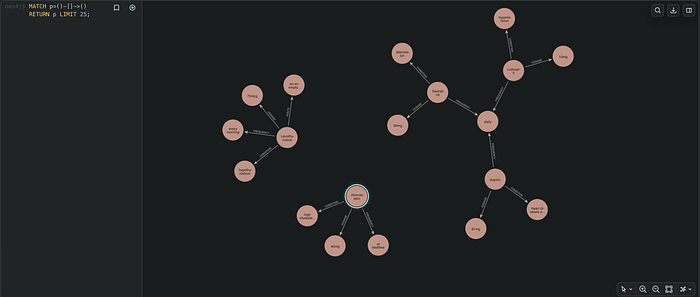
Press enter or click to view image in full size

query = "List all medications related to cardiovascular conditions and their dosages."

Console:
Starting retriever search...
Retriever results: items=[RetrieverResultItem(content="<Record node=<Node element_id='4:a53f7783-1308-4f3d-9a27-45cede6b6376:19' labels=frozenset({'Entity'}) properties={'name': 'on an empty stomach before any other medications', 'id': '1c9fb28e-c3e1-4515-afa0-01939beac419'}> score=0.5062605>", metadata=None), RetrieverResultItem(content="<Record node=<Node element_id='4:a53f7783-1308-4f3d-9a27-45cede6b6376:0' labels=frozenset({'Entity'}) properties={'name': 'Atorvastatin', 'id': '1db81626-c3de-4cab-b5dd-091327785182'}> score=0.47961158>", metadata=None), RetrieverResultItem(content="<Record node=<Node element_id='4:a53f7783-1308-4f3d-9a27-45cede6b6376:6' labels=frozenset({'Entity'}) properties={'name': 'heart disease prevention', 'id': '44573186-869f-4d5d-ba04-fe254ec4ed21'}> score=0.45777896>", metadata=None), RetrieverResultItem(content="<Record node=<Node element_id='4:a53f7783-1308-4f3d-9a27-45cede6b6376:8' labels=frozenset({'Entity'}) properties={'name': 'Lisinopril', 'id': '04f27c55-38a3-46a9-a411-4faf07836a56'}> score=0.45199984>", metadata=None), RetrieverResultItem(content="<Record node=<Node element_id='4:a53f7783-1308-4f3d-9a27-45cede6b6376:7' labels=frozenset({'Entity'}) properties={'name': 'Levothyroxine', 'id': '60654f2d-2ec8-4f4e-be02-cd57b7c5abfb'}> score=0.4511963>", metadata=None)] metadata={'__retriever': 'QdrantNeo4jRetriever'}
Extracting entity IDs...
Entity IDs: ['1c9fb28e-c3e1-4515-afa0-01939beac419', '1db81626-c3de-4cab-b5dd-091327785182', '44573186-869f-4d5d-ba04-fe254ec4ed21', '04f27c55-38a3-46a9-a411-4faf07836a56', '60654f2d-2ec8-4f4e-be02-cd57b7c5abfb']
Fetching related graph...
Subgraph: [...]
Formatting graph context...
Graph context: {'nodes': ['on an empty stomach before any other medications', 'hypertension', 'Atorvastatin', 'Lisinopril', 'Levothyroxine', 'at bedtime', 'high cholesterol', 'Aspirin', '75mcg', '81mg', 'daily', '10mg', 'heart disease prevention', 'every morning', 'Sertraline', 'hypothyroidism', '40mg'], 'edges': ['heart disease prevention condition Aspirin', 'Aspirin frequency daily', 'heart disease prevention condition Aspirin', 'Aspirin dosage 81mg', 'Lisinopril frequency daily', 'daily frequency Sertraline', 'Lisinopril frequency daily', 'daily frequency Aspirin', 'on an empty stomach before any other medications route Levothyroxine', 'Levothyroxine condition hypothyroidism', 'on an empty stomach before any other medications route Levothyroxine', 'Levothyroxine frequency every morning', 'on an empty stomach before any other medications route Levothyroxine', 'Levothyroxine dosage 75mcg', 'Atorvastatin condition high cholesterol', 'Atorvastatin frequency at bedtime', 'Atorvastatin dosage 40mg', 'heart disease prevention condition Aspirin', 'Levothyroxine route on an empty stomach before any other medications', 'Levothyroxine condition hypothyroidism', 'Levothyroxine frequency every morning', 'Levothyroxine dosage 75mcg', 'Lisinopril condition hypertension', 'Lisinopril frequency daily', 'Lisinopril dosage 10mg', 'on an empty stomach before any other medications route Levothyroxine']}
Running GraphRAG...
Final Answer: Here’s a list of medications related to cardiovascular conditions and their dosages based on the knowledge graph:

*   **Aspirin:** 81mg (frequency: daily) - for heart disease prevention.
*   **Atorvastatin:** 40mg (frequency: at bedtime) - for high cholesterol.
*   **Lisinopril:** 10mg (frequency: daily) - for hypertension.
查詢:「列出所有與心血管狀況相關的藥物及其劑量。」控制台輸出顯示,檢索器先從 Qdrant 取得最相關的實體,萃取出實體 ID,再從 Neo4j 取得相關子圖譜並格式化為圖譜情境,最終 LLM 回答:Aspirin(阿斯匹靈):81mg(頻率:每日)——用於預防心臟疾病;Atorvastatin(阿托伐他汀):40mg(頻率:睡前)——用於高膽固醇;Lisinopril(賴諾普利):10mg(頻率:每日)——用於高血壓。
query = "What medication is prescribed for hypothyroidism, and at what dose?"

Console:
Starting retriever search...
Retriever results: items=[RetrieverResultItem(content="<Record node=<Node ... properties={'name': 'hypothyroidism', 'id': '95b91440-5ff1-41eb-a036-b57880094b05'}> score=0.6616618>", metadata=None), ...]
Extracting entity IDs...
Entity IDs: ['95b91440-5ff1-41eb-a036-b57880094b05', '60654f2d-2ec8-4f4e-be02-cd57b7c5abfb', 'd14d70ef-3780-4ebe-b803-1ab8bd8ec847', '1c9fb28e-c3e1-4515-afa0-01939beac419', 'cddff401-0958-4093-b196-ad270b7aa797']
Fetching related graph...
Subgraph: [...]
Formatting graph context...
Graph context: {'nodes': ['Lisinopril', '75mcg', 'twice daily', 'diabetes', 'on an empty stomach before any other medications', 'hypertension', 'daily', 'Metformin', '500mg', '10mg', 'hypothyroidism', 'Levothyroxine', 'every morning'], 'edges': [...]}
Running GraphRAG...
Final Answer: Levothyroxine 75mcg is prescribed for hypothyroidism, taken every morning.
查詢:「為甲狀腺功能低下症(hypothyroidism)開立的是哪種藥物,劑量為何?」最終答案:開立的是 Levothyroxine(左旋甲狀腺素)75mcg,用於甲狀腺功能低下症,每天早晨服用。
query = "Which medications does the patient take once daily versus twice daily?"

Console:
Starting retriever search...
Retriever results: items=[RetrieverResultItem(content="<Record node=<Node ... properties={'name': 'twice daily', 'id': '73d5a502-05be-4bb7-916a-10b8ff5130fa'}> score=0.6052238>", metadata=None), ...]
Extracting entity IDs...
Entity IDs: ['73d5a502-05be-4bb7-916a-10b8ff5130fa', '1c9fb28e-c3e1-4515-afa0-01939beac419', '06da6faa-baa5-4657-a961-5091f58e3058', '9cbb512f-ca6b-47de-bb12-378ac35826bd', 'd14d70ef-3780-4ebe-b803-1ab8bd8ec847']
Fetching related graph...
Subgraph: [...]
Formatting graph context...
Graph context: {'nodes': ['twice daily', 'daily', '75mcg', '50mg', '81mg', 'Aspirin', 'on an empty stomach before any other medications', 'hypothyroidism', 'hypertension', 'depression', 'Lisinopril', 'Levothyroxine', 'heart disease prevention', 'every morning', 'Sertraline', 'diabetes', '500mg', '10mg', 'Metformin'], 'edges': [...]}
Running GraphRAG...
Final Answer: Here’s the breakdown of medications taken once daily versus twice daily based on the knowledge graph:

**Once Daily:**

*   Aspirin: daily frequency
*   Sertraline: daily frequency
*   Levothyroxine: every morning frequency

**Twice Daily:**

*   Metformin: twice daily frequency
查詢:「病患有哪些藥物是每天服用一次、哪些是每天服用兩次?」最終答案——每天一次:Aspirin(每日)、Sertraline(每日)、Levothyroxine(每天早晨);每天兩次:Metformin(每天兩次)。
(註:上述每個查詢的控制台輸出中,
Subgraph與部分edges的完整原始傾印內容因篇幅過長而以[...]省略,僅保留關鍵的圖譜情境與最終答案;原文的完整傾印可於來源連結中查閱。)
The Conclusion: / 結論:
In this article, we learned how to build a complete GraphRAG pipeline using 100% local components powered by Ollama, Neo4j, Qdrant, and LangExtract. We explored how unstructured text can be transformed into structured knowledge through entity and relationship extraction, and how that knowledge can be represented as a graph inside Neo4j. We also saw how Qdrant enables semantic retrieval over graph entities, creating a bridge between vector search and graph traversal. By combining these technologies, we moved beyond traditional chunk-based retrieval and enabled context-aware retrieval driven by connected knowledge. The resulting architecture allows an LLM to reason over relationships rather than isolated pieces of text, leading to more grounded and explainable responses. Most importantly, the entire solution runs locally, giving developers complete control over their data, models, and infrastructure. As GraphRAG continues to gain adoption, architectures like this provide a practical blueprint for building intelligent, relationship-aware retrieval systems using open-source technologies.
在本文中,我們學會了如何使用由 Ollama、Neo4j、Qdrant 與 LangExtract 驅動的 100% 本機元件,建立一條完整的 GraphRAG 流程。我們探討了如何透過實體與關係萃取,將非結構化文字轉換為結構化知識,以及如何將該知識在 Neo4j 中表示為圖譜。我們也看到 Qdrant 如何在圖譜實體之上實現語意檢索,在向量搜尋與圖譜遍歷之間搭起橋樑。透過結合這些技術,我們超越了傳統以片段為基礎的檢索,實現了由彼此連接的知識所驅動、具情境感知能力的檢索。由此產生的架構讓 LLM 能基於關係(而非孤立的文字片段)進行推理,從而帶來更有依據、更具可解釋性的回應。最重要的是,整套解決方案在本機執行,讓開發者能完全掌控自己的資料、模型與基礎設施。隨著 GraphRAG 持續被廣泛採用,這類架構為使用開源技術建構智慧型、具關係感知能力的檢索系統,提供了一份實用的藍圖。
🔤 關鍵術語
| 英文 | 繁中譯名 | 文章中的脈絡 / 簡短說明 |
|---|---|---|
| GraphRAG | 圖譜檢索增強生成 | 全文核心架構,將文字轉成知識圖譜後,結合向量檢索與圖遍歷來回答問題,而非檢索文件片段 |
| LangExtract | LangExtract(實體抽取套件) | 由 Ollama 託管的 LLM 驅動,自動從非結構化文字抽取實體與關係,轉為可建圖的知識 |
| Neo4j | Neo4j(圖資料庫) | 系統的結構化知識庫,將實體存為節點、語意關係存為原生邊,支援多跳遍歷 |
| Qdrant | Qdrant(向量資料庫) | 高效能語意檢索層,儲存實體向量並以餘弦距離做相似度搜尋 |
| Ollama | Ollama(本地模型執行框架) | 在本機運行 LLM 與嵌入模型(gemma3、embeddinggemma),實現 100% 本地化 |
| knowledge graph | 知識圖譜 | 以實體及其關係組織資訊的形式化知識表示,取代以文件為界的儲存方式 |
| vector embeddings | 向量嵌入 | 對實體名稱與概念生成的密集向量表示,捕捉語意以供相似度比較 |
| graph traversal | 圖遍歷 | 在 Neo4j 中沿節點與關係探索,取得相連的子圖與上下文 |
| entity extraction | 實體抽取 | 從原始文字辨識出 medication、dosage、frequency、condition 等實體 |
| graph node | 圖節點 | 每個被抽取的概念成為帶唯一識別碼(UUID)的節點 |
| graph edge | 圖邊 | dosage、frequency、condition 等語意關係成為連接節點的顯式邊 |
| multi-hop relationships | 多跳關係 | 跨越多層相連概念的查詢,揭露超出初始抽取點的脈絡資訊 |
| subgraph | 子圖 | 圖擴展後取回的、包含匹配實體及其相連脈絡的局部圖 |
| semantic similarity search | 語意相似度搜尋 | Qdrant 將查詢向量與實體向量比對,回傳語意最相近的圖實體 |
| graph expansion | 圖擴展 | 從檢索到的節點向鄰近節點與關係遍歷,蒐集補充上下文 |
| chunk-based retrieval | 分塊式檢索 | 傳統 RAG 切分文件成 chunk 再嵌入的做法,本架構刻意避開 |
| triples | 三元組 | 將關係轉成可讀的「實體-關係-實體」陳述(如 Lisinopril dosage 10mg)餵給 LLM |
| graph-grounded reasoning | 圖譜接地推理 | LLM 基於明確的實體與關係事實推理,而非從碎片文字推斷 |
| cosine distance | 餘弦距離 | Qdrant collection 設定的向量相似度度量(models.Distance.COSINE) |
| Cypher | Cypher(圖查詢語言) | Neo4j 的查詢語言;關係型別需直接插入查詢字串,故須清理以防注入 |
| QdrantNeo4jRetriever | QdrantNeo4jRetriever(檢索器) | neo4j-graphrag 套件元件,橋接 Qdrant 向量結果與 Neo4j 節點 ID |
| vector dimension | 向量維度 | 嵌入向量的維度(本例為 768),於建立 collection 時設定 |