用 LLM 建構與查詢知識圖譜
文章資訊
作者:Dylan Tartarini 日期:2026-07-03
原文標題:Build and Query Knowledge Graphs with LLMs
Medium 原連結:https://pub.towardsai.net/build-and-query-knowledge-graphs-with-llms-4f39251df792
📝 重點摘要
TL;DR
用 LLM 把文件抽取成 Neo4j 知識圖譜,並比較五種 GraphRAG 查詢策略。
核心問題
傳統向量 RAG 只做文件內(intra-document)的相似度檢索,LLM 無法推理文件之間的交叉引用與隱含關係(inter-document)。作者主張改用圖結構組織知識庫,保留實體與關係,以突破 vanilla RAG 的效能瓶頸。
關鍵發現 / 數據
- 五種查詢策略:Enhanced RAG、Community Reports、Cypher Queries、Community Subgraph、Cypher + RAG,各有不同適用場景。
- Community Reports(社群摘要)能回答需跨文件、高層次概覽的問題;Cypher 適合答案精確、schema 明確的問題。
- 「Cypher + RAG」被評為最完整:兼具相似度檢索與圖遍歷,且具 fallback(Cypher 失敗時退回 Enhanced RAG)。
- 「Community Subgraph」仍是 work-in-progress,多次執行結果不穩定,LLM 易被過量資訊混淆。
- 策略須依三大指標權衡:Token 用量、延遲(Latency)、效能(品質/事實根基/連貫性),而非只看準確度。
方法亮點
- 攝取流程:載入 → 清洗切塊 → 用
GraphExtractor(LangChainwith_structured_output+ Pydantic)抽取節點/關係的結構化圖譜。 - 可選提供 Ontology(allowed labels/relations)作為圖 schema 藍圖,Ontology 越精確、Cypher 生成越容易。
- 圖上關係設計:Chunk 之間
NEXT、Chunk→Document 為PART_OF、概念→來源 Chunk 為MENTIONS。 - 用 Leiden/Louvain 階層式分群偵測 community,再由 LLM 摘要成 Community Report,並存於獨立向量索引(與 chunk 索引分離)。
對我的研究有用嗎?
對 GraphRAG 研究者,本文最有價值的是「同一知識庫同時存在圖表示與向量索引時,查詢策略的多樣性與取捨」這個框架——尤其把 chunk 與 community 分成兩個向量索引、並結合遍歷中間結果的 Cypher+RAG 混合法,可作為檢索管線設計參考。Community Report 對應 Microsoft GraphRAG 的全域摘要思路,可用於多跳/概覽型問題。Ontology 對 Cypher 生成品質的影響,也呼應 schema-guided extraction 的研究主題。
評語
實作導向的優質教學文,架構清楚、程式碼具體;但屬經驗分享而非嚴謹評測——比較表缺量化 benchmark,部分策略(Community Subgraph)作者自承不穩定,結論偏主觀,適合當工程參考而非引用來源。
🌐 中英對照
Author: Dylan Tartarini
Published:
Source: https://pub.towardsai.net/build-and-query-knowledge-graphs-with-llms-4f39251df792
Fetched: 2026-07-03T00:45:11.537861作者:Dylan Tartarini
發表:
來源:https://pub.towardsai.net/build-and-query-knowledge-graphs-with-llms-4f39251df792
擷取時間:2026-07-03T00:45:11.537861
Build and Query Knowledge Graphs with LLMs / 用大型語言模型建構並查詢知識圖譜
Extracting Entities and building Knowledge at enterprise level / 在企業層級萃取實體並建構知識
This story was originally published in Towards Data Science.
Click on the link to read for free.
本文最初發表於 Towards Data Science。
點擊連結即可免費閱讀。
Knowledge Graphs are relevant / 知識圖譜的重要性
A Knowledge Graph could be defined as a structured representation of information that connects concepts, entities, and their relationships in a way that mimics human understanding. It is often used to organise and integrate data from various sources, enabling machines to reason, infer, and retrieve relevant information more effectively.
知識圖譜 (Knowledge Graph) 可以被定義為一種資訊的結構化表示,它以模擬人類理解的方式將概念、實體 (entity) 及其關係連結起來。它常被用來組織並整合來自不同來源的資料,讓機器能更有效地進行推理、推論並檢索相關資訊。
In a previous post on Medium I made the point that this kind of structured representation can be used to enhance and perfect the performances of LLMs in Retrieval Augmented Generation applications. We could speak of GraphRAG as an ensemble of techniques and strategies employing a graph-based representation of knowledge to better serve information to LLMs compared to more standard approaches that could be taken for “Chat with your documents” use cases.
在我先前一篇 Medium 貼文中,我提出了一個觀點:這種結構化表示可以用來增強並完善大型語言模型 (LLM) 在檢索增強生成 (Retrieval Augmented Generation, RAG) 應用中的表現。相較於「與你的文件對話」這類使用情境中可能採用的較為標準的做法,我們可以把 GraphRAG 視為一整套運用基於圖 (graph) 的知識表示、以更好地向 LLM 提供資訊的技術與策略。
The “vanilla” RAG approach relies on vector similarity (and, sometimes, hybrid search) with the goal of retrieving from a vector database pieces of information (chunks of documents) that are similar to the user’s input, according to some similarity measure such as cosine or euclidean. These pieces of information are then passed to a Large Language Model that is prompted to use them as context to generate a relevant output to the user’s query.
「原味 (vanilla)」的 RAG 做法依賴向量相似度(有時也會用混合搜尋 (hybrid search)),目標是根據某種相似度度量(如餘弦 (cosine) 或歐幾里得 (euclidean) 距離),從向量資料庫中檢索出與使用者輸入相似的資訊片段(文件的區塊 (chunk))。接著這些資訊片段會被傳遞給大型語言模型,並提示它將這些內容作為上下文 (context),以針對使用者的查詢生成相關的輸出。
My argument is that the biggest point of failure in those kind of applications is similarity search relying on explicit mentions in the knowledge base (intra-document level), leaving the LLM blind to cross-references between documents, or even to implied (implicit) and contextual references. In brief, the LLM is limited as it cannot reason at a inter-document level.
我的論點是,這類應用最大的失敗點在於相似度搜尋依賴知識庫中的明確提及(文件內層級 (intra-document level)),使得 LLM 對文件之間的交叉引用視而不見,甚至對隱含的(implicit)和上下文性的引用也無從察覺。簡而言之,LLM 受到限制,因為它無法在跨文件 (inter-document) 層級進行推理。
This can be addressed moving away from pure vector representations and vector stores to a more comprehensive way of organizing the knowledge base, extracting concepts from each piece of text and storing while keeping track of relationships between pieces of information.
要解決這個問題,可以從純向量表示與向量儲存 (vector store) 轉向一種更全面的知識庫組織方式:從每一段文字中萃取概念,並在儲存的同時追蹤各資訊片段之間的關係。
Graph structure is in my opinion the best way of organizing a knowledge base with documents containing cross-references and implicit mentions to each other like it always happens inside organizations and enterprises. A graph main features are in fact
在我看來,對於那些包含彼此交叉引用與隱含提及的文件(在組織與企業內部總是如此)的知識庫,圖結構是最好的組織方式。圖的主要特徵其實包括:
- Entities (Nodes): they represent real-world objects like people, places, organizations, or abstract concepts;
- Relationships (Edges): they define how entities are connected between them (i.e: “Bill → WORKS_AT → Microsoft”);
-
Attributes (Properties): provide additional details about entities (e.g., Microsoft’s founding year, revenue, or location) or relationships ( i.e. “Bill → FRIENDS_WITH {since: 2021} → Mark”).
-
實體 (Entities)(節點 (Nodes)):代表現實世界中的物件,如人、地點、組織或抽象概念;
- 關係 (Relationships)(邊 (Edges)):定義實體之間如何相互連接(例如:「Bill → WORKS_AT → Microsoft」);
- 屬性 (Attributes)(Properties):提供關於實體(例如 Microsoft 的成立年份、營收或所在地)或關係(例如「Bill → FRIENDS_WITH {since: 2021} → Mark」)的額外細節。
A Knowledge Graph can then be defined as the Graph representation of corpora of documents coming from a coherent domain. But how exactly do we move from vector representation and vector databases to a Knowledge Graph?
因此,知識圖譜可以被定義為來自同一連貫領域的文件語料庫 (corpora) 的圖表示。但我們究竟該如何從向量表示與向量資料庫轉移到知識圖譜呢?
Further, how do we even extract the key information to build a Knowledge Graph?
再進一步說,我們究竟要如何萃取出建構知識圖譜所需的關鍵資訊呢?
In this article, I will present my point of view on the subject, with code examples from a repository I developed while learning and experimenting with Knowledge Graphs. This repository is publicly available on my Github and contains:
在本文中,我將提出我對這個主題的觀點,並附上我在學習與實驗知識圖譜時所開發的一個儲存庫 (repository) 中的程式碼範例。這個儲存庫公開於我的 Github 上,內容包含:
- the source code of the project
- example notebooks written while building the repo
- a Streamlit app to showcase work done until this point
-
a Docker file to built the image for this project without having to go through the manual installation of all the software needed to run the project.
-
專案的原始碼
- 建構此儲存庫時所撰寫的範例筆記本 (notebook)
- 一個用來展示至今成果的 Streamlit 應用程式
- 一個 Docker 檔案,用來建構此專案的映像檔 (image),如此便無需手動安裝執行專案所需的所有軟體。
The article will present the repo in order to cover the following topics:
本文將透過介紹此儲存庫,涵蓋以下主題:
✅ Tech Stack Breakdown of the tools available, with a brief presentation of each of the components used to build the project.
✅ 對可用工具的技術堆疊剖析 (Tech Stack Breakdown),並簡要介紹用於建構此專案的每個元件。
✅ How to get the Demo up and running in your own local environment.
✅ 如何讓 Demo 在你自己的本機環境中順利執行。
✅ How to perform the Ingestion Process of documents, including extracting concepts from them and assembling them into a Knowledge Graph.
✅ 如何執行文件的擷取流程 (Ingestion Process),包括從文件中萃取概念並將其組裝成知識圖譜。
✅ How to query the Graph, with a focus on the variety of possible strategies that can be employed to perform semantic search, graph query language generation and hybrid search.
✅ 如何查詢圖譜,重點放在可用於執行語意搜尋 (semantic search)、圖查詢語言 (graph query language) 生成以及混合搜尋的各種可能策略。
If you are a Data Scientist, a ML/AI Engineer or just someone curious on how to build smarter search systems, this guide will walk you through the full workflow with code, context and clarity.
無論你是資料科學家 (Data Scientist)、機器學習/人工智慧工程師 (ML/AI Engineer),或只是對如何建構更聰明的搜尋系統感到好奇的人,本指南都將透過程式碼、脈絡與清晰的說明,帶你走完整個工作流程。
Tech Stack Breakdown / 技術堆疊剖析
As a Data Scientist who started learning programming in 2019/20, my main language is of course Python. Here, I am using its 3.12 version.
身為一名在 2019/20 年開始學習程式設計的資料科學家,我的主要語言當然是 Python。在這裡,我使用的是它的 3.12 版本。
This project is built with a focus on open-source tools and free-tier accessibility both on the storage side as well as on the availability of Large Language Models. This makes it a good starting point for newcomers or for those who are not willing to pay for cloud infrastructure or for OpenAI’s API KEYs.
這個專案的建構重點放在開源工具,以及在儲存端和大型語言模型可用性兩方面的免費方案 (free-tier) 可及性。這使得它成為新手,或不願意為雲端基礎設施或 OpenAI 的 API 金鑰付費者的良好起點。
The source code is, however, written with production use cases in mind — focusing not just on quick demos, but on how to transition a project to real-world deployment. The code is therefore designed to be easily customizable, modular, and extendable, so it could be adapted to your own data sources, LLMs, and workflows with minimal friction.
然而,原始碼在撰寫時是考量到正式生產環境 (production) 的使用情境——不僅著眼於快速的 demo,更著眼於如何將專案過渡到真實世界的部署。因此,程式碼被設計為易於客製化、模組化 (modular) 且可擴充 (extendable),使其能以最小的摩擦適配你自己的資料來源、LLM 與工作流程。
Below is a breakdown of the key components and how they work together. You can also read the repo’s README.md for further information on how to get up and running with the demo app.
以下是關鍵元件的剖析,以及它們如何協同運作。你也可以閱讀該儲存庫的 README.md,以取得關於如何啟動並執行 demo 應用程式的更多資訊。
🕸️ Neo4j — Graph Database + Vector Store / Neo4j — 圖資料庫 + 向量儲存
Neo4j powers the knowledge graph layer and also stores vector embeddings for semantic search. The core of Neo4j is Cypher, the query language needed to interact with a Neo4j Database. Some of the key other features from Neo4j that are used in this project are:
Neo4j 驅動了知識圖譜層,同時也儲存用於語意搜尋的向量嵌入 (vector embedding)。Neo4j 的核心是 Cypher,也就是與 Neo4j 資料庫互動所需的查詢語言。本專案所使用的其他一些 Neo4j 關鍵功能包括:
- GraphDB: To store structured relationships between entities and concepts.
- VectorDB: Embedding support allows similarity search and hybrid queries.
- Python SDK: Neo4j offers a python driver to interact with its instance and wrap around it. Thanks to the python driver, knowing Cypher is not mandatory to interact with the code in this repo. Thanks to the SDK, we are able to use other python graph data science libraries as well, such as
networkxorpython-louvain. - Local Development: Neo4j offers a Desktop version and it also could be easily deployed via Docker images into containers or on any Virtual Machine (Linux/macOS/Windows).
-
Production Cloud: You can also use Neo4j Aura for a fully-managed solution; this comes with a free tier, and it’s ready to be hosted in any cloud of your choice depending on your needs.
-
圖資料庫 (GraphDB):用來儲存實體與概念之間的結構化關係。
- 向量資料庫 (VectorDB):對嵌入的支援使得相似度搜尋與混合查詢成為可能。
- Python SDK:Neo4j 提供了一個 python 驅動程式 (driver) 來與其實例互動並加以封裝。有了這個 python 驅動程式,要與此儲存庫中的程式碼互動並不一定要懂 Cypher。有了這個 SDK,我們也能使用其他 python 圖資料科學函式庫,例如
networkx或python-louvain。 - 本機開發 (Local Development):Neo4j 提供了一個桌面版本,也可以輕鬆透過 Docker 映像檔部署到容器 (container) 中,或部署到任何虛擬機 (Virtual Machine)(Linux/macOS/Windows)上。
- 生產雲端 (Production Cloud):你也可以使用 Neo4j Aura 作為完全託管的解決方案;它提供免費方案,並可依你的需求託管於你所選擇的任何雲端。
🦜 LangChain — Agent Framework for LLM Workflows / LangChain — 用於 LLM 工作流程的代理框架
LangChain is used to coordinate how LLMs interact with tools like the vector index and the entities in the Knowledge Graphs, and of course with the user input.
LangChain 被用來協調 LLM 如何與各種工具互動,例如向量索引 (vector index) 和知識圖譜中的實體,當然也包括與使用者輸入的互動。
- Used to define custom agents and toolchains.
- Integrates with retrievers, memory, and prompt templates.
-
Makes it easy to swap in different LLM backends.
-
用於定義自訂的代理 (agent) 與工具鏈 (toolchain)。
- 可與檢索器 (retriever)、記憶 (memory) 與提示範本 (prompt template) 整合。
- 讓抽換不同的 LLM 後端 (backend) 變得容易。
🤖 LLMs + Embeddings / 大型語言模型 + 嵌入
LLMs and Embeddings can be invoked both from a local deployment using Ollama or an online endpoint of your choice. I am currently using the Groq free-tier API to experiment, switching between gemma2-9b-it and various versions of Llama, such as meta-llama/llama-4-scout-17b-16e-instruct . For Embeddings, I am using mxbai-embed-large running via Ollama on my M1 Macbook Air; on the same setup I was also able to run llama3.2 (2B) in the past, keeping in mind my hardware limitations.
LLM 與嵌入模型既可以透過 Ollama 從本機部署中呼叫,也可以從你選擇的線上端點 (endpoint) 呼叫。我目前使用 Groq 的免費方案 API 來做實驗,在 gemma2-9b-it 和各種版本的 Llama(例如 meta-llama/llama-4-scout-17b-16e-instruct)之間切換。至於嵌入,我使用的是在我的 M1 Macbook Air 上透過 Ollama 執行的 mxbai-embed-large;在相同的設定下,考量到我的硬體限制,我過去也曾能夠執行 llama3.2(2B)。
Both Ollama and Groq are plug and play and have Langchain’s wrappers.
Ollama 和 Groq 兩者都是即插即用 (plug and play),並且都有 Langchain 的封裝器 (wrapper)。
👑 Streamlit — Frontend UI for Interactions & Demos / Streamlit — 用於互動與展示的前端 UI
I have written a small demo app using Streamlit, a python library that allows developers to build minimal frontend layers without writing any HTML or CSS, just pure python.
我使用 Streamlit 撰寫了一個小型的 demo 應用程式,它是一個 python 函式庫,讓開發者無需撰寫任何 HTML 或 CSS,只用純 python 就能建構出最精簡的前端層。
In this demo app you will see how to
在這個 demo 應用程式中,你將看到如何:
- Ingest your documents into Neo4j under a Graph-based representation.
-
Run live demos of the graph-based querying, showcasing key differences between various querying strategies.
-
以基於圖的表示形式,將你的文件擷取進 Neo4j。
- 執行基於圖的查詢的即時展示,呈現各種查詢策略之間的關鍵差異。
Streamlit’s main advantages is that it’s super lightweight, fast to deploy, and doesn’t require a separate frontend framework or backend. Its features make it the perfect fit for demos and prototypes such as this one.
Streamlit 的主要優點在於它極為輕量、部署快速,而且不需要獨立的前端框架或後端。它的這些特性使其非常適合像這樣的 demo 與原型 (prototype)。
Press enter or click to view image in full size
按下 Enter 或點擊以檢視完整尺寸的圖片
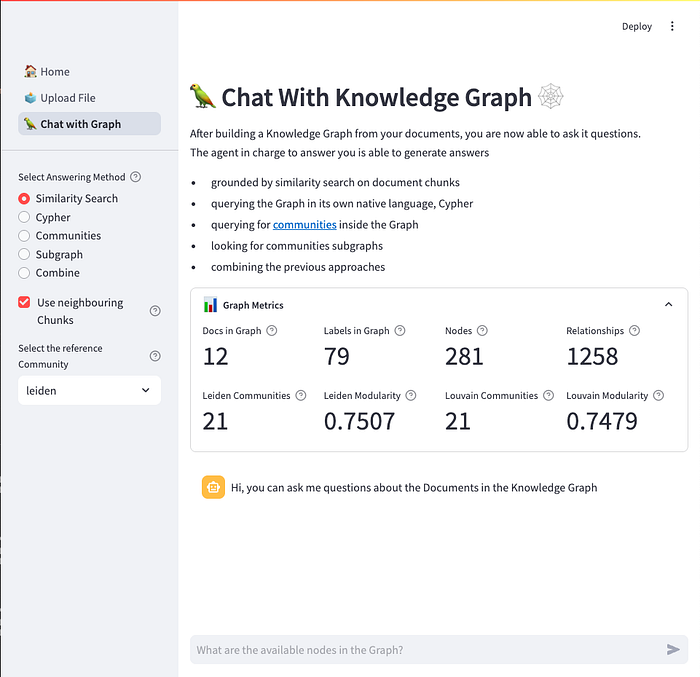
However, it is not suitable for production apps because of it limited customisation features and UI control, as well as the absence of a native way to perform authorisation and authentication, and a proper way to handle scaling. Going from demo to production usually requires a more suitable front-end framework and a clear separation between back-end and front-end frameworks and their responsibilities.
然而,由於它的客製化功能與 UI 控制有限,加上缺乏原生的授權 (authorisation) 與認證 (authentication) 方式,以及缺乏妥善處理擴展 (scaling) 的方法,它並不適合用於正式生產環境的應用程式。從 demo 走向生產環境通常需要一個更合適的前端框架,以及後端與前端框架及其職責之間清楚的分離。
🐳 Docker — Containerisation for Local Dev & Deployment / Docker — 用於本機開發與部署的容器化
Docker is a tool that lets you package your application and all its dependencies into a container — a lightweight, standalone, and portable environment that runs consistently on any system.
Docker 是一個工具,讓你能把應用程式及其所有相依套件 (dependency) 打包進一個容器——一個輕量、獨立且可攜的環境,能在任何系統上一致地執行。
Since I imagined it could be challenging to manage all the mentioned dependencies, I also added a Dockerfile for building an image of the app, so that Neo4j, Ollama and the app itself could run in isolated, reproducible containers via docker-compose.
由於我設想管理上述所有相依套件可能會很棘手,因此我還加入了一個 Dockerfile 來建構應用程式的映像檔,如此一來 Neo4j、Ollama 以及應用程式本身就能透過 docker-compose 在彼此隔離、可重現的容器中執行。
To run the demo app yourself, you can follow the instructions on the README.md
若要自己執行這個 demo 應用程式,你可以依照 README.md 上的說明操作。
Now that the tech stack we are going to use has been presented, we can deep dive into how the app actually works behind the curtains, starting from the ingestion pipeline.
既然我們要使用的技術堆疊已經介紹完畢,接下來我們就可以深入探討這個應用程式在幕後實際上是如何運作的,就從擷取管線 (ingestion pipeline) 開始。
From Text Corpus to Knowledge Graph / 從文字語料庫到知識圖譜
As I previously mentioned, it is recommendable that documents that are being ingested into a Knowledge Graph come from the same domain. These could be manuals from the medical domain on diseases and their symptoms, code documentation from past projects, or newspaper articles on a particular subject.
如同我先前提到的,建議被擷取進知識圖譜的文件來自同一個領域。這些文件可以是醫療領域中關於疾病及其症狀的手冊、過往專案的程式碼文件,或是關於某個特定主題的報紙文章。
Being a politics geek, to test and play with my code, I choose pdf Press Materials from the European Commission’s Press corner.
身為一個政治迷,為了測試並把玩我的程式碼,我選擇了來自歐盟執委會新聞角 (European Commission’s Press corner) 的 pdf 新聞資料。
Once the documents have been collected, we have to ingest them into the Knowledge Graph.
一旦收集好文件,我們就必須把它們擷取進知識圖譜。
The ingestion pipeline needs to follow the steps reported below
擷取管線需要遵循以下所述的步驟:
The reference source code for this part of the article is in src/ingestion.
本文這一部分的參考原始碼位於 src/ingestion。
1. Load files into a machine-friendly format / 1. 將檔案載入為機器友善的格式
In the code example below, the class Ingestoris used to infer the mime type of each file we’re trying to read and langchain’s document loaders are employed to read its content accordingly; this allows for customisations regarding the format of source files that will populate our Knowledge Graph.
在下面的程式碼範例中,Ingestor 類別被用來推斷我們試圖讀取的每個檔案的 MIME 類型,並相應地運用 langchain 的文件載入器 (document loader) 來讀取其內容;這使得我們能針對將填入知識圖譜的來源檔案格式進行客製化。
class Ingestor:
    """
    Base `Ingestor` Class with common methods.
    Can be specialized by source.
    """
    def ___init__(self, source: Source):
        self.source = source

    @abstractmethod
    def list_files(self)-> List[str]:
        pass
    @staticmethod
    def load_file(filepath: str, metadata: dict) -> List[Document]:
        mime = magic.Magic(mime=True)
        mime_type = mime.from_file(filepath) or metadata.get('Content-Type')
        if mime_type == 'inode/x-empty':
            return []
        loader_class = MIME_TYPE_MAPPING.get(mime_type)
        if not loader_class:
            logger.warning(f'Unsupported MIME type: {mime_type} for file {filepath}, skipping.')
            return []

        if loader_class == PDFPlumberLoader:
            loader = loader_class(
                file_path=filepath,
                extract_images=False,
            )
        elif loader_class == Docx2txtLoader:
            loader = loader_class(
                file_path=filepath
            )
        elif loader_class == TextLoader:
            loader = loader_class(
                file_path=filepath
            )
        elif loader_class == BSHTMLLoader:
            loader = loader_class(
                file_path=filepath,
                open_encoding="utf-8",
            )
        try:
            return loader.load()
        except Exception as e:
            logger.warning(f"Error loading file: {filepath} with exception: {e}")
            pass

    @staticmethod
    def merge_pages(pages: List[Document]) -> str:
        return "\n\n".join(page.page_content for page in pages)
    @staticmethod
    def create_processed_document(file: str, document_content: str, metadata: dict):
        processed_doc = ProcessedDocument(filename=file, source=document_content, metadata=metadata)
        return processed_doc
    def ingest(self, filename: str, metadata: Dict[str, Any]) -> ProcessedDocument | None:
        """
        Loads a file from a path and turn it into a `ProcessedDocument`
        """
        try:
            document_content = self.merge_pages(document_pages)
        except(TypeError):
            logger.warning(f"Empty document {filename}, skipping..")

        if document_content is not None:
            processed_doc = self.create_processed_document(
                base_name,
                document_content,
                metadata
            )
            return processed_doc

    def batch_ingest(self) -> List[ProcessedDocument]:
        """
        Ingests all files in a folder
        """
        processed_documents = []
        for file in self.list_files():
            file, metadata = self.file_preparation(file)
            processed_doc = self.ingest(file, metadata)
            if processed_doc:
                processed_documents.append(processed_doc)
        return processed_documents
2. Clean and split document content into text chunks / 2. 清理文件內容並將其切分為文字區塊
This is necessary for the graph extraction phase ahead of us. To clean texts, depending on domain and on the document’s format, it might make sense to write custom cleaning and chunking functions. This is where the document’s chunks list is populated.
這對於我們接下來的圖萃取 (graph extraction) 階段是必要的。為了清理文字,視領域與文件格式而定,撰寫自訂的清理與切塊 (chunking) 函式可能會是合理的做法。文件的 chunks 清單就是在這裡被填入的。
Chunking size, overlap and other possible configurations here could be domain dependent and should be configured according to the expertise of the DS / AI Engineer; the class in charge of chunking is exemplified below.
此處的切塊大小 (chunk size)、重疊 (overlap) 以及其他可能的設定可能取決於領域,並應依據資料科學家/AI 工程師的專業判斷來設定;負責切塊的類別範例如下。
            self.splitter = RecursiveCharacterTextSplitter(
                chunk_size=self.chunk_size,
                chunk_overlap=self.chunk_overlap,
                is_separator_regex=False
            )

        else:
            logger.warning(f"Chunker type '{self.chunker_type}' not supported.")
    def _chunk_document(self, text: str) -> list[str]:
        """Chunks the document and returns a list of chunks."""
        return self.splitter.split_text(text)
    def get_chunked_document_with_ids(
        self,
        text: str,
        ) -> list[dict]:
        """Chunks the document and returns a list of dictionaries with chunk ids and chunk text."""
        return [
            {
                "chunk_id": i + 1,
                "text": chunk,
                "chunk_size": self.chunk_size,
                "chunk_overlap": self.chunk_overlap
            }
            for i, chunk in enumerate(self._chunk_document(text))
        ]

    def chunk_document(self, doc: ProcessedDocument) -> ProcessedDocument:
        """
        Chunks the text of a `ProcessedDocument` instance.
        """
        chunks_dict = self.get_chunked_document_with_ids(doc.source)

        doc.chunks = [Chunk(**chunk) for chunk in chunks_dict]
    def chunk_documents(self, docs: List[ProcessedDocument]) -> List[ProcessedDocument]:
        """
        Chunks the text of a list of `ProcessedDocument` instances.
        """
        updated_docs = []
        for doc in docs:
            updated_docs.append(self.chunk_document(doc))
        return updated_docs
3. Extract Concepts Graph / 3. 萃取概念圖
For each chunk in the document, we want to extract a graph of concepts. To do so, we program a custom agent powered by a LLM with this precise task. Langchain comes in handy here due to a method called with_structured_output that wraps LLM calls and lets you define the expected output schema using a pydantic model. This ensures that the LLM of your choice returns structured, validated responses and not free-form text.
對於文件中的每一個區塊,我們都想要萃取出一個概念圖。為此,我們編寫一個由 LLM 驅動、專門負責這項任務的自訂代理。Langchain 在這裡很好用,因為它有一個名為 with_structured_output 的方法,能封裝 LLM 的呼叫,並讓你使用 pydantic 模型 (model) 定義預期的輸出綱要 (schema)。這確保了你所選用的 LLM 會回傳結構化、經過驗證的回應,而不是自由格式的文字。
This is what the GraphExtractor looks like:
GraphExtractor 看起來是這樣的:
class GraphExtractor:
    """
    Agent able to extract informations in a graph representation format from a given text.
    """
    def __init__(self, conf: LLMConf, ontology: Optional[Ontology]=None):
        self.conf = conf
        self.llm = fetch_llm(conf)
        self.prompt = get_graph_extractor_prompt()
        self.prompt.partial_variables = {
            'allowed_labels':ontology.allowed_labels if ontology and ontology.allowed_labels else "",
            'labels_descriptions': ontology.labels_descriptions if ontology and ontology.labels_descriptions else "",
            'allowed_relationships': ontology.allowed_relations if ontology and ontology.allowed_relations else ""
        }
        if self.llm is not None:
            try:
                graph: _Graph = self.llm.with_structured_output(
                    schema=_Graph
                    ).invoke(
                        input=self.prompt.format(input_text=text)
                    )
Notice that the expected output _Graph is defined as:
請注意,預期的輸出 _Graph 定義如下:
class _Relationship(Serializable):
    source: str
    target: str
    type: str
    properties: Optional[Dict[str, str]] = None
Optionally, the LLM agent in charge of extracting a graph from chunks can be provided with an Ontology describing the domain of the documents.
作為一個選項,負責從區塊中萃取圖的 LLM 代理,可以被提供一個描述文件領域的本體論 (Ontology)。
An ontology can be described as the formal specification of the types of entities and relationships that can exist in the graph — it is, essentially, its blueprint.
本體論可以被描述為對圖中可能存在的實體與關係類型的形式化規範 (formal specification)——本質上,它就是圖的藍圖 (blueprint)。
class Ontology(BaseModel):
    allowed_labels: Optional[List[str]]=None
    labels_descriptions: Optional[Dict[str, str]]=None
    allowed_relations: Optional[List[str]]=None
4. Embed each chunk of the document / 4. 嵌入文件的每個區塊
Next, we want to obtain a vector representation of the text contained in each chunk. This can be done using the Embeddings model of your choice and passing the list of documents to the ChunkEmbedder class.
接下來,我們想要取得每個區塊中所含文字的向量表示。這可以透過使用你所選擇的嵌入模型,並將文件清單傳遞給 ChunkEmbedder 類別來完成。
class ChunkEmbedder:
    """ Contains methods to embed Chunks from a (list of) `ProcessedDocument`."""
    def __init__(self, conf: EmbedderConf):
        self.conf = conf
        self.embeddings = get_embeddings(conf)
    def embed_document_chunks(self, doc: ProcessedDocument) -> ProcessedDocument:
        """
        Embeds the chunks of a `ProcessedDocument` instance.
        """
        if self.embeddings is not None:
            for chunk in doc.chunks:
                chunk.embedding = self.embeddings.embed_documents([chunk.text])
                chunk.embeddings_model = self.conf.model
            logger.info(f"Embedded {len(doc.chunks)} chunks.")
            return doc
        else:
            logger.warning(f"Embedder type '{self.conf.type}' is not yet implemented")
    def embed_documents_chunks(self, docs: List[ProcessedDocument]) -> List[ProcessedDocument]:
        """
        Embeds the chunks of a list of `ProcessedDocument` instances.
        """
        if self.embeddings is not None:
            for doc in docs:
                doc = self.embed_document_chunks(doc)
            return docs
        else:
            logger.warning(f"Embedder type '{self.conf.type}' is not yet implemented")
            return docs
5. Save the embedded chunks into the Knowledge Graph / 5. 將嵌入後的區塊儲存到知識圖譜中
Finally, we have to upload the documents and their chunks in our Neo4j instance. I’ve built upon the already available Neo4jGraph langchain class to create a customised version for this repo.
最後,我們必須把文件及其區塊上傳到我們的 Neo4j 實例中。我在既有的 Neo4jGraph langchain 類別的基礎上,為此儲存庫打造了一個客製化的版本。
The code of the KnowledgeGraph class is available at src/graph/knowledge_graph.py and this is how its core method add_documents works:
KnowledgeGraph 類別的程式碼位於 src/graph/knowledge_graph.py,其核心方法 add_documents 的運作方式如下:
a. for each file, create a Document node on the Graph with its properties (metadata) such as the source of the file, the name, the ingestion date..
a. 對於每個檔案,在圖上建立一個帶有其屬性(中繼資料 (metadata))的 Document 節點,例如檔案的來源、名稱、擷取日期……
b. for each chunk, create a Chunk node, connected to the original Document node by a relationship (PART_OF) and save the embedding of the chunk as a property of the node; connect each Chunk node with the following with another relationship (NEXT).
b. 對於每個區塊,建立一個 Chunk 節點,透過一個關係(PART_OF)連接到原始的 Document 節點,並將區塊的嵌入儲存為該節點的一個屬性;再以另一個關係(NEXT)將每個 Chunk 節點與下一個 Chunk 節點連接起來。
c. for each chunk, save the extracted subgraph: nodes, relationships and their properties; we also connect them to their source Chunk with a relationship (MENTIONS).
c. 對於每個區塊,儲存所萃取出的子圖 (subgraph):節點、關係及其屬性;我們也用一個關係(MENTIONS)將它們連接到其來源 Chunk。
d. perform hierarchical clustering on the Graph to detect communities of nodes inside it. Then, use a LLM to summarise the resulting communities obtaining Community Reports and embed said summaries.
d. 在圖上執行階層式分群 (hierarchical clustering),以偵測圖內部節點所形成的社群 (communities)。接著,使用 LLM 來摘要所得到的社群,取得社群報告 (Community Reports),並將這些摘要嵌入。
Communities in a graph are clusters or groups of nodes that are more densely connected to each other than to the rest of the graph. In other words, nodes within the same community have many connections with each other and relatively fewer connections with nodes outside the group.
圖中的社群是彼此之間的連接比與圖其餘部分的連接更為密集的節點叢集或群組。換言之,同一社群內的節點彼此之間有許多連接,而與群組外的節點連接相對較少。
The result of this process in Neo4j looks something like this: data structured into entities and relationships with their properties, just as we wanted. In particular, Neo4j also offers the opportunity to have multiple vector indexes in the same instance, and we exploit this feature to separate the embeddings of chunks from those of communities.
在 Neo4j 中,這個流程的結果看起來大致如此:資料被結構化為帶有屬性的實體與關係,正如我們所期望的那樣。特別是,Neo4j 還提供了在同一實例中擁有多個向量索引的機會,而我們利用了這項功能,將區塊的嵌入與社群的嵌入分開。
Press enter or click to view image in full size
按下 Enter 或點擊以檢視完整尺寸的圖片
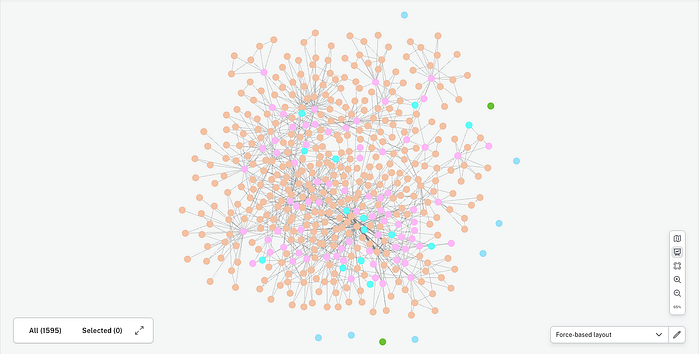
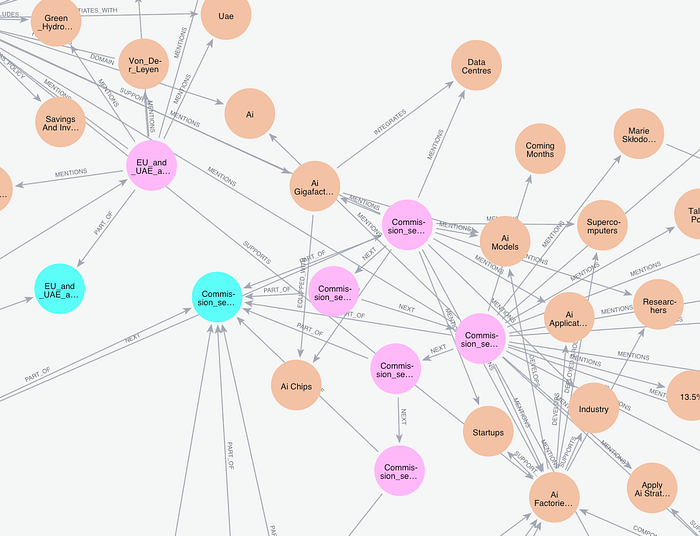
In the image above, you might have noticed that some nodes in the Graph are more connected to each other, while other nodes have fewer connection and lie on the borders of the Graph. Since the image you are looking at is produced from the European Commission’s Press Corner pdfs, it is only normal that in the center we could find entities such as “Von Der Leyen” (President of the European Commission) or even “European Commission”: in fact, those are some of the most mentioned entities in our Knowledge Graph.
在上面的圖片中,你可能已經注意到圖中有些節點彼此之間連接較多,而其他節點連接較少,位於圖的邊緣。由於你所看到的圖片是由歐盟執委會新聞角的 pdf 產生的,因此在中心位置我們會找到諸如「Von Der Leyen」(歐盟執委會主席)甚至「European Commission」這樣的實體,是再正常不過的了:事實上,這些正是我們知識圖譜中最常被提及的一些實體。
Below, you can find a more zoomed-in screenshot, where relationship and entity names are actually visible. The original filename of the document (lightblue) at the center is “Commission sets course for Europe’s AI leadership with an ambitious AI Continent Action Plan”. Apparently the extraction of entities and relationships via LLM worked fairly fine on this one.
下面,你可以看到一張放大更多的截圖,其中關係與實體的名稱實際上是可見的。中心那份文件(淺藍色)的原始檔名是「Commission sets course for Europe’s AI leadership with an ambitious AI Continent Action Plan」。顯然,透過 LLM 進行的實體與關係萃取在這一份文件上運作得相當不錯。
Press enter or click to view image in full size
按下 Enter 或點擊以檢視完整尺寸的圖片
Once the Knowledge Graph has been created, we can employ LLMs and Agents to query it and ask questions on the available documents. Let’s go for it!
一旦知識圖譜建立完成,我們就可以運用 LLM 與代理來查詢它,並針對現有的文件提問。讓我們開始吧!
Graph-informed Retrieval Augmented Generation / 由圖驅動的檢索增強生成
Since the release of ChatGPT in late 2022, I have built my fair share of POCs and Demos on Retrieval Augmented Generation, “chat-with-your-documents” use cases.
自從 2022 年底 ChatGPT 發布以來,我在檢索增強生成、也就是「與你的文件對話」這類使用情境上,已經建構了為數不少的概念驗證 (POC) 與 demo。
They all share the same methodology for giving the end user the desired answer: embed the user question, perform similarity search on the vector store of choice, retrieve k chunks (pieces of information) from the vector store, then pass the user’s question and the context obtained from those chunks to a LLM; finally, answer the question.
它們都採用相同的方法論來給予終端使用者所期望的答案:嵌入使用者的問題、在所選的向量儲存上執行相似度搜尋、從向量儲存中檢索出 k 個區塊(資訊片段),接著把使用者的問題以及從這些區塊中取得的上下文傳遞給 LLM;最後,回答問題。
You might want to add some memory of the conversation (read: a chat history) and even callbacks to perform some guardrail activities such as keeping track of tokens spent in the process and latency of the answer. Many vector stores also allow for hybrid search, which is the same process mentioned above, only adding a filter on chunks based on their metadata before the similarity search even happens.
你可能會想加入一些對話的記憶(也就是聊天歷史 (chat history)),甚至加入回呼 (callback) 來執行某些護欄 (guardrail) 活動,例如追蹤過程中所花費的 token 數以及答案的延遲 (latency)。許多向量儲存也支援混合搜尋,其實就是上述相同的流程,只是在相似度搜尋發生之前,先根據區塊的中繼資料對其加上一個篩選條件 (filter)。
This is the level of complexity you get with this kind of RAG applications: choose the number of k texts you want to retrieve, predetermine the filters, choose the LLM in charge of answering. Eventually, these kind of approaches reach an asymptote in terms of performance, and you might be left with only a handful of options on how to tweak the LLM parameters to better handle user queries.
這就是這類 RAG 應用所能達到的複雜度層級:選擇你想檢索的 k 段文字數量、預先決定篩選條件、選擇負責回答的 LLM。最終,這類做法在效能上會達到一個漸近線 (asymptote),你可能只剩下寥寥可數的幾個選項,來調整 LLM 的參數以更好地處理使用者的查詢。
Instead, what does the RAG approach looks like with a Knowledge Graph? The honest answer to that question is: It really boils down on what kind of questions you are going to ask.
相對地,搭配知識圖譜的 RAG 做法又是什麼樣子呢? 對這個問題誠實的回答是:這其實歸結於你打算問哪一種問題。
While learning about Knowledge Graphs and their applications in real world use cases, I spent a long time reading. Blogposts, articles and Medium posts, even some books. The more I dug, the more questions came to my mind, the less definitive my answers: apparently, when dealing with knowledge that is structured BOTH in a graph representation and into vector indexes, a lot of options open up.
在學習知識圖譜及其在真實世界使用情境中的應用時,我花了很長的時間閱讀。部落格貼文、文章與 Medium 貼文,甚至一些書籍。我挖得越深,腦中浮現的問題就越多,我的答案也越不確定:顯然,當處理的知識同時以圖表示和向量索引兩種形式結構化時,會開啟許多選項。
After my reading, I spent some time developing my own answers (and the code that goes with it) on strategies that can be applied when querying the Knowledge Graph using Large Language Models. What follows is a brief excursus on my take on the subject.
在閱讀之後,我花了一些時間,針對使用大型語言模型查詢知識圖譜時可套用的策略,發展出我自己的答案(以及相應的程式碼)。以下是我對這個主題看法的簡短陳述。
the reference source code is part of the GraphAgentResponder class, available at src/agents/graph_qa.py .
參考原始碼是 GraphAgentResponder 類別的一部分,位於 src/agents/graph_qa.py。
1. Enhanced RAG / 1. 強化版 RAG
First of all, you could always perform the usual RAG process: chunks embeddings are, after all, available in the Graph, and they can be retrieved like with any other vector database. Moreover, you could also perform hybrid search, since those chunks are actually nodes, and nodes have properties (attributes) that can be used for filtering.
首先,你隨時都可以執行一般的 RAG 流程:畢竟區塊的嵌入就存在於圖中,而且它們可以像在任何其他向量資料庫中一樣被檢索出來。此外,你也可以執行混合搜尋,因為這些區塊實際上就是節點,而節點具有可用於篩選的屬性。
What if we went a step further and took into consideration that Chunk nodes are connected to each other by a NEXT relationship, and to the original Document node by a PART_OF relationship? Querying for similarity on embeddings and then enriching the context with neighbouring chunks might unlock new possibilities when it comes to level of details provided in the answer, but also the ability to quote the source file and its metadata.
如果我們更進一步,把 Chunk 節點彼此之間以 NEXT 關係連接、並以 PART_OF 關係連接到原始 Document 節點這件事納入考量呢?在嵌入上查詢相似度,然後以鄰近的區塊來豐富上下文,在答案所提供的細節程度上,或許能開啟新的可能性,同時也帶來引用來源檔案及其中繼資料的能力。
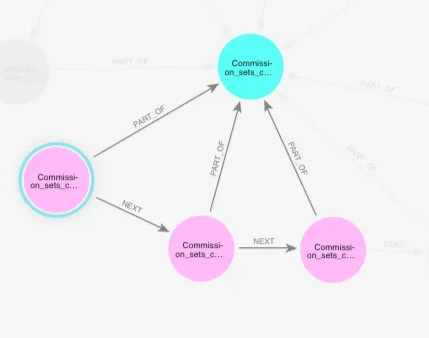
For instance, similarity search could end up pointing to chunk 2 of the previously mentioned document, but querying for neighbouring chunks could allow the LLM to provide a more detailed, contextualised answer.
舉例來說,相似度搜尋最終可能指向前述文件的第 2 個區塊,但查詢鄰近的區塊能讓 LLM 提供更詳細、更貼合脈絡的答案。
To give a working example, let’s consider a question on the nodes depicted in the screenshot previously shown about a press release focused on Artificial Intelligence: “what is the EU strategy on Artificial Intelligence?”. This is what our Agent answers:
舉一個實際的例子,讓我們針對先前展示的截圖中所描繪、關於一篇聚焦人工智慧 (Artificial Intelligence) 的新聞稿的節點,來考慮一個問題:「歐盟在人工智慧上的策略是什麼?」以下是我們的代理所給出的回答:
> `The EU strategy on artificial intelligence is outlined in the AI Continent Action Plan, which aims to make Europe a global leader in AI. The plan focuses on five key pillars:`
> 1. `Building a large-scale AI data and computing infrastructure`
> 2. `Creating a true internal market for data (with a comprehensive Data Union Strategy to be launched in 2025)`
> 3. `Developing algorithms and fostering AI adoption in strategic EU sectors (through the Apply AI Strategy)`
> 4. `Strengthening AI skills and talents (through initiatives such as the Talent Pool, Marie Skłodowska-Curie Action, and AI fellowships schemes)`
>
> `The plan also includes initiatives such as setting up AI Factories and AI Gigafactories to support EU AI startups, industry, and researchers in developing AI models and applications.`
2. Community Reports / 2. 社群報告
Another version of enhanced RAG that came to my mind while building this first version of the repository employs Community Reports.
在建構這第一版儲存庫時,我腦中浮現的另一種強化版 RAG 運用了社群報告。
In the last step of the ingestion phase in fact, we used hierarchical clustering techniques such as the Leiden or Louvain algorithm to detect communities between nodes in the Knowledge Graph, and then employed a LLM to summarise those communities, obtaining Community Reports.
事實上,在擷取階段的最後一個步驟中,我們使用了階層式分群技術,例如 Leiden 或 Louvain 演算法,來偵測知識圖譜中節點之間的社群,然後運用 LLM 來摘要這些社群,取得社群報告。
These reports are stored in the Graph under a different vector index than the one for Chunks, and both of those two indexes can be queried via similarity search. Further, retrieved contexts can be combined when passing them to the LLM to obtain answers that are grounded at the intra-document level but also are informed of what is happening in the graph at the inter-document level.
這些報告被儲存在圖中一個與區塊所用不同的向量索引之下,而這兩個索引都可以透過相似度搜尋來查詢。此外,在將檢索到的上下文傳遞給 LLM 時可以將它們結合起來,以取得既立足於文件內層級、同時又了解圖在跨文件層級上正在發生什麼的答案。
Press enter or click to view image in full size
按下 Enter 或點擊以檢視完整尺寸的圖片
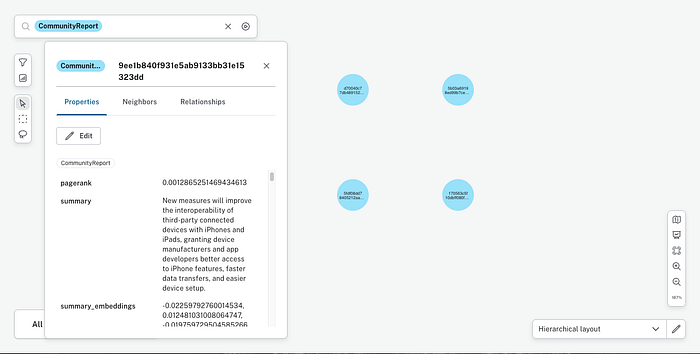
This strategy is certainly better fitted for those kind of questions that might need information from multiple sources in the form of overviews or high level summaries.
這個策略當然更適合那種可能需要來自多個來源、以概覽或高層次摘要形式呈現的資訊的問題。
Let’s go back to the “What is the EU strategy on Artificial Intelligence?” question and see how the bot answers now, being able to retrieve both chunks and community reports via similarity search:
讓我們回到「歐盟在人工智慧上的策略是什麼?」這個問題,看看現在這個機器人在能夠透過相似度搜尋同時檢索區塊與社群報告的情況下如何回答:
> `The EU strategy on artificial intelligence aims to make the EU a leader in the development and deployment of AI that is trustworthy, safe, and respects human values and rights.`
>
>
> `To achieve this goal, in April 2019, the European Commission presented a Communication on AI, which outlined a European approach to AI. The approach focuses on:`
>
> 1. **`Promoting excellence in AI**: The EU wants to support research and innovation in AI, and encourage the development of AI startups and scale-ups.`
> 2. **`Ensuring trust in AI**: The EU aims to build trust in AI through a robust regulatory and legal framework. This includes the development of AI that respects EU values, such as the General Data Protection Regulation (GDPR).`
>
> `The strategy also highlights the need for:`
>
> - **`Investing in AI education and skills**: Developing the skills of the future workforce.`
> - **`Addressing the socio-economic changes driven by AI**: Preparing for changes in the job market.`
> - **`Establishing an EU AI ecosystem**: Encouraging collaboration and coordination among member states.`
>
> `The European Commission also established an **AI regulatory framework**, proposing to regulate AI based on a **risk-based approach**, with stricter rules for high-risk AI applications. Would you like more information on specific aspects of the EU AI strategy?`
Clearly, the answer is more high-leveled than before. This is expected and is in fact what happens when having access to inter-documents contexts.
顯然,這個答案比先前更為高層次。這在意料之中,事實上正是能夠取用跨文件上下文時會發生的情況。
3. Cypher Queries / 3. Cypher 查詢
Moving away from the purely RAG-based strategy, a different option at our disposal now that we have our knowledge base structured in a graph is to ask the LLM to traverse it using a graph query language. In Neo4j, this means that we want to instruct the LLM with the schema of the graph and then ask it to write Cypher queries to inspect nodes, entities and relationships, based on the user’s question.
跳脫純粹基於 RAG 的策略,既然我們的知識庫已經以圖的形式結構化,我們手邊還有另一個不同的選項,就是要求 LLM 使用圖查詢語言來遍歷 (traverse) 它。在 Neo4j 中,這意味著我們要以圖的綱要來指示 LLM,然後根據使用者的問題,要求它撰寫 Cypher 查詢來檢視節點、實體與關係。
This is all possible thanks to the GraphCyperQAChain, which is a Chain class from langchain for question-answering against a graph by generating Cypher statements.
這一切之所以可行,都要歸功於 GraphCyperQAChain,它是 langchain 中的一個 Chain 類別,透過生成 Cypher 陳述式來針對圖進行問答。
In the example below you are seeing what happens if you ask to the LLM the question “Who is Thomas Regnier?”.
在下面的範例中,你會看到如果向 LLM 提出「Thomas Regnier 是誰?」這個問題會發生什麼事。
The model writes a Cypher query similar to
模型會撰寫一個類似如下的 Cypher 查詢:
MATCH (person:Person {name: "Thomas Regnier"})-[r]-(connected)
RETURN person.name AS name,
  type(r) AS relationship_type,
  labels(connected) AS connected_node_labels,
  connected
and after looking at the intermediate results answers like:
在查看中間結果之後,它的回答如下:
Thomas Regnier is the Contact person for Tech Sovereignity,
defence, space and Research of the European Commission
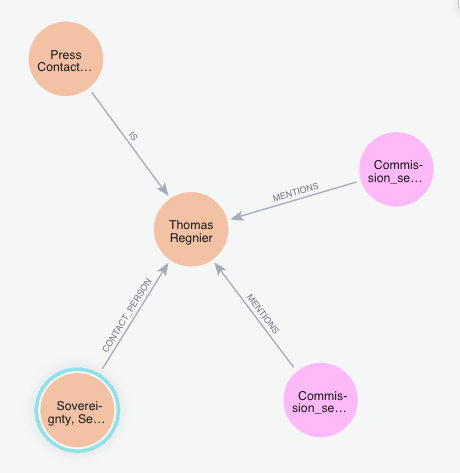
Another example question that you might be wanting to ask and that needs graph traversal capabilities to be answered could be “What Document mentions Europe Direct?”. The question would lead the Agent to write a Cypher query that search for the Europe Direct node → search for Chunk nodes mentioning that node → follow the PART_OF relationship that goes from Chunk to Document node(s).
另一個你可能會想問、且需要圖遍歷能力才能回答的範例問題可能是「哪份文件提到了 Europe Direct?」。這個問題會引導代理撰寫一個 Cypher 查詢,其流程為:搜尋 Europe Direct 節點 → 搜尋提到該節點的 Chunk 節點 → 沿著從 Chunk 通往 Document 節點的 PART_OF 關係走。
This is what the answer look like:
答案看起來是這樣的:
> `The following documents mention Europe Direct:`
> 1. `STATEMENT/25/964`
> 2. `STATEMENT/25/1028`
> 3. `European Commission Press release (about Discover EU travel passes)`
> `These documents provide a phone number (00 800 67 89 10 11) and an email for Europe Direct for general public inquiries.`
Notice that this purely query-based approach might work out best for those questions that have a concise and direct answer inside the Knowledge Graph or when the Graph schema is well defined. Of course, the concept of schema in the Graph is tightly linked with the Ontology concept mentioned in the ingestion part of this article: the more precise and descriptive the Ontology, the better defined the schema, the easier for the LLM to write Cypher queries to inspect the Graph.
請注意,這種純粹基於查詢的做法,對於那些在知識圖譜中有簡潔而直接答案的問題,或當圖的綱要定義良好時,可能效果最好。當然,圖中綱要的概念與本文擷取部分所提到的本體論概念緊密相關:本體論越精確、越具描述性,綱要就定義得越好,LLM 也就越容易撰寫 Cypher 查詢來檢視圖。
4. Community Subgraph / 4. 社群子圖
This strategy is a combination of the approach on CommunityReport and the Cypher approach, and can be broken down in the following steps:
這個策略是社群報告做法與 Cypher 做法的結合,可以拆解為以下步驟:
- obtain the most relevant Community Report(s) via similarity search
- fetch the Chunks belonging to the most relevant communities
- follow the
MENTIONSrelationship of those Chunks and use the community ids to obtain a community subgraph -
pass the resulting context and a dictionary representing the subgraph to a Large Language Model to decide how to answer to the user.
-
透過相似度搜尋取得最相關的社群報告
- 擷取屬於最相關社群的區塊
- 沿著這些區塊的
MENTIONS關係走,並使用社群 id 來取得一個社群子圖 (community subgraph) - 將所得到的上下文以及一個代表該子圖的字典 (dictionary) 傳遞給大型語言模型,由它決定如何回答使用者。
Press enter or click to view image in full size
按下 Enter 或點擊以檢視完整尺寸的圖片
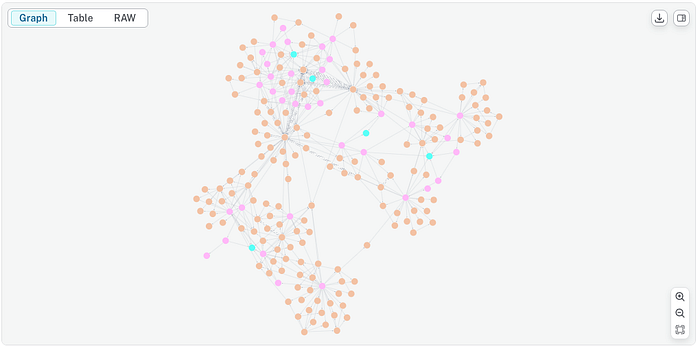
This is the most “work in progress” out of the strategies I listed so far, with results that vary greatly between different runs. They are not currently consistent and usually the LLM tends to get confused by all the information gathered. However, I do have the feeling this approach is worth exploring and investigating a little more.
這是我目前列出的策略中最「進行中 (work in progress)」的一個,其結果在不同次執行之間差異極大。它們目前並不一致,而且 LLM 通常容易被所蒐集到的大量資訊搞混。不過,我確實有種感覺,覺得這個做法值得再多加探索與研究。
What is immediately clear is how this strategy could get really complicated very soon. To handle this, I am pondering whether to use filters of some sort when fetching the community subgraph, while a bigger context size for the LLM (or a bigger LLM) could also surely help.
立即可以看出的是,這個策略很快就可能變得非常複雜。為了應對這一點,我正在思考在擷取社群子圖時是否要使用某種篩選條件,而為 LLM 提供更大的上下文長度(或使用更大的 LLM)肯定也會有所幫助。
5. Cypher + RAG / 5. Cypher + RAG
The last strategy I want to propose is based on the combination of the Enhanced RAG approach and the Cypher Approach. In fact, it employs both the context from similarity search as well as the intermediate steps of the GraphCypherQAChain to come up with an exhaustive and coherent answer.
我想提出的最後一個策略,是基於強化版 RAG 做法與 Cypher 做法的結合。事實上,它同時運用來自相似度搜尋的上下文以及 GraphCypherQAChain 的中間步驟,來得出一個詳盡而連貫的答案。
To give you an example of how the Agent might behave, let’s go back to one of the questions used for the query-based approach: “what documents mentions Europe Direct?”.
為了讓你了解代理可能的表現,讓我們回到基於查詢的做法所用的其中一個問題:「哪些文件提到了 Europe Direct?」
The answer is shown below. As can be noticed, it is both shorter and more informative.
答案如下所示。可以注意到,它既更簡短,也更具資訊量。
> `The following documents mention Europe Direct:`
>
> - `A press release about the European Commission offering 36,000 free EU travel passes to 18-year-olds, where general public inquiries can be made through Europe Direct by phone or email.`
> - `A statement about the European Commission's efforts to support businesses, workers, and Europeans, which includes contact information for general public inquiries through Europe Direct.`
> - `A press release about progress in research and innovation in Europe, which also provides contact information for general public inquiries through Europe Direct.`
>
> `You can contact Europe Direct by phone at 00 800 67 89 10 11 or by email.`
This answering method is currently one of the most complete approaches I came up with, and it also has a fallback strategy: if something goes wrong on the query generation part (say, a query is too complex to write, or the LLM dedicated to it reaches its tokens limit), the Agent can still rely on the Enhanced RAG approach, so that we still get an answer from it.
這種回答方法目前是我想出的最完整的做法之一,而且它還有一個後備 (fallback) 策略:如果在查詢生成的部分出了什麼差錯(比方說,某個查詢複雜到難以撰寫,或專責的 LLM 達到了它的 token 上限),代理仍然可以依靠強化版 RAG 做法,如此我們依然能從它那裡得到一個答案。
Summing up and approach comparison / 總結與做法比較
In the past few paragraphs, I presented my take on different answering strategies available when our knowledge base is well-organised into a Graph. My presentation however is far from complete: many other possibilities could be available and I plan to continue on studying on the matter and come up with more options.
在過去幾段中,我呈現了當我們的知識庫妥善組織成圖時,可用的各種不同回答策略的看法。然而,我的呈現遠稱不上完整:可能還有許多其他的可能性,而我打算繼續研究這個議題,並想出更多選項。
In my opinion, since Graphs unlock so many options, the goal has to be understanding how these strategies would behave under different scenarios — from lightweight semantic lookups to multi-hop reasoning over a richly linked knowledge graph — and how to make informed trade-offs depending on the use case.
在我看來,既然圖開啟了如此多的選項,目標就必須是理解這些策略在不同情境下會如何表現——從輕量的語意查找,到在一個連結豐富的知識圖譜上進行多跳 (multi-hop) 推理——以及如何依據使用情境做出有依據的取捨 (trade-off)。
When building real-world applications, it’s critical to weight answering strategies not just by accuracy, but also by cost, speed, and scalability.
在建構真實世界的應用時,關鍵在於評估回答策略時不僅要看準確度,還要看成本、速度與可擴展性 (scalability)。
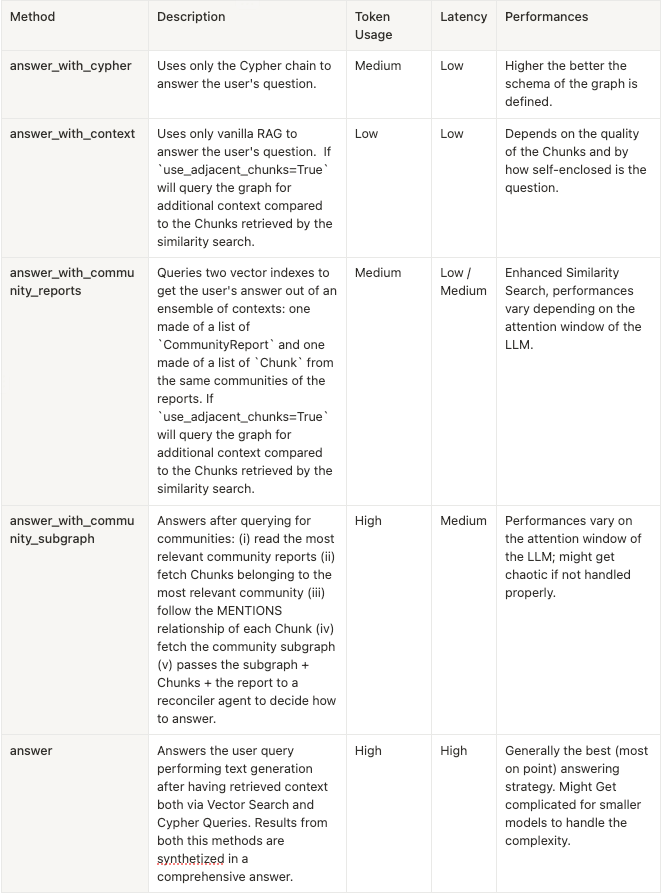
When deciding what strategy to employ, the key drivers that we might want to look at are
在決定要採用哪種策略時,我們可能會想關注的關鍵驅動因素 (key drivers) 有:
- Tokens Usage: How many tokens are consumed per query, especially when traversing multi-hop paths or injecting large subgraphs into the prompt
- Latency: The time it takes to process a retrieval + generation cycle, including graph traversal, prompt construction, and model inference
-
Performance: The quality and relevance of the generated responses, with respect to semantic fidelity, factual grounding, and coherence.
-
Token 用量 (Tokens Usage):每次查詢消耗多少 token,尤其是在遍歷多跳路徑或將大型子圖注入提示時
- 延遲 (Latency):處理一個「檢索 + 生成」循環所需的時間,包括圖遍歷、提示建構與模型推論 (inference)
- 效能 (Performance):所生成回應的品質與相關性,就語意忠實度、事實立足性 (factual grounding) 與連貫性而言。
Below, I present a comparison table breaking down the answering methods proposed in this section, under the light of these drivers.
以下,我提出一張比較表,依據這些驅動因素來剖析本節所提出的各種回答方法。
Closing Remarks / 結語
In this article, we walked through a complete pipeline for building and interacting with knowledge graphs using LLMs — from document ingestion all the way to querying the graph through a demo app.
在本文中,我們走過了一條使用 LLM 建構知識圖譜並與之互動的完整管線——從文件擷取,一路到透過一個 demo 應用程式查詢圖。
We covered:
我們涵蓋了:
- How to ingest documents and transform unstructured content into a structured Knowledge Graph representation using semantic concepts and relationships extracted via LLMs
- How to host the Knowledge Graph in Neo4j
- How to query the graph using a variety of strategies, from vector similarity and hybrid search to graph traversal and multi-hop reasoning — depending on the retrieval task
-
How the pieces integrate into a fully functional demo created with Streamlit and containerized with Docker.
-
如何擷取文件,並使用透過 LLM 萃取出的語意概念與關係,將非結構化內容轉換為結構化的知識圖譜表示
- 如何在 Neo4j 中託管知識圖譜
- 如何使用各種策略來查詢圖,從向量相似度與混合搜尋,到圖遍歷與多跳推理——視檢索任務而定
- 這些部件如何整合成一個以 Streamlit 建立、並用 Docker 容器化的功能完整的 demo。
Now I would like to hear opinions and comments.. and contributions are also welcome!
現在,我很想聽聽大家的意見與評論……而且也歡迎貢獻!
If you find this project useful, have ideas for new features, or want to help improve the existing components, feel free to jump in, open issues or sending in Pull Requests.
如果你覺得這個專案有用、對新功能有想法,或想協助改進既有的元件,歡迎隨時加入、開 issue 或送出 Pull Request。
Thank you for reading until this point!
感謝你讀到這裡!
References / 參考資料
[1]. Data showcased in this article come from the European Commission’s press corner: https://ec.europa.eu/commission/presscorner/home/en. Press releases are available under Creative Commons Attribution 4.0 International (CC BY 4.0) license.
[1]. 本文所展示的資料來自歐盟執委會新聞角:https://ec.europa.eu/commission/presscorner/home/en。新聞稿係依據創用 CC 姓名標示 4.0 國際 (Creative Commons Attribution 4.0 International, CC BY 4.0) 授權條款提供。
🔤 關鍵術語
| 英文 | 繁中譯名 | 文章中的脈絡 / 簡短說明 |
|---|---|---|
| Knowledge Graph | 知識圖譜 | 以節點、關係、屬性連結概念與實體的結構化知識表示,模擬人類理解 |
| GraphRAG | 圖譜檢索增強生成 | 運用圖譜表示法將知識更有效地提供給 LLM 的一套 RAG 技術與策略 |
| Retrieval Augmented Generation (RAG) | 檢索增強生成 | 檢索相關文件片段作為 LLM 生成回答的上下文 |
| Vector embeddings | 向量嵌入 | 將文字轉為向量表示,儲存於向量資料庫供相似度檢索 |
| Vector similarity / Similarity search | 向量相似度搜尋 | 依 cosine 或 euclidean 等度量從向量庫檢索相似 chunk |
| Hybrid search | 混合搜尋 | 相似度搜尋前先依 metadata 對 chunk 做過濾的檢索方式 |
| Cypher | Cypher 查詢語言 | Neo4j 用來查詢圖資料庫、檢視節點與關係的查詢語言 |
| Entity / Node | 實體/節點 | 代表人物、地點、組織等真實世界物件或抽象概念 |
| Relationship / Edge | 關係/邊 | 定義實體間如何連結(如 Bill → WORKS_AT → Microsoft) |
| Graph traversal | 圖譜遍歷 | LLM 沿節點與關係走訪圖譜以回答需多跳推理的問題 |
| Ontology | 本體論 | 描述圖中可存在的實體與關係型別的正式規格,即圖的藍圖 |
| Chunking / Chunk overlap | 分塊/區塊重疊 | 將文件切分為文字區塊(含大小與重疊設定)以利圖抽取 |
| Hierarchical clustering | 階層式分群 | 對圖進行分群以偵測節點社群(communities) |
| Community / Community Reports | 社群/社群報告 | 圖中密集連結的節點群,並以 LLM 摘要成社群報告 |
| Leiden / Louvain algorithm | Leiden/Louvain 演算法 | 用於偵測圖中社群的階層式分群演算法 |
| Vector index | 向量索引 | Neo4j 中分開儲存 chunk 與社群嵌入的多重索引 |
| Structured output / Pydantic model | 結構化輸出 | 以 with_structured_output 搭配 pydantic 讓 LLM 回傳驗證過的結構化結果 |
| Multi-hop reasoning | 多跳推理 | 需跨越多層節點關係才能得出答案的推理 |
| GraphCypherQAChain | 圖 Cypher 問答鏈 | LangChain 用來生成 Cypher 語句對圖做問答的 Chain 類別 |
| Inter-document / Intra-document level | 跨文件/文件內層級 | 相似度搜尋僅限文件內,圖表示則能捕捉跨文件參照 |