Building Agentic RAG on Neo4j's Knowledge Graph / 在 Neo4j 知識圖譜 (Knowledge Graph) 上建構代理式 RAG
Author: Yogender Pal 作者:Yogender Pal Published: 發布日期: Source: https://pub.towardsai.net/building-agentic-rag-on-neo4js-knowledge-graph-fc9612d195e4 來源:https://pub.towardsai.net/building-agentic-rag-on-neo4js-knowledge-graph-fc9612d195e4 Fetched: 2026-06-07T02:46:12.473307 擷取時間:2026-06-07T02:46:12.473307
Building Agentic RAG on Neo4j's Knowledge Graph / 在 Neo4j 知識圖譜上建構代理式 RAG
Vector embeddings retrieve "similar text." Neo4j retrieves the truth. Here's how Agentic RAG brings them together. / 向量嵌入 (Vector embeddings) 檢索的是「相似的文字」,而 Neo4j 檢索的是「事實」。本文將說明代理式 RAG (Agentic RAG) 如何將兩者結合在一起。
Press enter or click to view image in full size
按下 Enter 鍵或點擊以全尺寸檢視圖片
Photo by Land O'Lakes, Inc. on Unsplash
照片由 Land O'Lakes, Inc. 提供,來源為 Unsplash
Code is available in chapter5/rag.py:
程式碼位於 chapter5/rag.py:
You need some understanding of Neo4j and Langchain.
你需要對 Neo4j 與 Langchain 有一些基本的了解。
Introduction / 簡介
RAG systems relying entirely on vector similarity search works beautifully — as long as your questions are fuzzy, conceptual, or descriptive. But the moment you need precise, structured, or multi-hop answers, semantic search collapses.
完全依賴向量相似度搜尋 (vector similarity search) 的 RAG 系統運作得非常出色——只要你的問題是模糊的、概念性的或描述性的就行。但一旦你需要精確、結構化或多跳 (multi-hop) 的答案時,語意搜尋 (semantic search) 就會崩潰。
Ask a typical vector-based RAG system:
試著詢問一個典型的、以向量為基礎的 RAG 系統:
- Which contracts are active? (Aggregation)
- 哪些合約目前生效中?(聚合 (Aggregation))
- Who acted in The Matrix, and what other films were they in? (multi-hop).
- 誰演出了《駭客任務 (The Matrix)》,而他們還參演過哪些其他電影?(多跳)
- How many suppliers connected to Vendor X through Y (two hops).
- 有多少供應商透過 Y 與廠商 X 相連?(兩跳)
- How many agreements expire next quarter? (Aggregation)
- 有多少協議將在下一季到期?(聚合)
And it will give you something that sounds reasonable but is not guaranteed to be correct.
而它會給你一個聽起來合理、但無法保證正確的答案。
This article walks through:
本文將逐步說明:
- Why vector similarity alone fails in structured domains and for relational questions
- 為什麼單靠向量相似度在結構化領域與關聯性問題上會失敗
- How graph reasoning fixes hallucinations at their root
- 圖推理 (graph reasoning) 如何從根本上修正幻覺 (hallucinations)
- How to design tool descriptions that LLMs consistently choose
- 如何設計能讓大型語言模型 (LLM) 穩定選用的工具描述
- How an Agentic RAG pipeline can decide when to use a graph query
- 代理式 RAG 流程如何決定何時使用圖查詢
- How I built LLM tool-calling that generates + executes Cypher
- 我如何建構能生成並執行 Cypher 的 LLM 工具呼叫 (tool-calling)
Process overview / 流程概覽
The process begins with a question-normalization stage, where the input is rewritten into a deterministic, atomic form to eliminate ambiguity. This refined query is then passed to an LLM-based tool router, which selects the appropriate execution path — either a direct lookup tool or the Text2Cypher generator for complex, relationship-aware graph queries. The selected tool executes against Neo4j, returning structured results that are subsequently evaluated by an LLM critique module. This critique process identifies whether the returned data fully satisfies the original question and, if not, automatically generates additional targeted sub-queries that re-enter the routing and execution loop. Only when the system determines that all necessary information has been retrieved does it produce a final answer, ensuring responses remain strictly grounded in database results with no external fabrication.
此流程始於一個問題正規化 (question-normalization) 階段,在此階段中,輸入會被改寫成一種確定性的 (deterministic)、原子化的 (atomic) 形式,以消除歧義。接著,這個經過精煉的查詢會被傳遞給一個以 LLM 為基礎的工具路由器 (tool router),由它選擇適當的執行路徑——可能是直接查詢工具,也可能是用於處理複雜、具關係感知 (relationship-aware) 的圖查詢的 Text2Cypher 生成器。被選中的工具會針對 Neo4j 執行,回傳結構化的結果,這些結果隨後會由一個 LLM 評論模組 (critique module) 進行評估。這個評論過程會判斷回傳的資料是否完全滿足原始問題,若否,則會自動生成額外的、有針對性的子查詢,使其重新進入路由與執行的迴圈。只有當系統判定所有必要資訊都已被檢索取得時,它才會產生最終答案,從而確保回應嚴格地立基於資料庫結果,沒有任何外部捏造的內容。
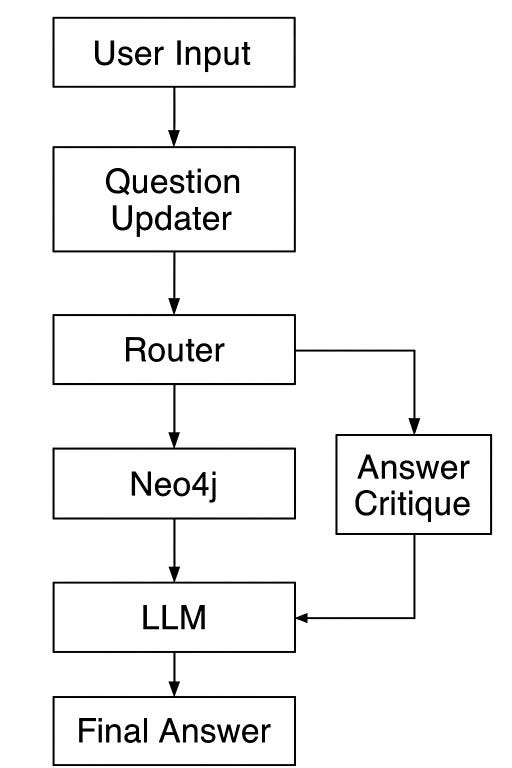
Info flow (image by llm)
資訊流(圖片由 LLM 生成)
1. Install Neo4j in Ubuntu machine: / 1. 在 Ubuntu 機器上安裝 Neo4j:
# 1. download binaries
wget -O - https://debian.neo4j.com/neotechnology.gpg.key | sudo gpg --dearmor -o /etc/apt/keyrings/neotechnology.gpg
echo 'deb [signed-by=/etc/apt/keyrings/neotechnology.gpg] https://debian.neo4j.com stable latest' | sudo tee -a /etc/apt/sources.list.d/neo4j.list
sudo apt-get update

#2. install
sudo apt-get install neo4j=1:2025.10.1
sudo systemctl enable neo4j

#3. check status
sudo systemctl start neo4j
sudo systemctl status neo4j

# output
● neo4j.service - Neo4j Graph Database
     Loaded: loaded (/usr/lib/systemd/system/neo4j.service; enabled; preset: en>
     Active: active (running) since Sun 2025-12-07 05:57:10 CET; 24h ago
   Main PID: 2360 (java)
      Tasks: 132 (limit: 37947)
     Memory: 1.0G (peak: 1.0G)
        CPU: 26min 31.786s
     CGroup: /system.slice/neo4j.service
             ├─2360 /usr/bin/java -Xmx128m -classpath "/usr/share/neo4j/lib/*:/>
             └─3081 /usr/lib/jvm/java-21-openjdk-amd64/bin/java -cp "/var/lib/n>

#4. set default server on localhost: uncomment server.default_listen_address=0.0.0.0 in neo4j.config
sudo nano /etc/neo4j/neo4j.conf
server.default_listen_address=0.0.0.0

#5 run in web browser:
http://127.0.0.1:7474
# username: neo4j, password: neo4j, you would need to change the password once logged in
2. Download Movie graph in Neo4j / 2. 在 Neo4j 中下載電影圖
Press enter or click to view image in full size
按下 Enter 鍵或點擊以全尺寸檢視圖片
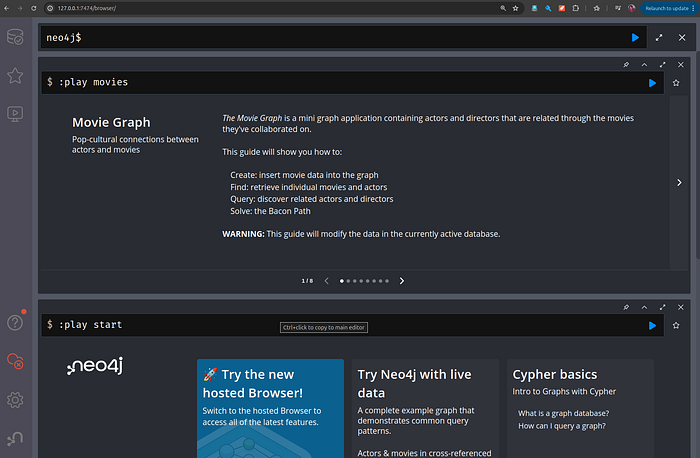
Downloading movie graph in the Neo4j local instance
在 Neo4j 本地實例中下載電影圖
Visualizing the graph
將圖視覺化
# run in the bar too see all the nodes and relationships:
MATCH (n)-[r]->(m)
RETURN n, r, m

#or to see nodes:
MATCH (m:Movie)
RETURN m;
Press enter or click to view image in full size
按下 Enter 鍵或點擊以全尺寸檢視圖片
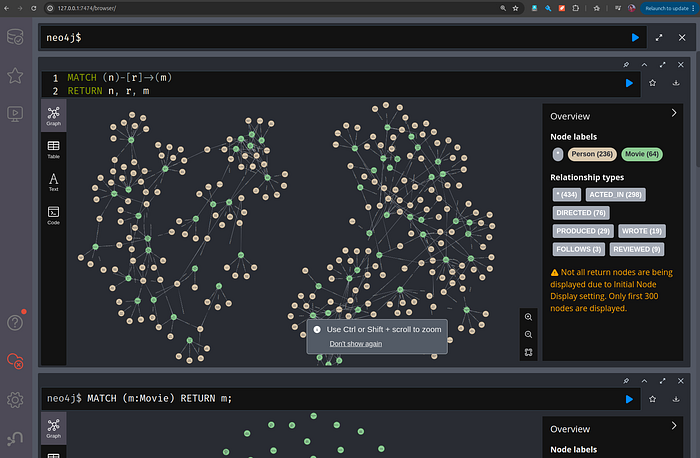
movies graph visualization
電影圖視覺化
It has two types of nodes (lables): Person and Movies. The relationship types from Person -> Movies is also shown as ACTED_IN, DIRECTED, PRODUCED and so on.
它有兩種類型的節點 (node)(標籤 lables):Person(人物)與 Movies(電影)。從 Person -> Movies 的關係類型 (relationship types) 也顯示為 ACTED_IN(演出於)、DIRECTED(執導)、PRODUCED(製作)等等。
3. Agentic Graph RAG on Neo4j's Knowledge Graph / 3. 在 Neo4j 知識圖譜上的代理式圖 RAG (Agentic Graph RAG)
Schema Extracter
結構描述提取器 (Schema Extracter)
Primary purpose of this code is to interrogate a live Neo4j database, extract its nodes, relationships, and properties, and convert that into a textual schema representation that an LLM can use to generate accurate Cypher queries. Why we need to LLM to generate Cypher queries? Because LLMs are good a it and we want to use natural language to generate Cypher queries which in turn will be used to extract the data from the graph.
這段程式碼的主要目的是查探一個運行中的 Neo4j 資料庫,提取其節點、關係與屬性 (properties),並將其轉換為一種 LLM 可用來生成準確 Cypher 查詢的文字結構描述表示 (textual schema representation)。為什麼我們需要 LLM 來生成 Cypher 查詢呢?因為 LLM 擅長此道,而且我們想用自然語言來生成 Cypher 查詢,再用這些查詢從圖中提取資料。
The script starts by establishing a connection to Neo4j using the official Python driver. APOC's apoc.meta.data() procedure is a tool that reveals the entire structure of a Neo4j graph—node labels, relationship types, directions, and property definitions (you need to install it). The first query extracts all node labels and groups their associated properties. The second does the same for relationship types, including any relationship-level attributes. Finally, the third query maps out the directional graph structure: which node labels are connected, through which relationships, and in what direction. if you run these query in cypher-shell you can see the schema of the movie graph.
此腳本首先使用官方的 Python 驅動程式 (driver) 建立與 Neo4j 的連線。APOC 的 apoc.meta.data() 程序 (procedure) 是一個能揭示 Neo4j 圖整體結構的工具——包括節點標籤、關係類型、方向以及屬性定義(你需要先安裝它)。第一個查詢會提取所有節點標籤,並將其關聯的屬性分組。第二個查詢對關係類型做同樣的事,包括任何關係層級的屬性。最後,第三個查詢勾勒出具方向性的圖結構:哪些節點標籤彼此相連、透過哪些關係相連,以及以什麼方向相連。如果你在 cypher-shell 中執行這些查詢,就能看到電影圖的結構描述。
Press enter or click to view image in full size
按下 Enter 鍵或點擊以全尺寸檢視圖片
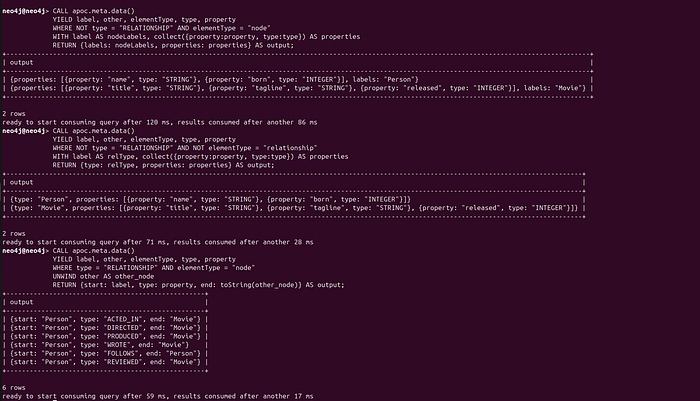
Schema Extracter in cypher-shell
在 cypher-shell 中的結構描述提取器
import re
from typing import List
import pdfplumber
import requests
imporpyt tiktoken
from neo4j import GraphDatabase
from typing import Any
import neo4j
from typing import Literal
from langchain_google_vertexai import ChatVertexAI
import json
import re

driver = GraphDatabase.driver("neo4j://127.0.0.1:7687",
    auth=("neo4j", "qawsedRF123"),
    notifications_min_severity="OFF"
)

NODE_PROPERTIES_QUERY = """
CALL apoc.meta.data()
YIELD label, other, elementType, type, property
WHERE NOT type = "RELATIONSHIP" AND elementType = "node"
WITH label AS nodeLabels, collect({property:property, type:type}) AS properties
RETURN {labels: nodeLabels, properties: properties} AS output
"""
REL_PROPERTIES_QUERY = """
CALL apoc.meta.data()
YIELD label, other, elementType, type, property
WHERE NOT type = "RELATIONSHIP" AND NOT elementType = "relationship"
WITH label AS relType, collect({property:property, type:type}) AS properties
RETURN {type: relType, properties: properties} AS output
"""
REL_QUERY = """
CALL apoc.meta.data()
YIELD label, other, elementType, type, property
WHERE type = "RELATIONSHIP" AND elementType = "node"
UNWIND other AS other_node
RETURN {start: label, type: property, end: toString(other_node)} AS output
"""

def get_structured_schema(driver: neo4j.Driver) -> dict[str, Any]:
    node_labels_response = driver.execute_query(NODE_PROPERTIES_QUERY)
    node_properties = [
        data["output"] for data in [r.data() for r in node_labels_response.records]
    ]

    rel_properties_query_response = driver.execute_query(REL_PROPERTIES_QUERY)
    rel_properties = [
        data["output"]
        for data in [r.data() for r in rel_properties_query_response.records]
    ]

    rel_query_response = driver.execute_query(REL_QUERY)
    relationships = [
        data["output"] for data in [r.data() for r in rel_query_response.records]
    ]

    return {
        "node_props": {el["labels"]: el["properties"] for el in node_properties},
        "rel_props": {el["type"]: el["properties"] for el in rel_properties},
        "relationships": relationships,
    }

def get_schema(
    driver: neo4j.Driver,
) -> str:
    structured_schema = get_structured_schema(driver)

    def _format_props(props: list[dict[str, Any]]) -> str:
        return ", ".join([f"{prop['property']}: {prop['type']}" for prop in props])
    formatted_node_props = [
        f"{label} {{{_format_props(props)}}}"
        for label, props in structured_schema["node_props"].items()
    ]

    formatted_rel_props = [
        f"{rel_type} {{{_format_props(props)}}}"
        for rel_type, props in structured_schema["rel_props"].items()
    ]

    formatted_rels = [
        f"(:{element['start']})-[:{element['type']}]->(:{element['end']})"
        for element in structured_schema["relationships"]
    ]

    return "\n".join(
        [
            "Node properties:",
            "\n".join(formatted_node_props),
            "Relationship properties:",
            "\n".join(formatted_rel_props),
            "The relationships:",
            "\n".join(formatted_rels),
        ]
    )
Once the metadata is returned, the get_structured_schema() function transforms it into a consistent Python dictionary. It assembles a mapping of node labels to property lists, relationship types to their own properties, and a list describing all (start node)–(relationship)–(end node) tuples. This structured representation is extremely valuable for any downstream AI agent because it provides the precise context needed to decide which nodes to traverse and how to construct valid Cypher queries. Without this schema, an LLM would be effectively guessing, which often leads to broken queries or hallucinated property names.
一旦中繼資料 (metadata) 回傳後,get_structured_schema() 函式會將其轉換為一個一致的 Python 字典 (dictionary)。它會組裝出一個映射 (mapping),內容包括節點標籤對應到屬性列表、關係類型對應到其自身的屬性,以及一個描述所有「(起始節點)–(關係)–(結束節點)」三元組 (tuples) 的列表。這種結構化的表示對任何下游 (downstream) 的 AI 代理 (AI agent) 都極具價值,因為它提供了決定要遍歷 (traverse) 哪些節點、以及如何建構有效 Cypher 查詢所需的精確脈絡。若沒有這個結構描述,LLM 實際上就只能用猜的,這往往會導致查詢出錯或屬性名稱被幻覺捏造出來。
The final step is converting the schema object into a clean, readable text block through the get_schema() function. This is where the data becomes LLM-friendly. The function formats each node's properties into lines like Movie {title: STRING, released: INTEGER}, relationship properties into their own section, and the graph's structural relationships into canonical Cypher patterns like (:Person)-[:ACTED_IN]->(:Movie). This compact, human-readable representation can be directly injected into an LLM prompt, enabling the model to understand the graph exactly as Neo4j defines it. When the agent sees this schema, it can confidently infer the correct nodes, properties, and paths to use when answering natural-language questions.
最後一步是透過 get_schema() 函式,將結構描述物件轉換成一個乾淨、易讀的文字區塊。這正是資料變得對 LLM 友善的關鍵之處。此函式會把每個節點的屬性格式化成如 Movie {title: STRING, released: INTEGER} 這樣的行,把關係屬性整理進它們自己的區段,並把圖的結構性關係格式化成如 (:Person)-[:ACTED_IN]->(:Movie) 這樣的標準 (canonical) Cypher 模式 (patterns)。這種精簡、人類可讀的表示可以直接注入到 LLM 的提示 (prompt) 中,使模型能夠完全按照 Neo4j 所定義的方式去理解該圖。當代理看到這個結構描述時,便能自信地推斷出在回答自然語言問題時應使用的正確節點、屬性與路徑。
Text2Cypher
prompt_template = {
    "static": {
        "instructions": """
    Instructions:
    Generate Cypher statement to query a graph database to get the data to answer the user question below.

    Format instructions:
    Do not include any explanations or apologies in your responses.
    Do not respond to any questions that might ask anything else than for you to
    construct a Cypher statement.
    Do not include any text except the generated Cypher statement.
    ONLY RESPOND WITH CYPHER, NO CODEBLOCKS.
    Make sure to name RETURN variables as requested in the user question.
    """
    },
    "dynamic": {
        "schema": """
    Graph Database Schema:
    Use only the provided relationship types and properties in the schema.
    Do not use any other relationship types or properties that are not provided in the schema.
    {}
    """,
        "terminology": """
    Terminology mapping:
    This section is helpful to map terminology between the user question and the graph database schema.
    {}
    """,
        "examples": """
    Examples:
    The following examples provide useful patterns for querying the graph database.
    {}
    """,
        "question": """
    User question: {}
    """,
    },
}

class Text2Cypher:
    def __init__(self, driver: neo4j.Driver):
        self.driver = driver
        self.dynamic_sections = {}
        self.required_sections = ["question"]
        self.prompt_template = prompt_template

        schema_string = get_schema(driver)
        self.set_prompt_section("schema", schema_string)

    def set_prompt_section(
        self,
        section: Literal["terminology", "examples", "schema", "question"],
        value: str,
    ):
        self.dynamic_sections[section] = value

    def get_full_prompt(self):
        prompt = self.prompt_template["static"]["instructions"]
        print ('prompt=======', prompt)
        # loop through the prompt_template["dynamic"] and add the values from self.dynamic_sections
        for section in self.prompt_template["dynamic"]:
            if section in self.dynamic_sections:
                prompt += self.prompt_template["dynamic"][section].format(
                    self.dynamic_sections[section]
                )
        return prompt

    def generate_cypher(self):
        # check if required sections are set
        for section in self.required_sections:
            if section not in self.dynamic_sections:
                raise ValueError(
                    f"Section {section} is required to generate a prompt. Use set_prompt_section to set it."
                )
        prompt = self.get_full_prompt()
        cypher = chat(messages=[{"role": "user", "content": prompt}])
        return strip_code_cypher(cypher)

def chat(messages, **config):
    llm = ChatVertexAI(model="gemini-2.0-flash")
    return llm.invoke(messages, **config).content
The Text2Cypher class is responsible for turning a user's natural-language question into a clean, executable Cypher query grounded in the actual Neo4j graph schema. When the class is initialized, it fetches the live database schema using get_schema() and stores it as one dynamic section of a larger prompt. These dynamic sections—such as schema, examples, terminology, and the user's question—are combined with a static instruction block defined in a prompt_template. This allows the system to build a full prompt on the fly, ensuring the LLM always receives accurate context about the graph's structure, node properties, relationship types, and expected query format.
Text2Cypher 類別 (class) 負責將使用者的自然語言問題轉換成一個乾淨、可執行、且立基於實際 Neo4j 圖結構描述的 Cypher 查詢。當此類別被初始化時,它會使用 get_schema() 取得運行中的資料庫結構描述,並將其儲存為一個較大提示中的某個動態區段 (dynamic section)。這些動態區段——例如結構描述、範例、術語以及使用者的問題——會與一個定義在 prompt_template 中的靜態指令區塊結合。如此一來,系統便能即時 (on the fly) 建構出一個完整的提示,確保 LLM 始終能收到關於圖的結構、節點屬性、關係類型與預期查詢格式的準確脈絡。
When a query is requested, the class checks that all required sections (especially the question) are present, assembles the final prompt with get_full_prompt(), and sends it to the LLM via chat(). Because models often wrap their output in Markdown fences, the returned text is passed through strip_code_cypher() so only the Cypher remains. The result is a deterministic, schema-aligned query you can run directly against Neo4j. This mechanism makes the LLM far more reliable than vector search alone for tasks requiring exact graph traversal, property filtering, and structured aggregation—capabilities that embeddings cannot provide with the same precision.
當一個查詢被請求時,此類別會檢查所有必要區段(尤其是問題)是否都存在,用 get_full_prompt() 組裝出最終的提示,再透過 chat() 將其送至 LLM。由於模型常常會用 Markdown 圍欄 (fences) 包裹其輸出,回傳的文字會被傳入 strip_code_cypher(),以便只保留 Cypher 本身。其結果是一個確定性的、與結構描述對齊的查詢,你可以直接針對 Neo4j 執行。對於需要精確圖遍歷、屬性篩選與結構化聚合的任務而言,這套機制讓 LLM 遠比單純的向量搜尋更為可靠——而這些能力是嵌入 (embeddings) 無法以同等精確度提供的。
Tools defination and description / 工具定義與描述
answer_given_description = {
    "type": "function",
    "function": {
        "name": "respond",
        "description": "If the conversation already contains a complete answer to the question, use this tool to extract it. Additionally, if the user engages in small talk, use this tool to remind them that you can only answer questions about movies and their cast.",
        "parameters": {
            "type": "object",
            "properties": {
                "answer": {
                    "type": "string",
                    "description": "Respond directly with the answer",
                }
            },
            "required": ["answer"],
        },
    },
}

def answer_given(answer: str):
    """Extract the answer from a given text."""
    return answer

text2cypher_description = {
    "type": "function",
    "function": {
        "name": "text2cypher",
        "description": "Query the database with a user question. When other tools don't fit, fallback to use this one.",
        "parameters": {
            "type": "object",
            "properties": {
                "question": {
                    "type": "string",
                    "description": "The user question to find the answer for",
                }
            },
            "required": ["question"],
        },
    },
}

def text2cypher(question: str):
    """Query the database with a user question."""
    t2c = Text2Cypher(driver)
    t2c.set_prompt_section("question", question)
    cypher = t2c.generate_cypher()
    try:
        records, _, _ = driver.execute_query(cypher)
        print ('neo4j data:', [record.data() for record in records])
        return [record.data() for record in records]
    except Exception as e:
        return [f"{cypher} cause an error: {e}"]


movie_info_by_title_description = {
    "type": "function",
    "function": {
        "name": "movie_info_by_title",
        "description": "Get information about a movie by providing the title",
        "parameters": {
            "type": "object",
            "properties": {
                "title": {
                    "type": "string",
                    "description": "The movie title",
                }
            },
            "required": ["title"],
        },
    },
}

def movie_info_by_title(title: str):
    """Return movie information by title."""
    query = """
    MATCH (m:Movie)
    WHERE toLower(m.title) CONTAINS $title
    OPTIONAL MATCH (m)<-[:ACTED_IN]-(a:Person)
    OPTIONAL MATCH (m)<-[:DIRECTED]-(d:Person)
    RETURN m AS movie, collect(a.name) AS cast, collect(d.name) AS directors
    """
    records, _, _ = driver.execute_query(query, title=title.lower())
    return [record.data() for record in records]

movies_info_by_actor_description = {
    "type": "function",
    "function": {
        "name": "movies_info_by_actor",
        "description": "Get information about a movie by providing an actor",
        "parameters": {
            "type": "object",
            "properties": {
                "actor": {
                    "type": "string",
                    "description": "The actor name",
                }
            },
            "required": ["actor"],
        },
    },
}

def movies_info_by_actor(actor: str):
    """Return movie information by actor."""
    query = """
    MATCH (a:Person)-[:ACTED_IN]->(m:Movie)
    OPTIONAL MATCH (m)<-[:ACTED_IN]-(a:Person)
    OPTIONAL MATCH (m)<-[:DIRECTED]-(d:Person)
    WHERE toLower(a.name) CONTAINS $actor
    RETURN m AS movie, collect(a.name) AS cast, collect(d.name) AS directors
    """
    records, _, _ = driver.execute_query(query, actor=actor.lower())
    return [record.data() for record in records]

tools = {
    "movie_info_by_title": {
        "description": movie_info_by_title_description,
        "function": movie_info_by_title
    },
    "movies_info_by_actor": {
        "description": movies_info_by_actor_description,
        "function": movies_info_by_actor
    },
    "text2cypher": {
        "description": text2cypher_description,
        "function": text2cypher
    },
    "answer_given": {
        "description": answer_given_description,
        "function": answer_given
    }
}
This section defines the tooling layer that agent uses to decide how to answer a question. Each tool is described using function-calling schema, where you specify the tool name, its purpose, and the exact parameters it accepts. These descriptions are passed to the LLM so it can intelligently route the user's query to the right function. For example, movie_info_by_title and movies_info_by_actor provide narrow, deterministic lookups using well-defined Cypher queries optimized for specific tasks like retrieving cast lists or fetching all movies tied to an actor. The answer_given tool is more meta—it allows the agent to short-circuit unnecessary processing if answer is present in the query itself. Meanwhile, text2cypher acts as a general fallback when no specialized tool fits; it delegates to your Text2Cypher class to dynamically generate Cypher directly from natural language.
這個段落定義了代理用來決定如何回答問題的工具層 (tooling layer)。每個工具都使用函式呼叫結構描述 (function-calling schema) 來描述,你會在其中指定工具名稱、其用途,以及它所接受的確切參數。這些描述會被傳遞給 LLM,讓它能夠智慧地把使用者的查詢路由到正確的函式。舉例來說,movie_info_by_title 與 movies_info_by_actor 使用定義良好、針對特定任務(如取得演員陣容列表或抓取與某演員相關的所有電影)最佳化過的 Cypher 查詢,提供範圍狹窄、確定性的查詢。answer_given 工具則更為「後設 (meta)」——若答案本身已存在於查詢之中,它能讓代理「短路 (short-circuit)」掉不必要的處理。同時,當沒有任何專用工具適用時,text2cypher 則作為一個通用的後備方案 (fallback);它會委派給你的 Text2Cypher 類別,直接從自然語言動態生成 Cypher。
Each tool is implemented as a Python function that executes real Neo4j queries through the shared database driver. The more specialized tools (movie_info_by_title and movies_info_by_actor) use parameterized Cypher to avoid hallucinations and deliver structured results. The text2cypher function is particularly powerful: it generates a Cypher query via LLM, sanitizes it, and executes it—but only after grounding the model in the live database schema. This gives your agent the flexibility of natural-language interaction with the safety of schema-aligned execution. All tools are finally collected in the tools dictionary so the router can look them up by name, ensuring your agent can seamlessly switch between deterministic graph lookups and LLM-assisted generation depending on the user's needs.
每個工具都被實作成一個 Python 函式,透過共享的資料庫驅動程式執行真實的 Neo4j 查詢。較為專用的工具(movie_info_by_title 與 movies_info_by_actor)使用參數化 (parameterized) 的 Cypher 來避免幻覺,並交付結構化的結果。text2cypher 函式特別強大:它透過 LLM 生成一個 Cypher 查詢、加以清理 (sanitize),然後執行它——但這一切都是在先讓模型立基於運行中的資料庫結構描述之後才進行的。這賦予你的代理既有自然語言互動的彈性,又有與結構描述對齊執行的安全性。所有工具最後都被收集進 tools 字典中,讓路由器能依名稱查找它們,確保你的代理能根據使用者的需求,在確定性的圖查詢與 LLM 輔助的生成之間無縫切換。
Tool Routers
工具路由器 (Tool Routers)
tool_picker_prompt = """
    Your job is to chose the right tool needed to respond to the user question.
    The available tools are provided to you in the prompt.
    Make sure to pass the right and the complete arguments to the chosen tool.
"""

def handle_tool_calls(tools: dict[str, any], llm_tool_calls: list[dict[str, any]]):
    output = []
    if llm_tool_calls:
        print ('llm_tool_calls:', llm_tool_calls)
        for tool_call in llm_tool_calls:
            function_to_call = tools[tool_call['name']]["function"]
            print ('function_to_call:', function_to_call)
            function_args = tool_call.get("args", {})
            print('function arguments:', function_args)
            res = function_to_call(**function_args)
            print ('res function to call:', res)
            output.append(res)
    return output

def tool_choice(messages,temperature=0, tools=[], config={}, model=None):
    llm = ChatVertexAI(model="gemini-2.0-flash")
    return llm.invoke(messages, tools=tools).tool_calls

def route_question(question: str, tools: dict[str, any], answers: list[dict[str, str]]):
    llm_tool_calls = tool_choice(
        [
            {
                "role": "system",
                "content": tool_picker_prompt,
            },
            *answers,
            {
                "role": "user",
                "content": f"The user question to find a tool to answer: '{question}'",
            },
        ],
        tools=[tool["description"] for tool in tools.values()],
    )
    return handle_tool_calls(tools, llm_tool_calls)
The tool_choice() function then hands the conversation—along with the tool definitions—to Vertex AI's Gemini model, which returns a list of tool calls. From there, handle_tool_calls() becomes the execution engine: it resolves each tool name to an actual Python function, extracts the arguments proposed by the LLM, and executes the corresponding function. The route_question() helper ties everything together by packaging the conversation history, the user question, and the available tool specifications into a single prompt—letting the LLM "think" about which tool provides the most accurate, context-aware response.
接著,tool_choice() 函式會把對話內容——連同工具定義——交給 Vertex AI 的 Gemini 模型,由它回傳一個工具呼叫的列表。從這裡開始,handle_tool_calls() 就成了執行引擎:它會把每個工具名稱解析成一個實際的 Python 函式,提取 LLM 提議的參數,並執行對應的函式。route_question() 輔助函式則把所有東西綁在一起,將對話歷史、使用者問題與可用工具的規格打包成單一的提示——讓 LLM「思考」哪個工具能提供最準確、最具脈絡感知的回應。
Query updater agent
查詢更新代理 (Query updater agent)
query_update_prompt = """
    You are an expert at updating questions to make the them ask for one thing only, more atomic, specific and easier to find the answer for.
    You do this by filling in missing information in the question, with the extra information provided to you in previous answers.

    You respond with the updated question that has all information in it.
    Only edit the question if needed. If the original question already is atomic, specific and easy to answer, you keep the original.
    Do not ask for more information than the original question. Only rephrase the question to make it more complete.

    JSON template to use:
    {
        "question": "question1"
    }
    DO NOT ADD ```json ``` and whitespaces in your response.
"""

def query_update(input: str, answers: list[any]) -> str:
    messages = [
        {"role": "system", "content": query_update_prompt},
        *answers,
        {"role": "user", "content": f"The user question to rewrite: '{input}'"},
    ]
    config = {"response_format": {"type": "json_object"}}
    output = chat(messages, response_format={"type": "json_object"})
    jsonloads = json.loads(strip_code_fences(output))
    print ('1:', jsonloads)
    try:
        return jsonloads["question"]
    except json.JSONDecodeError:
        print("Error decoding JSON 1")
    return []

def handle_user_input(input: str, answers: list[dict[str, str]] = []):
    updated_question = query_update(input, answers)
    response  = route_question(updated_question, tools, answers)
    answers.append({"role": "assistant", "content": f"For the question: '{updated_question}', we have the answer: '{json.dumps(response)}'"})
    return answers
query_update uses an LLM to rewrite a user's question into a more precise, atomic version by leveraging prior answers for missing context; it enforces a strict JSON format, parses the cleaned output, and returns the improved question. The handle_user_input function then orchestrates the workflow by taking the user's raw query, converting it into this refined version, routing it through the tool-selection logic, storing the resulting answer in the conversation history, and returning the updated state—ensuring each user message becomes clearer, more actionable, and easier for downstream tools to handle.
query_update 利用 LLM,藉由參考先前的答案來補足缺漏的脈絡,把使用者的問題改寫成一個更精確、更原子化的版本;它強制使用嚴格的 JSON 格式、解析清理後的輸出,並回傳改良後的問題。接著,handle_user_input 函式負責協調整個工作流程:它接收使用者的原始查詢、將其轉換成這個精煉後的版本、透過工具選擇邏輯進行路由、把產生的答案儲存進對話歷史,並回傳更新後的狀態——確保每一則使用者訊息都變得更清晰、更具可執行性,也更容易讓下游工具處理。
Critic agent / 評論代理 (Critic agent)
answer_critique_prompt = """
    You are an expert at identifying if questions has been fully answered or if there is an opportunity to enrich the answer.
    The user will provide a question, and you will scan through the provided information to see if the question is answered.
    If anything is missing from the answer, you will provide a set of new questions that can be asked to gather the missing information.
    All new questions must be complete, atomic and specific.
    However, if the provided information is enough to answer the original question, you will respond with an empty list.

    JSON template to use for finding missing information:
    {
        "questions": ["question1", "question2"]
    }
"""

def critique_answers(question: str, answers: list[dict[str, str]]) -> list[str]:
    messages = [
        {
            "role": "system",
            "content": answer_critique_prompt,
        },
        *answers,
        {
            "role": "user",
            "content": f"The original user question to answer: {question}",
        },
    ]
    config = {"response_format": {"type": "json_object"}}
    output = chat(messages=messages, response_format={"type": "json_object"})
    jsonloads = json.loads(strip_code_fences(output))
    print ('2:', jsonloads)
    try:
        return jsonloads["questions"]
    except json.JSONDecodeError:
        print("Error decoding JSON 2")
    return []
This module adds an automated quality-check step that evaluates whether a user's question has been fully answered. The answer_critique_prompt instructs the LLM to review the original question and all previous answers, then decide whether the response is complete. If anything is missing, the model must generate a list of precise, atomic follow-up questions; otherwise, it returns an empty list. The critique_answers function builds the message stack, calls the LLM with a strict JSON format, sanitizes the output with strip_code_fences, and parses the resulting list. This creates a clean, deterministic signal for whether more information is needed or the answer is already sufficient.
這個模組加入了一個自動化的品質檢查步驟,用以評估使用者的問題是否已被完整回答。answer_critique_prompt 指示 LLM 去審視原始問題與所有先前的答案,然後判斷該回應是否完整。如果有任何缺漏,模型就必須生成一個精確、原子化的後續問題列表;否則,它會回傳一個空列表。critique_answers 函式會建構訊息堆疊、以嚴格的 JSON 格式呼叫 LLM、用 strip_code_fences 清理輸出,並解析得到的列表。這就為「是否需要更多資訊」或「答案是否已經足夠」建立了一個乾淨、確定性的訊號。
Main agent / 主代理 (Main agent)
main_prompt = """
    Your job is to help the user with their questions.
    You will receive user questions and information needed to answer the questions
    If the information is missing to answer part of or the whole question, you will say that the information
    is missing. You will only use the information provided to you in the prompt to answer the questions.
    You are not allowed to make anything up or use external information.
"""

def main(input: str):
    answers = handle_user_input(input)
    critique = critique_answers(input, answers)

    if critique:
        answers = handle_user_input(" ".join(critique), answers)

    llm_response = chat(
        [
            {"role": "system", "content": main_prompt},
            *answers,
            {"role": "user", "content": f"The user question to answer: {input}"},
        ]
    )

    return llm_response

response = main("Who's the main actor in the movie Matrix and what other movies is that person in?")

response
Out[5]: 'Based on the information provided, the main actors in "The Matrix" are Emil Eifrem, Hugo Weaving, Laurence Fishburne, Carrie-Anne Moss, and Keanu Reeves.\n\nHere are other movies they have starred in:\n*   **Emil Eifrem:** The Matrix\n*   **Hugo Weaving:** Cloud Atlas, V for Vendetta, The Matrix Revolutions, The Matrix Reloaded, The Matrix,\n*   **Laurence Fishburne:** The Matrix Revolutions, The Matrix Reloaded, The Matrix\n*   **Carrie-Anne Moss:** The Matrix Revolutions, The Matrix Reloaded, The Matrix\n*   **Keanu Reeves:** Something\'s Gotta Give, The Replacements, Johnny Mnemonic, The Devil\'s Advocate, The Matrix Revolutions, The Matrix Reloaded, The Matrix'
This final layer acts as the orchestrator that ties the entire agentic workflow together. The main_prompt constrains the model to rely strictly on provided information—never external knowledge—ensuring answers remain grounded in Neo4j-queried data and prior tool outputs. The main function coordinates the process: it first routes the user query through the tool pipeline, collects the initial answers, and then invokes the critique module to check for missing information. If gaps are detected, it automatically triggers a second tool pass using the follow-up questions. Finally, it compiles all accumulated answers and feeds them—along with the original question—into a clean, deterministic LLM call. The function returns a final response that is complete, context-aware, and strictly derived from the structured graph data and agent workflow.
這個最終層扮演著協調者 (orchestrator) 的角色,把整個代理式工作流程綁在一起。main_prompt 約束模型嚴格依賴所提供的資訊——絕不使用外部知識——確保答案始終立基於 Neo4j 查詢得到的資料與先前的工具輸出。main 函式負責協調整個過程:它首先把使用者查詢透過工具流程進行路由、收集初步答案,接著呼叫評論模組以檢查是否有缺漏的資訊。若偵測到落差,它會自動用那些後續問題觸發第二輪工具流程。最後,它會彙整所有累積的答案,並將它們——連同原始問題——餵入一次乾淨、確定性的 LLM 呼叫之中。此函式回傳的最終回應,是完整的、具脈絡感知的,並且嚴格衍生自結構化的圖資料與代理工作流程。
That is all!
就這樣!