GraphRAG: Building a Better AI System (Full Tutorial)
Author: Thu Vu
Published:
Source: https://medium.com/@vuthihienthu.ueb/graphrag-building-a-better-ai-system-full-tutorial-8dd609312e46
Fetched: 2026-06-07T02:18:26.466335
GraphRAG: Building a Better AI System (Full Tutorial)
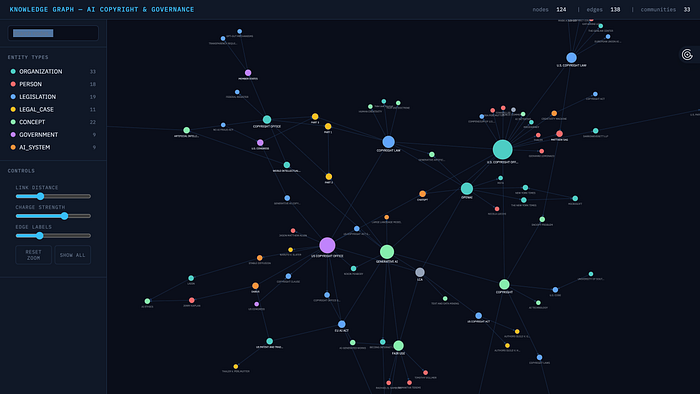
Image source: Author
Knowledge graphs aren’t just a fancy way to represent information. They’re a powerful way to help AI actually reason over it.
In today’s walkthrough, we’re building a GraphRAG system to understand AI copyright. This topic is a mess. And I mean that in the most interesting way possible.
And just like with any complex topic, the information isn’t sitting neatly in one place. It’s scattered across hundreds of news articles, court filings, policy documents, and hot takes published across the web.
We’re going to build a system that scrapes that information live from Google, turns it into a structured knowledge graph, and then uses GraphRAG to ask questions no search engine or standard AI could reliably answer — questions like:
“Which companies are at the center of these disputes — and how are they all connected?”
By the end of this walkthrough, you’ll know exactly:
- how GraphRAG works
- when to use it, and
- how to build it yourself on a real document dataset you may have
I’ll also share a code walkthrough of this example project — scraping relevant articles with a web search API, building the knowledge graph with LlamaIndex, analyzing it Graspologic, visualizing it with PyVis, and finally querying this system.
- Note: You can also watch the video version of this blog post👇
The Problem With Standard RAG
So let’s start with a quick recap of how standard RAG (Retrieval-Augmented Generation) works, because understanding its limitations is what makes GraphRAG click.
In a typical RAG pipeline, you take your documents — PDFs, articles, transcripts, whatever — and split them into chunks. Each chunk gets converted into a numerical vector using an embedding model.
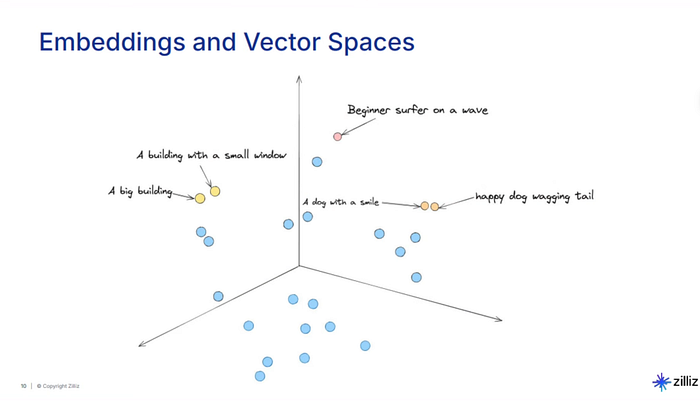
These vectors capture the meaning of the text, so chunks about similar topics end up close together in what we call a vector space.
When a user asks a question, the system converts that question into a vector too, finds the chunks closest to it, pulls those chunks, and feeds them to the LLM as context. The LLM then generates an answer based on what it was given.
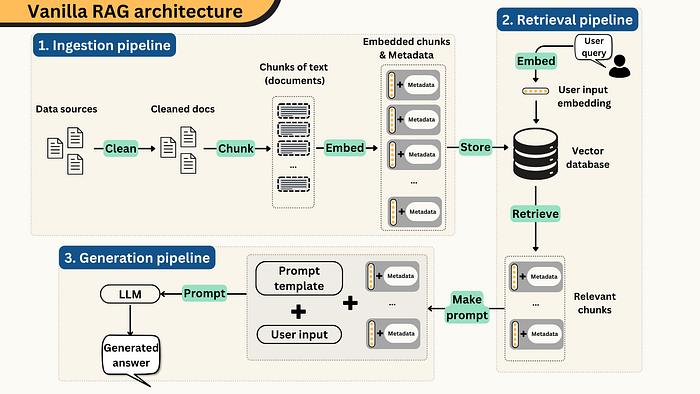
Image source: Author
This is great, because it allows the LLM to answer questions about data it was never trained on — your company’s internal docs, research papers, customer tickets, whatever.
But here’s the problem.
The more you scale your data, the more accuracy drops.
One study found that vector search accuracy starts degrading at just 10,000 pages — reaching a 12% accuracy drop at 100,000 pages. The more documents you add, the more overlap you get in the embedding space, and the harder it becomes for the system to retrieve the right chunks.
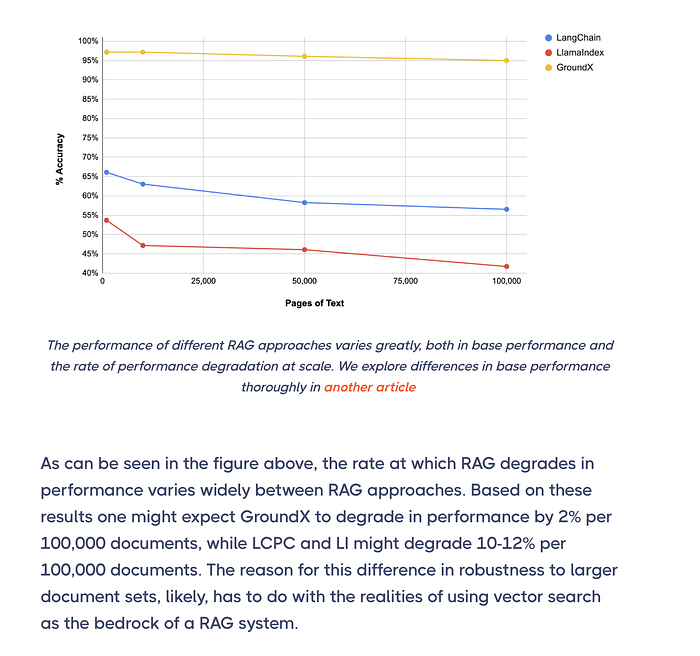
Image source: https://www.eyelevel.ai/post/do-vector-databases-lose-accuracy-at-scale
But scaling isn’t even the main issue. Standard RAG has two more fundamental blind spots:
- First, each chunk is treated as an isolated fragment. Once documents are split and embedded, every chunk exists on its own, disconnected from the chunks around it and from related information in other documents. The system finds text that sounds like your question, but has no understanding of how those fragments connect to form a complete picture.
- Second, there’s no ability to reason across documents. When an answer requires linking information scattered across multiple sources — or when the question is about the dataset as a whole, like “What are the main themes in the data?” — standard RAG has no mechanism for it. Vector similarity matches individual chunks. It doesn’t synthesize across them.
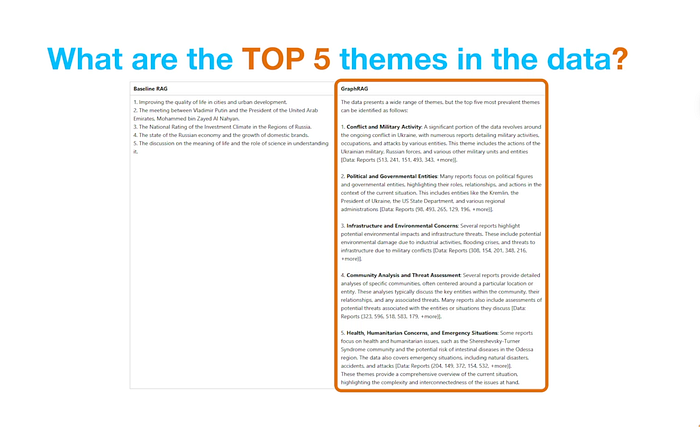
Image Source: Author
This is the problem GraphRAG was built to solve.
What Is GraphRAG?
Instead of treating your documents as disconnected chunks in vector space, GraphRAG adds a structural layer on top.
Here’s the core idea: it uses an LLM to read each chunk and extract entities — people, companies, technologies, events, legal cases — and the relationships between them. These entities become nodes in a knowledge graph, and their relationships become edges connecting them.
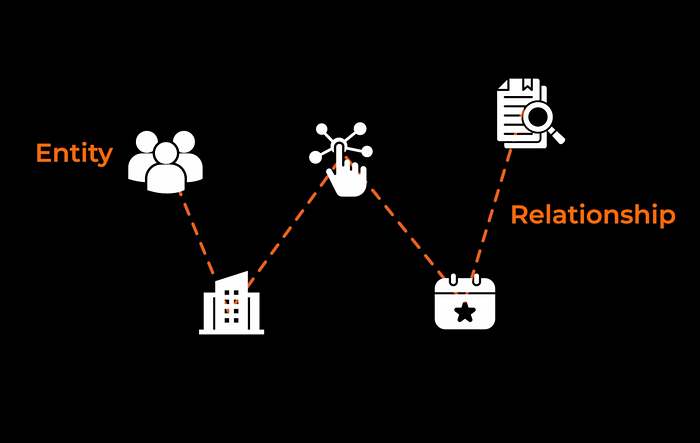
Image source: Author
The result is a structured graph of your entire dataset that reflects how the information actually relates across documents.
Microsoft Research, which originally published the GraphRAG paper, calls this sensemaking. It’sthe ability to understand connections, patterns, and themes across a large body of information, rather than just retrieving isolated facts.
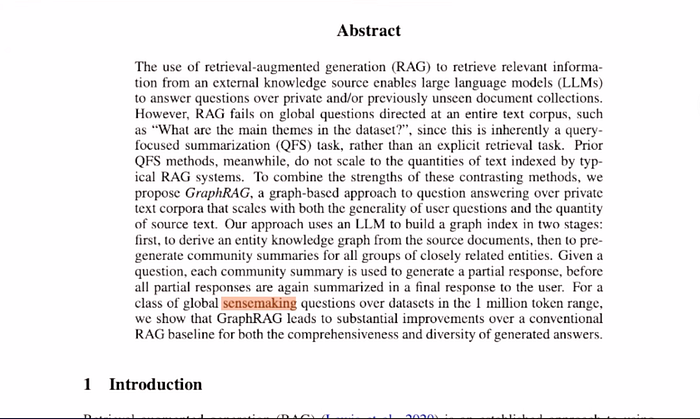
Image Source: https://arxiv.org/pdf/2404.16130
GraphRAG doesn’t just find text that matches your query. It reasons over a web of connected entities, which means it can chain facts across documents, trace relationships between things mentioned in completely different sources, and answer questions about the dataset as a whole.
Using a knowledge graph have also been shown to improve LLM response accuracy.
Press enter or click to view image in full size
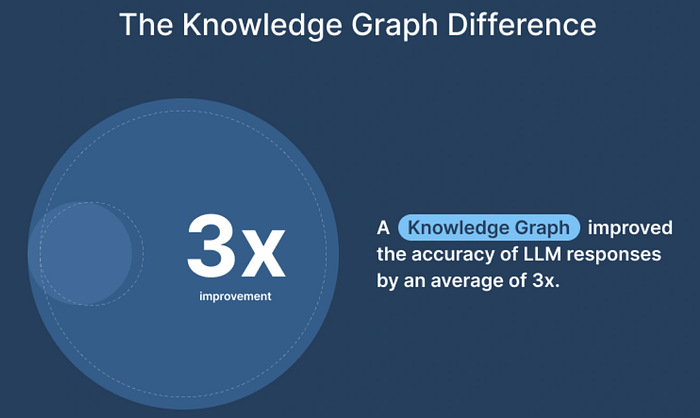
Image Source: https://data.world/blog/generative-ai-benchmark-increasing-the-accuracy-of-llms-in-the-enterprise-with-a-knowledge-graph/
GraphRAG vs. Vector RAG: When to Use Each
I want to be clear about something — GraphRAG doesn’t replace standard vector RAG. They’re good at different things.
Here are the simple rules to follow:
Use GraphRAG when:
- You’re working with hundreds or thousands of interconnected documents
- Questions require connecting facts, tracing relationships, or identifying patterns
- You need big-picture answers such as themes, trends, summaries across an entire dataset
- Explainability matters. You need to trace how the system arrived at an answer
- You’re in a domain like law, policy, or research where accuracy on complex queries is critical
Use Vector RAG when:
- The questions are simple, direct lookups: “When was this law passed?” or “Who filed this lawsuit?”
- The answer lives inside a single document or chunk
- Speed and cost are the priority
- Your dataset is small and doesn’t have dense cross-document relationships
How GraphRAG Works (The Pipeline)
Let’s get into how GraphRAG actually works under the hood. There are two main phases: indexing, where you build the knowledge graph, and querying, where you retrieve from it.
Press enter or click to view image in full size
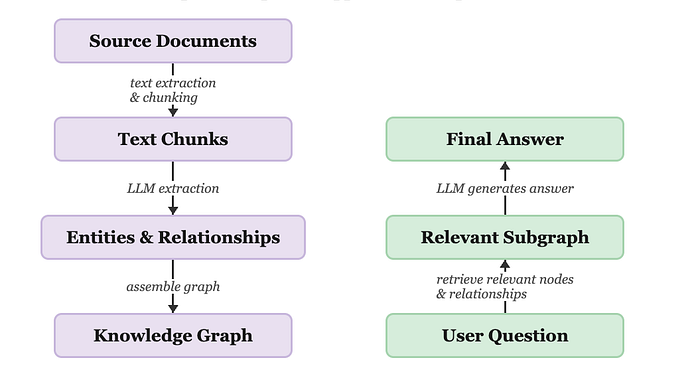
Image source: General GraphRAG Pipeline
This is the general pipeline. Microsoft’s approach, which this project follows, extends the general pipeline with two additional steps: community detection (grouping related entities into clusters) and community summarization (generating LLM summaries for each cluster). At query time, these summaries are queried instead of the raw graph, which is what makes it particularly effective for big-picture questions.
Press enter or click to view image in full size
Press enter or click to view image in full size
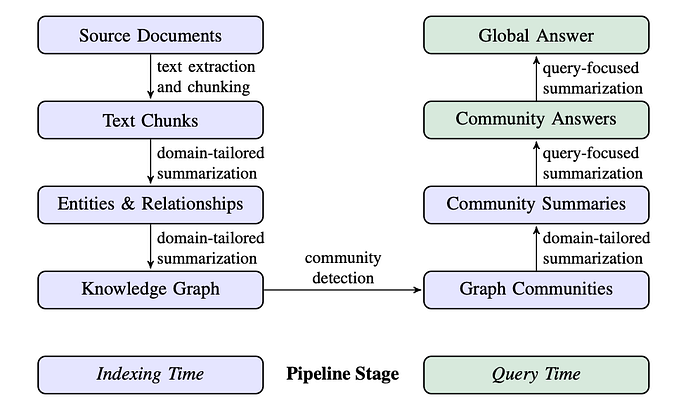
Image source: https://arxiv.org/pdf/2404.16130
About the Project
For this project we’re using:
- SerpAPI to scrape Google News articles on AI copyright and governance. It gives clean, structured results with no browser automation required.
- LlamaIndex for orchestration. It handles the entire pipeline from document loading through entity extraction, graph construction, and querying. I’m using LlamaIndex here because it has the most native GraphRAG support.
- Graspologic — Microsoft Research’s graph algorithm library — for community detection using the hierarchical Leiden algorithm. This is what groups related entities into meaningful clusters.
- D3.js for visualization. It’s a JavaScript library for building custom, interactive data visualizations in the browser. We use it to render the knowledge graph as a dynamic network you can search, filter, and explore.
- For LLMs, I’m using
gpt-4o-minifor entity extraction — it's cheaper and fast enough for this step. Thengpt-4ofor the final answer generation, where quality matters more.
No external graph database needed — the graph is stored in-memory using LlamaIndex’s SimplePropertyGraphStore.
Code Walkthrough
We’ll use VS Code and build this step by step.
Step 1 — Setup and Imports
First, let’s install our dependencies and import everything we need.
We’re using LlamaIndex for the GraphRAG pipeline, Graspologic for community detection, D3.js for visualization, and Requests to call the SerpAPI.
# Install dependencies
# pip install llama-index llama-index-llms-openai graspologic pandas nest-asyncio python-dotenv requests

import asyncio
import nest_asyncio
import pandas as pd
import networkx as nx
from dotenv import load_dotenv
from llama_index.core import Document, PropertyGraphIndex, Settings
from llama_index.core.graph_stores.types import (
    EntityNode, KG_NODES_KEY, KG_RELATIONS_KEY, Relation
)
from llama_index.core.graph_stores import SimplePropertyGraphStore
from llama_index.core.llms.llm import LLM
from llama_index.core.prompts import PromptTemplate
from llama_index.core.schema import TransformComponent, BaseNode
from llama_index.core.async_utils import run_jobs
from llama_index.core.query_engine import CustomQueryEngine
from llama_index.llms.openai import OpenAI
from graspologic.partition import hierarchical_leiden
# Patch the event loop so LlamaIndex async calls work inside Jupyter
nest_asyncio.apply()
# Load API keys from .env file (create one with OPENAI_API_KEY=sk-...)
load_dotenv()
Step 2 — Configuration
We’re using two different models for different parts of the pipeline:
Press enter or click to view image in full size

# ── LLM Configuration ─────────────────────────────────────────────────────────
EXTRACTION_LLM = OpenAI(model="gpt-4o-mini", temperature=0)  # For extraction + summaries
QUERY_LLM      = OpenAI(model="gpt-4o",      temperature=0)  # For final answer synthesis

# ── Pipeline Parameters ────────────────────────────────────────────────────────
MAX_ARTICLES        = 50    # Number of articles to process
MAX_PATHS_PER_CHUNK = 20    # Max entity-relationship-entity triplets extracted per chunk
NUM_WORKERS         = 4     # Parallel workers for extraction (faster, same cost)
MAX_CLUSTER_SIZE    = 10    # Max entities per community cluster
GRAPH_OUTPUT_FILE   = "ai_copyright_graph.html"
Settings.llm = EXTRACTION_LLM
Step 3 — Scrape Articles with SerpAPI
Now let’s get our data.
I’m using SerpAPI to scrape Google search results for our dataset. SerpAPI gives you real-time, structured, clean search results from Google and other search engines through a simple API.
I ran two queries: "AI intellectual property" and "copyright Generative AI". After filtering out pages that couldn't be scraped due to paywalls or bot protection, we ended up with 13 successfully scraped articles saved to ai_copyright_dataset.csv.
If you want to see the full scraping pipeline, including how we pull the full article text and handle YouTube transcripts, check out the GitHub repo here.
Press enter or click to view image in full size
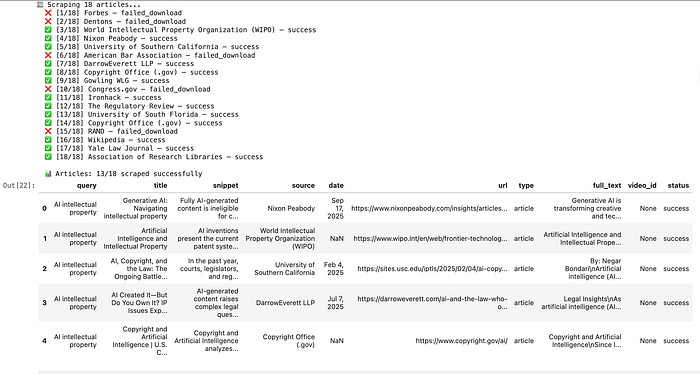
Image: Scraped articles, saved to ai_copyright_dataset.csv
Step 4 — Define the Ontology
Before we touch the LLM, we define our ontology. The ontology is the schema of our knowledge graph. It controls exactly what kinds of entities and relationships the LLM is allowed to extract.
This is an important step. Without a defined schema, the LLM will:
- invent different entity types per document (“AI_COMPANY” vs “TECH_FIRM” vs “ORGANIZATION”)
- use inconsistent relationship labels for the same concept
This would make the resulted graph messy and not very useful.
For this particular use case, I defined 7 entity types and 8 relationship type below.
But this really depends on your use case and what you want to research.
# ── Entity types ──────────────────────────────────────────────────────────────
# We'll embed these directly into the extraction prompt below.

ENTITY_TYPES = [
    "ORGANIZATION",  # Companies, labs, industry groups (OpenAI, Google, RIAA)
    "PERSON",        # Executives, policymakers, judges (Sam Altman, Thierry Breton)
    "LEGISLATION",   # Laws, acts, regulations (EU AI Act, DMCA, Copyright Act)
    "LEGAL_CASE",    # Lawsuits, court rulings (NYT v. OpenAI, Getty v. Stability AI)
    "CONCEPT",       # Abstract ideas: fair use, training data, IP rights
    "GOVERNMENT",    # Nations, regulatory bodies, courts (EU, US Copyright Office)
    "AI_SYSTEM",     # Specific models or products (GPT-4, Stable Diffusion, Gemini)
]
# ── Relationship types ─────────────────────────────────────────────────────────
RELATION_TYPES = [
    "FILED_AGAINST",  # Plaintiff Organization/Person → LEGAL_CASE
    "DEFENDANT_IN",   # Organization/Person → LEGAL_CASE
    "REGULATES",      # GOVERNMENT/LEGISLATION → ORGANIZATION/AI_SYSTEM
    "ADVOCATES_FOR",  # ORGANIZATION/PERSON → CONCEPT or policy position
    "TRAINED_ON",     # AI_SYSTEM → CONCEPT or dataset type
    "PART_OF",        # PERSON → ORGANIZATION
    "REFERENCES",     # LEGAL_CASE/LEGISLATION → CONCEPT
    "OPPOSES",        # ORGANIZATION/GOVERNMENT → LEGISLATION/CONCEPT
]
Step 5 — Write the Extraction Prompt
This is where our ontology gets embedded into the LLM’s instructions.
Most GraphRAG implementations extract bare triplets: (OpenAI, DEFENDANT_IN, NYT v. OpenAI).
But this prompt extracts descriptions alongside every entity and relationship:
- Entity description: “OpenAI is an AI research company that developed GPT-4, currently facing multiple copyright lawsuits”
- Relationship description: “OpenAI is named as defendant in the New York Times lawsuit over allegedly using copyrighted articles as training data”
These descriptions flow through to the community summaries, making them far richer and enabling much better final answers.
# Build the entity and relationship type strings dynamically from our ontology
entity_types_str   = ", ".join(ENTITY_TYPES)
relation_types_str = ", ".join(RELATION_TYPES)

KG_TRIPLET_EXTRACT_TMPL = f"""
-Goal-
Given a news article about AI copyright, governance, or intellectual property,
identify all entities mentioned in the article and their relationships.
Extract up to {{max_knowledge_triplets}} entity-relation triplets.
-Allowed Entity Types-
{entity_types_str}
-Allowed Relationship Types-
{relation_types_str}
-Steps-
1. Identify ALL entities. For each entity extract:
   - name: Name of the entity, capitalized
   - type: One of the allowed entity types above
   - description: A brief description of the entity and its role in AI copyright/governance
2. Identify relationships between entities. For each pair extract:
   - source: name of the source entity
   - target: name of the target entity
   - relation: one of the allowed relationship types above
   - description: a sentence explaining why and how these entities are related
-Real Data-
######################
text: {{text}}
######################
"""
Step 6 — Define Structured Extraction Models
Instead of parsing raw LLM text with regex, we define Pydantic models that describe exactly what we want the LLM to return. LlamaIndex passes these to OpenAI as a function schema, so the response is structured JSON — validated and typed automatically.
Three models are defined:
ExtractedEntity— a single entity withname,type, anddescriptionExtractedRelationship— a relationship between two entities:source,target,relation,descriptionExtractionResult— the top-level wrapper containing a list of each
EntityTypeStr and RelationTypeStr are Literal types built from the ontology. This means the LLM cannot return an invalid type because Pydantic will reject it before it ever reaches our code.
from pydantic import BaseModel, Field, field_validator
from typing import Literal, List

EntityTypeStr = Literal[
    "ORGANIZATION", "PERSON", "LEGISLATION", "LEGAL_CASE",
    "CONCEPT", "GOVERNMENT", "AI_SYSTEM"
]
RelationTypeStr = Literal[
    "FILED_AGAINST", "DEFENDANT_IN", "REGULATES", "ADVOCATES_FOR",
    "TRAINED_ON", "PART_OF", "REFERENCES", "OPPOSES"
]
class ExtractedEntity(BaseModel):
    name: str = Field(description="Name of the entity, capitalized")
    type: EntityTypeStr = Field(description="One of the allowed entity types")
    description: str = Field(description="Brief description of the entity and its role")
class ExtractedRelationship(BaseModel):
    source: str = Field(description="Name of the source entity")
    target: str = Field(description="Name of the target entity")
    relation: RelationTypeStr = Field(description="One of the allowed relationship types")
    description: str = Field(description="Sentence explaining the relationship")
class ExtractionResult(BaseModel):
    entities: List[ExtractedEntity] = Field(default_factory=list)
    relationships: List[ExtractedRelationship] = Field(default_factory=list)
Step 7 — Build the Custom GraphRAGExtractor
This is the core extraction component. It sends each text chunk to the LLM with our ontology-constrained prompt, parses the response, and stores the extracted entities and relationships as structured objects on each node.
Why build a custom extractor?
LlamaIndex’s built-in SchemaLLMPathExtractor extracts entity and relationship labels but drops descriptions. By building our own extractor:
- Every
EntityNodecarries anentity_descriptionproperty - Every
Relationcarries arelationship_descriptionproperty - These flow into community summaries, making them much richer
The extractor runs asynchronously with num_workers=4 — processing 4 chunks in parallel, which speeds up extraction significantly without increasing API cost.
class GraphRAGExtractor(TransformComponent):
    """
    Extracts entities and relationships WITH descriptions from each text chunk.
    Uses Pydantic structured output (via OpenAI function calling) to guarantee
    that every entity has a valid type and every relationship uses an allowed label.
    Data flow for a single chunk:
      Raw text
        → LLM (astructured_predict)
        → ExtractionResult(
              entities=[
                  ExtractedEntity(name="OpenAI", type="ORGANIZATION", description="AI lab..."),
                  ExtractedEntity(name="NYT v. OpenAI", type="LEGAL_CASE", description="Copyright lawsuit..."),
              ],
              relationships=[
                  ExtractedRelationship(source="OpenAI", target="NYT v. OpenAI",
                                        relation="DEFENDANT_IN", description="OpenAI is named defendant..."),
              ]
          )
        → EntityNode(name="OpenAI", label="ORGANIZATION", properties={...})
        → EntityNode(name="NYT v. OpenAI", label="LEGAL_CASE", properties={...})
        → Relation(label="DEFENDANT_IN", source_id=<OpenAI id>, target_id=<NYT v. OpenAI id>)
    """
    llm: LLM = Field(default_factory=lambda: Settings.llm)
    extract_prompt: PromptTemplate = Field(
        default_factory=lambda: PromptTemplate(KG_TRIPLET_EXTRACT_TMPL)
    )
    num_workers: int = 4
    max_paths_per_chunk: int = 10
    @field_validator("extract_prompt", mode="before")
    @classmethod
    def coerce_to_prompt_template(cls, v):
        return PromptTemplate(v) if isinstance(v, str) else v
    def __call__(self, nodes, show_progress=False, **kwargs):
        return asyncio.run(self.acall(nodes, show_progress=show_progress, **kwargs))
    async def _aextract(self, node: BaseNode) -> BaseNode:
        text = node.get_content(metadata_mode="llm")
        # Calls the LLM with our ontology prompt, parses into ExtractionResult,
        # then builds EntityNode + Relation objects and attaches them to node metadata.
        # Full implementation in the GitHub repo.
Step 8 — Build the GraphRAGStore
GraphRAGStore extends LlamaIndex's SimplePropertyGraphStore with two additional capabilities: community detection and community summary generation.
By bundling these into the store itself, the pipeline stays clean — after building the index, you just call graph_store.build_communities() and everything is handled.
How community detection works here:
- First, convert the property graph to a NetworkX graph
- Then run hierarchical Leiden to find entity clusters
- For each cluster, collect all entities (with descriptions) and relationships (with descriptions)
- Finally, ask the LLM to write a briefing note for each cluster
The descriptions captured during extraction make these briefings significantly richer than if we’d only stored bare labels.
class GraphRAGStore(SimplePropertyGraphStore):
    """
    Extends SimplePropertyGraphStore with:
    - Leiden community detection
    - LLM-generated community summaries (using entity + relationship descriptions)
    After building the PropertyGraphIndex, call build_communities() to
    detect clusters and generate summaries. These summaries are then
    used by GraphRAGQueryEngine at query time.
    """
    community_summaries: dict = {}
    def build_communities(self):
        """
        Main entry point: run community detection and generate summaries.
        Call this once after PropertyGraphIndex is built.
        """
        print("Running community detection...")
        nx_graph = self._to_networkx()
        if not nx_graph.nodes:
            print("⚠️  Graph is empty - no communities to detect")
            return
        print(f"Graph has {nx_graph.number_of_nodes()} nodes, {nx_graph.number_of_edges()} edges")
        # Run hierarchical Leiden algorithm
        clusters = hierarchical_leiden(nx_graph, max_cluster_size=MAX_CLUSTER_SIZE)
        num_communities = len(set(c.cluster for c in clusters))
        print(f"Found {num_communities} communities")
        # Collect entities and relationships per community
        community_info = self._collect_community_info(nx_graph, clusters)
        # Generate LLM summaries
        self._generate_summaries(community_info)
        print(f"\n✅ {len(self.community_summaries)} community summaries generated")
    def _to_networkx(self) -> nx.Graph:
        """
        Convert the LlamaIndex property graph to a NetworkX graph for Graspologic.
        Edges carry relationship label and description as attributes.
        """
        nx_graph = nx.Graph()
        # Add entity nodes
        for node in self.graph.nodes.values():
            if isinstance(node, EntityNode):
                nx_graph.add_node(node.id)
        # Add edges with relationship metadata
        for relation in self.graph.relations.values():
            if relation.source_id in nx_graph and relation.target_id in nx_graph:
                nx_graph.add_edge(
                    relation.source_id,
                    relation.target_id,
                    relationship=relation.label,
                    description=relation.properties.get("relationship_description", ""),
                )
        return nx_graph
    def _collect_community_info(self, nx_graph, clusters) -> dict:
        """
        For each community cluster, collect:
        - Entity names, types, and descriptions
        - Relationship strings (with descriptions where available)
        This rich data is what makes the LLM summaries informative.
        """
        community_mapping = {item.node: item.cluster for item in clusters}
        # Build a lookup of node id -> {name, type, description}
        node_details = {}
        for node in self.graph.nodes.values():
            if not isinstance(node, EntityNode):
                continue
            node_details[node.id] = {
                "name":        node.name,
                "type":        node.label,
                "description": node.properties.get("entity_description", ""),
            }
        community_info = {}
        for item in clusters:
            cid, nid = item.cluster, item.node
            community_info.setdefault(cid, {"entities": [], "relationships": []})
            # Add entity details to community
            if nid in node_details:
                community_info[cid]["entities"].append(node_details[nid])
            # Add relationships to neighbors in the same community
            for neighbor in nx_graph.neighbors(nid):
                if community_mapping.get(neighbor) == cid:
                    edge = nx_graph.get_edge_data(nid, neighbor)
                    rel  = edge.get("relationship", "RELATED") if edge else "RELATED"
                    desc = edge.get("description",  "")        if edge else ""
                    src_name = node_details.get(nid,      {}).get("name", nid)
                    tgt_name = node_details.get(neighbor, {}).get("name", neighbor)
                    # Format: "Entity A --[RELATION]--> Entity B (description)"
                    entry = f"{src_name} --[{rel}]--> {tgt_name}"
                    if desc:
                        entry += f" ({desc})"
                    community_info[cid]["relationships"].append(entry)
        return community_info
    def _generate_summaries(self, community_info):
        """
        Ask the LLM to write a briefing note for each community cluster.
        Uses entity descriptions and relationship descriptions for richer context.
        """
        for community_id, data in community_info.items():
            if not data["relationships"] and not data["entities"]:
                continue
            # Format entities with type and description
            entities_text = "\n".join([
                f"- {e['name']} ({e['type']}): {e['description']}"
                for e in data["entities"] if e.get("name")
            ])
            # Deduplicate and format relationships
            relationships_text = "\n".join(sorted(set(data["relationships"])))
            prompt = f"""You are analysing a cluster of entities from news articles about
            AI copyright, governance, and intellectual property.
            Entities in this cluster:
            {entities_text}
            Relationships:
            {relationships_text}
            Write a concise briefing (3-5 sentences) that:
            1. Identifies the main organizations, people, legal cases, or topics in this cluster
            2. Explains how they are connected and why - including legal or regulatory context
            3. Highlights any disputes, lawsuits, policy positions, or tensions
            4. Notes anything particularly relevant for understanding AI copyright or governance
            Briefing:"""
            response = EXTRACTION_LLM.complete(prompt)
            self.community_summaries[community_id] = response.text
            print(f"  Community {community_id}: {response.text[:100]}...")
    def get_community_summaries(self) -> dict:
        return self.community_summaries
Step 9 — Build the GraphRAGQueryEngine
The query engine uses a two-step approach:
- Per-community answering — here, you ask the LLM to answer the question from each community summary independently. If a summary isn’t relevant, the LLM says so and we skip it. This avoids polluting the final answer with irrelevant content.
- Aggregation — combine all relevant partial answers into one final, non-redundant response using
QUERY_LLM(the stronger model).
class GraphRAGQueryEngine(CustomQueryEngine):
    """
    Queries all community summaries and synthesises a single answer.
    Step 1: For each community summary, ask EXTRACTION_LLM to answer the
            question based only on that summary. If not relevant, skip.
    Step 2: Aggregate all relevant partial answers using QUERY_LLM into
            one final, clear, non-redundant response.
    """
    graph_store: GraphRAGStore
    llm: LLM
    def custom_query(self, query_str: str) -> str:
        summaries = self.graph_store.get_community_summaries()
        if not summaries:
            return "No community summaries found. Run graph_store.build_communities() first."
        # Step 1: Get a partial answer from each community summary
        community_answers = [
            self._answer_from_community(summary, query_str)
            for summary in summaries.values()
        ]
        # Filter out empty/irrelevant responses
        relevant_answers = [a for a in community_answers if a.strip()]
        if not relevant_answers:
            return "I don't have enough information in the knowledge graph to answer that question."
        # Step 2: Aggregate into one final answer
        return self._aggregate(relevant_answers, query_str)
    def _answer_from_community(self, summary: str, query: str) -> str:
        """
        Ask EXTRACTION_LLM to answer the query from a single community summary.
        Returns empty string if the summary isn't relevant to the question.
        We use the cheaper model here since this runs once per community.
        """
        prompt = (
            f"Community summary:\n{summary}\n\n"
            f"Question: {query}\n\n"
            f"If this summary contains information relevant to the question, answer it. "
            f"If not relevant, reply exactly: 'No relevant information.'\n\n"
            f"Answer:"
        )
        response = EXTRACTION_LLM.complete(prompt)
        text = response.text.strip()
        # Filter out non-answers
        return "" if "no relevant information" in text.lower() else text
    def _aggregate(self, answers: List[str], query: str) -> str:
        """
        Synthesise all relevant partial answers into one final response.
        Uses QUERY_LLM (gpt-4o) for better reasoning quality on the final step.
        """
        combined = "\n\n---\n\n".join(answers)
        prompt = (
            f"You have received answers from multiple knowledge graph communities about this question:\n\n"
            f"Question: {query}\n\n"
            f"Community answers:\n{combined}\n\n"
            f"Synthesise these into a single, clear, well-structured final answer. "
            f"Remove redundancy, keep all important details, and ensure the answer "
            f"directly addresses the question.\n\n"
            f"Final Answer:"
        )
        return self.llm.complete(prompt).text
Step 10 — Load Article Dataset
Load the articles previously scraped with SerpApi.
# Load from CSV ───────────────────────────────────────────────────
df = pd.read_csv("ai_copyright_dataset.csv")
print(f"Number of articles: {len(df)}")
df.head()
Press enter or click to view image in full size
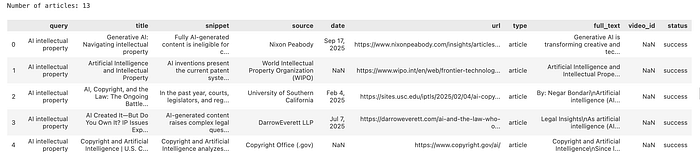
Image: Articles scraped with SerpApi
Step 11 — Convert to LlamaIndex Documents
We wrap each article as a LlamaIndex Document object.
Notice we’re keeping the title and source as metadata — we don’t need the LLM to extract those, we already have them. This is exactly the point we made about the ontology: don’t pay an LLM to rediscover information you already have.
# Wrap each article as a LlamaIndex Document
# text is the main content; everything else is metadata
nodes = [
    Document(
        text=article["text"],
        metadata={
            "title":  article.get("title",  ""),
            "source": article.get("source", ""),
        }
    )p
    for article in articles
]
Step 12 — Build the Knowledge Graph
Now everything comes together in the extraction pipeline.
PropertyGraphIndex orchestrates the full workflow:
- It passes each chunk to GraphRAGExtractor
- The extractor calls the LLM using our ontology-constrained prompt
- The resulting parsed entities and relationships are stored in GraphRAGStore
This is the most time-consuming step.
# Instantiate the extractor with our ontology prompt
kg_extractor = GraphRAGExtractor(
    llm=EXTRACTION_LLM,
    extract_prompt=KG_TRIPLET_EXTRACT_TMPL,
    max_paths_per_chunk=MAX_PATHS_PER_CHUNK,
    num_workers=NUM_WORKERS,
)

# GraphRAGStore is both the graph database and the community detection engine
graph_store = GraphRAGStore()
print("Building knowledge graph... (this may take a few minutes)")
index = PropertyGraphIndex(
    nodes=nodes,
    kg_extractors=[kg_extractor],
    property_graph_store=graph_store,
    embed_kg_nodes=False,             # we don't need vector similarity search for this GraphRAG pipeline
    show_progress=True,
)
Step 13 — Build Communities & Generate Summaries
Now we run community detection and generate LLM summaries for each cluster.
This is the step that enables big-picture queries. Instead of searching for similar chunks, GraphRAG queries these pre-built community briefings — each one a synthesized overview of a topic cluster in your data.
For our AI copyright dataset, you should see communities forming around things like:
- US copyright litigation (NYT, Getty, authors suing AI companies)
- EU regulatory activity (EU AI Act, GDPR interactions)
- Training data debates (fair use arguments, dataset licensing)
- Specific AI systems and their legal exposure
summaries = graph_store.get_community_summaries()
print(f"\n✅ {len(summaries)} community summaries ready for querying")
Step 14 — Visualize the Knowledge Graph
Create a d3.js network graph visualization from the graph we built.
Open ai_copyright_graph.html in your browser after running this cell.
def export_graph_data(graph_store: GraphRAGStore, output_file: str = "graph_data.json"):
    """
    Export the knowledge graph to a JSON file compatible with the D3.js template.
    Run this once after graph_store.build_communities().
Saves to disk so you can re-run the visualization without reprocessing
    the full pipeline - which is expensive.
    """
    # Walks the graph store, builds a node metadata lookup, collects all edges,
    # and writes everything to a JSON file for the D3 template to consume.
    # Full implementation in the GitHub repo.

def visualize_graph(
    graph_store: GraphRAGStore = None,
    graph_data_file: str = "graph_data.json",
    template_file: str = "graph_template.html",
    output_file: str = GRAPH_OUTPUT_FILE,
):
    """
    Generate a D3.js interactive knowledge graph visualization.
    Can be called in two ways:
    1. Pass graph_store directly - exports fresh data then builds the HTML:
         visualize_graph(graph_store=graph_store)
    2. Load from a previously exported JSON file - no pipeline re-run needed:
         visualize_graph()  # loads graph_data.json automatically
    Features:
    - Color-coded nodes by entity type (from ontology)
    - Node size scales with degree (more connections = bigger)
    - Click a node to highlight its neighbourhood, dim everything else
    - Sidebar legend - click any entity type to toggle its visibility
    - Search bar to find and highlight any node by name
    - Sliders for link distance, charge strength, and edge label threshold
    - Hover tooltips with entity name, type, description, and connection count
    - Stats header showing total nodes, edges, and communities
    """
    # Exports the graph data to JSON, loads the D3 HTML template,
    # injects the data, and writes out the final interactive visualization file.
    # Full implementation in the GitHub repo.

# Export data and build visualization from the graph store
visualize_graph(graph_store=graph_store)
The result:
Press enter or click to view image in full size
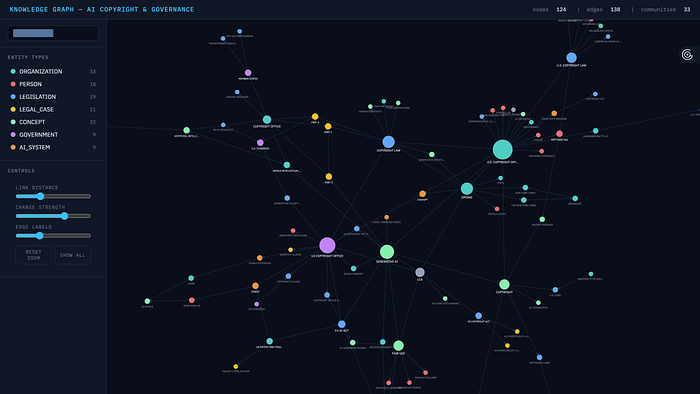
Image source: GraphRAG visualization
Step 15 — Query the System
Now we run queries that would be impossible to answer reliably with standard RAG.
The GraphRAGQueryEngine scores each community summary for relevance, filters irrelevant ones, and synthesizes a final answer from the best results, all using the community briefings generated in Step 13.
query_engine = GraphRAGQueryEngine(
    graph_store=graph_store,
    llm=QUERY_LLM,  # gpt-4o for final synthesis
)

print("✅ Query engine ready")
- First, a big-picture thematic question — exactly the kind that standard RAG struggles with:
# ── Query 1: Big-picture thematic question ────────────────────────────────────
# Requires synthesising the main legal arguments across many articles.
# Standard RAG would struggle — no single chunk contains the full picture.

q1 = "What are the main legal arguments being made around AI copyright and training data?"
print(f"Query: {q1}")
print("=" * 70)
print(query_engine.custom_query(q1))
The answer:
Query: What are the main legal arguments being made around AI copyright and training data?
======================================================================
The main legal arguments surrounding AI copyright and training data focus on several key issues:

1. **Originality and Authorship**: Traditional copyright laws require human authorship and originality for a work to be eligible for copyright protection. This raises questions about whether AI-generated content can be considered original and who, if anyone, can claim authorship. Cases like Naruto v. Slater have established that non-humans cannot hold copyright, complicating the status of AI-generated works.
2. **Fair Use Doctrine**: The use of copyrighted materials for training AI systems is a contentious issue. Proponents argue that such use could be considered fair use, especially if it is transformative and does not substitute the original work. Legal precedents like Authors Guild v. Google support this view, but the interpretation of fair use in the context of AI remains debated.
3. **Ownership of AI-Generated Works**: There is ongoing debate about who owns the rights to AI-generated content. Potential claimants include the developers of the AI, the users who input data, or the AI itself, though current laws typically do not recognize AI as an author.
4. **Ethical Use of Training Data**: The legality of using copyrighted material without permission for AI training is a significant concern. Lawsuits, such as those involving The New York Times and OpenAI, highlight the tension between innovation and the rights of content creators.
5. **Transparency and Opt-Out Mechanisms**: Advocates call for transparency in AI training processes and the implementation of opt-out mechanisms to protect individual rights and ensure informed consent regarding the use of personal data.
6. **Balancing Innovation and Protection**: There is a need to balance fostering innovation in AI with protecting intellectual property rights. This includes discussions on potential legal reforms to adapt copyright laws to the realities of AI-generated content.
These arguments reflect the complexities of integrating AI advancements with existing intellectual property laws and underscore the necessity for updated regulations to address these challenges.
- Now a cross-entity relationship question:
# ── Query 2: Cross-entity relationship question ────────────────────────────────
# Requires tracing which companies appear in disputes and what positions they hold.
# GraphRAG can follow DEFENDANT_IN, ADVOCATES_FOR, OPPOSES edges to answer this.

q2 = "Which companies are involved in AI copyright or governance disputes, and what are their positions?"
print(f"Query: {q2}")
print("=" * 70)
print(query_engine.custom_query(q2)
The answer:
Query: Which companies are involved in AI copyright or governance disputes, and what are their positions?
======================================================================
Several companies are currently involved in AI copyright and governance disputes, each with distinct positions and challenges:And finally a comparative policy question that requires reasoning across different governments and jurisdictions:

1. **Stability AI**: Facing legal challenges from artists and Getty Images, Stability AI is accused of using copyrighted images without authorization to train its AI model, Stable Diffusion. The company focuses on AI development and innovation, while the plaintiffs advocate for the protection of intellectual property rights.
2. **OpenAI and Meta**: Both companies are engaged in legal disputes over the use of copyrighted material for training generative AI systems. OpenAI is specifically facing a lawsuit from The New York Times for copyright infringement. The disputes revolve around the complexities of copyright law and the implications of the Fair Use Doctrine.
3. **Thomson Reuters and Ross Intelligence**: Thomson Reuters has filed a lawsuit against Ross Intelligence, alleging unauthorized use of its copyrighted materials to train AI models. Ross Intelligence is defending against these accusations, which question the legality of using copyrighted content for AI training.
4. **Midjourney**: Involved in discussions about copyright protections for AI-generated works, Midjourney challenges the U.S. Copyright Office's regulations, advocating for establishing copyright protections for AI-generated content.
5. **DABUS and LAION**: DABUS is involved in legal battles over its status as an inventor, challenging traditional notions of inventorship in AI contexts. LAION, a non-profit organization providing datasets for AI training, faces ethical concerns regarding data usage and copyright, raising questions about its responsibilities in AI training processes.
These disputes highlight ongoing tensions in the legal landscape regarding AI's role in innovation, the ethical implications of data sourcing, and the protection of intellectual property rights in the context of AI technologies.
# ── Query 3: Comparative policy question ──────────────────────────────────────
# Requires reasoning across different governments and jurisdictions —
# connecting EU, US, and UK regulatory approaches from different articles.

q3 = "How are different governments (e.g. EU, US, and UK) approaching AI governance?"
print(f"Query: {q3}")
print("=" * 70)
print(query_engine.custom_query(q3))
The result:
Query: How are different governments (e.g. EU, US, and UK) approaching AI governance?
======================================================================
Different governments are adopting varied approaches to AI governance, reflecting their unique legal and regulatory landscapes. The European Union is advancing its regulatory framework through the EU AI Act, which aims to establish comprehensive guidelines for AI systems. This act represents a proactive approach to AI governance, focusing on creating a structured environment for AI development and deployment.

In contrast, the United States has a more traditional stance, particularly in the realm of intellectual property. The U.S. Patent and Trademark Office (USPTO) does not recognize AI as a legal author or inventor, as evidenced by legal cases such as Thaler v. Perlmutter and Thaler v. Vidal. These cases underscore the US's position that only natural persons can be recognized as inventors on patent applications, which may not fully accommodate AI-generated inventions.
The UK's approach to AI governance is not explicitly detailed in the provided summaries, but it is noted that the UK Intellectual Property Office is considering the implications of AI in innovation, potentially indicating a more progressive stance similar to the European Patent Office (EPO). This suggests that the UK may be aligning its policies with broader European perspectives, although specific details are not provided.
Overall, these differing approaches highlight the regulatory complexities and the need for clear guidelines as governments navigate the intersection of technology and intellectual property law in the context of AI.
Wrap Up
And there you have it — a fully working GraphRAG system, built on live data you scraped yourself, reasoning over one of the most complex and fast-moving topics in AI right now.
You can access full code here, and if you want to try this on your own search topics, you can sign up for SerpAPI here.
Thanks for reading!
See you in the next one.